Unable to verify custom domain :: 409

We were recently forced to migrate to Cloud after being advised that Business plans are no longer available for self-hosted instances.

The migration was reasonably easy and billing support was helpful, but we are stuck trying to enable a custom domain and this is preventing us from using embedded web apps.

We have followed the instructions and can confirm the dig output is as documented. The CNAME has been live for a week now, our DNS provider is AWS Route53.

dig retool.company.com CNAME +noall +answer

; <<>> DiG 9.10.6 <<>> retool.company.com CNAME +noall +answer
;; global options: +cmd
retool.company.com.    3600    IN      CNAME   company.retool.com.

We have retried the verification multiple times over the last few days, every time the error is the same:

Waiting for HTTP-01 challenge propagation: wrong status code '409' expected '200'

We opened a support case and we were directed to post here. We’re not really sure why we need to create a public post for seeking technical support, but we are hoping someone can help us as this is impeding development.

Thank you

From DNS checks it looks like the retool.company.com record does not exist yet (NXDOMAIN)

$ dig retool.example.com CNAME +noall +answer

; <<>> DiG 9.10.6 <<>> retool.example.com CNAME +noall +answer
;; global options: +cmd
$ dig retool.company.com CNAME

; <<>> DiG 9.10.6 <<>> retool.company.com CNAME
;; global options: +cmd
;; Got answer:
;; ->>HEADER<<- opcode: QUERY, status: NXDOMAIN, id: 35691
;; flags: qr rd ra; QUERY: 1, ANSWER: 0, AUTHORITY: 1, ADDITIONAL: 1

;; OPT PSEUDOSECTION:
; EDNS: version: 0, flags:; udp: 1232
;; QUESTION SECTION:
;retool.company.com.		IN	CNAME

;; AUTHORITY SECTION:
company.com.		1435	IN	SOA	daisy.ns.cloudflare.com. dns.cloudflare.com. 2395915917 10000 2400 604800 1800

;; Query time: 20 msec
;; SERVER: 1.1.1.1#53(1.1.1.1)
;; WHEN: Mon Mar 09 01:55:19 EET 2026
;; MSG SIZE  rcvd: 107

Hi @mryurii ,

Because this is a public forum, we’ve redacted our company name from the above example.

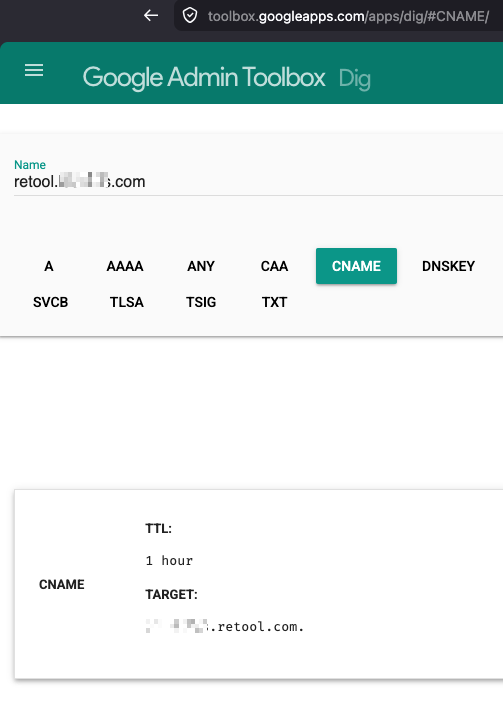
We can confirm that the CNAME definitely exists using Google’s Admin Toolbox, copying the value from Retool’s Branding settings page:

1 Like
dig retool.examplesubdomain.com CNAME +noall +answer

; <<>> DiG 9.10.6 <<>> retool.examplesubdomain.com CNAME +noall +answer
;; global options: +cmd
retool.examplesubdomain.com.	3600	IN	CNAME	examplesubdomain.retool.com.

try to point it to custom-domain.retool.com instead of examplesubdomain.comConfigure a custom domain for cloud organizations | Retool Docs

Understood, thank you @mryurii

P.S. can you please not advertise our company domain on this forum as it is publicly accessible.

Hello @mryurii and @mhlmi, I see this is your first time posting, welcome to the Community! Really glad to see both of you here. :raising_hands:

Thanks for jumping in and helping right away @mryurii! :folded_hands:
@mhlmi I went ahead and edited the comment so it no longer shows your company name.

Going forward, please continue posting questions here on the forum. If you need to reference something sensitive, you can use something like examplesubdomain.com in the post and then DM us on the forum with the private or confidential details if they are relevant to the issue.

2 Likes