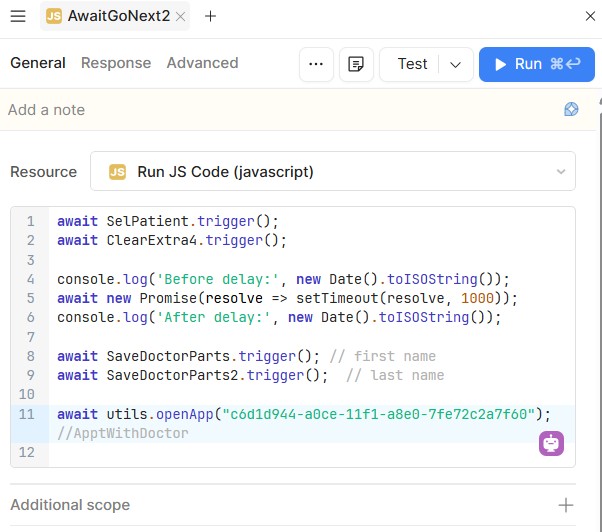
I have routed from one screen to another with code as below.
This works fine.
This time I am trying to run an App which is part of the remote screen. It has a lot of code which would be difficult to move.
Is there some way of initiating an App which is part of a remote screen?
Navigation between two screens via code works, but there's a desire to instead run/initiate an entire App that lives on a remote screen — one containing a lot of logic that would be difficult to move — rather than just routing to it.
AI Response
Rather than relocating the app's code, the recommended approach is to package that reusable logic and its components as a Module, which can then be embedded and run within any other app or screen without duplicating or moving the underlying code. Modules can pass data to and from the parent app, so the embedded logic behaves like it's part of the screen while remaining centrally maintained. An existing app that already contains many queries can be converted into a module so that its logic is reused in place instead of rebuilt.
The Community Team is testing out a new automation. Let us know if it's helpful (or not) by leaving a , , or . Or by marking this post as the "Solution"! Let us know if you have any feedback here.
I am trying to run an App which is part of the remote screen
I don't quite understand what you're trying to accomplish, @mdsmith1. Can you clarify what "remote screen" means in this context?
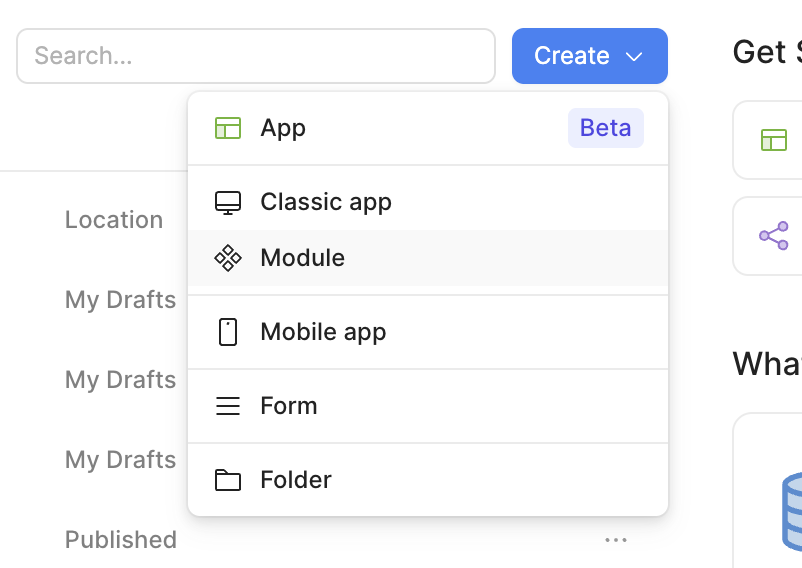
To answer your specific question, though - a module is a reusable collection of UI elements and resource queries that can be created the same way you'd create a normal app:
I should not have said "Remote Screen", I should have said "different screen". I think I probably should have said "different app".
I need to run a shut down procedure from an app called "Patients". It needs to be able to run "Build Out Schedule" code which is in an App called "Appointments". There is a ton of code there that takes 13 minutes to run.
It would be really hard to move all the code to the "Patients App".
Anyways Darren, I have developed a workaround so I am OK. If there is an easy way of calling a program in a different app, let me know. But don't spend a lot of time on it.

 ,
,  , or
, or  . Or by marking this post as the "Solution"! Let us know if you have any feedback