Current plan level (Free, Team, Business, or Enterprise: Pricing | Retool): Team
Monthly/Annual (if Team or Business): Monthly
Version of Retool (if self-hosted):
Question / Description:
Hi Retool team,
Setup: Retool Cloud, Team plan (upgraded from Free earlier today), one app ("Red Tuna Customer Database") with a published release, connected to one PostgreSQL resource ("RedTunaMDB", Supabase session pooler). The app works perfectly for my admin account.
Problem: Invited users (role: member of All Users; the only groups I see are Admin and All Users) can open the published app, but every query fails with:
"You don't have access to resource 'RedTunaMDB' (6c1869c6-25fa-4d52-b9c8-a2c807f2f307) in the production environment."
What I've tried:
Verified the resource works (admin account runs all queries fine)
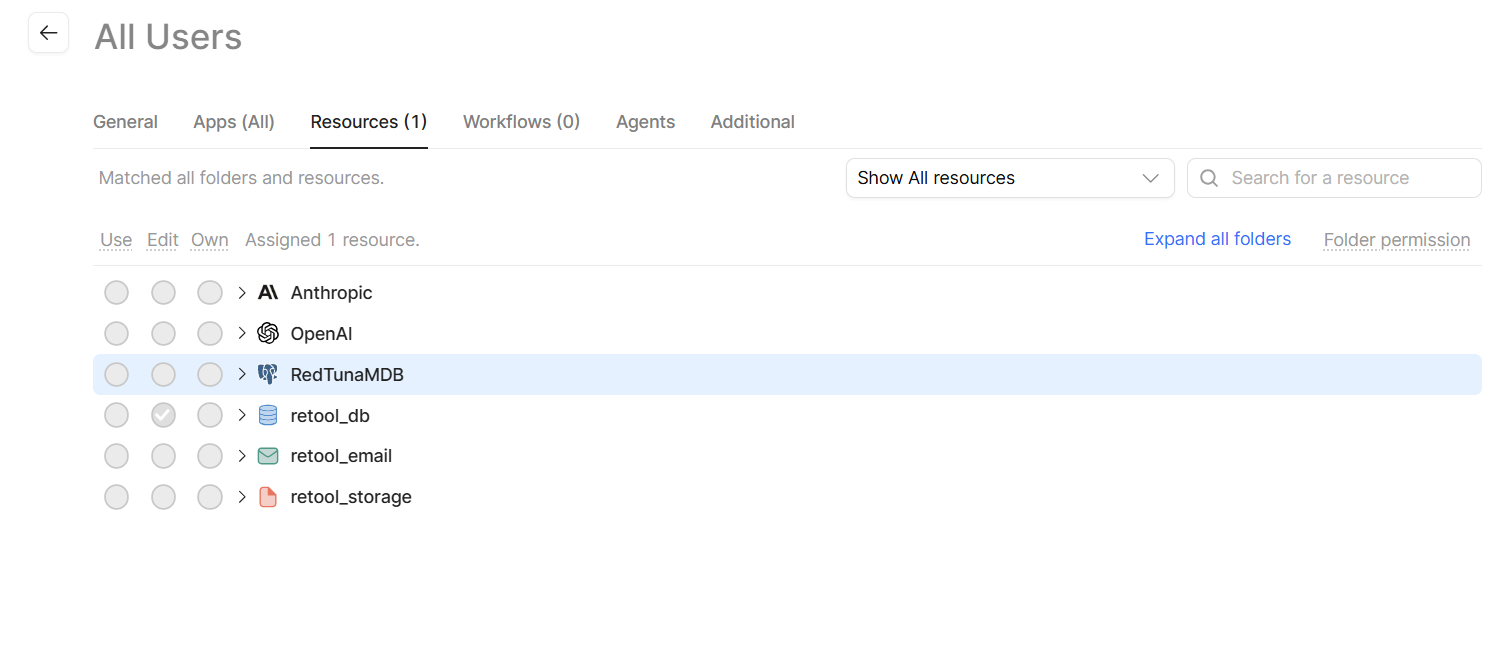
Checked Settings → Permissions: the All Users group's Resources grid is read-only (hover shows a blocked cursor), which I understand is expected on Free/Team
Upgraded from Free to Team specifically hoping to resolve this — no change; the invited user still gets the same error after re-login and refresh. (so my upgrade feels like wasted money at the moment)
Looked for a way to designate the $5 "end user" seats advertised on Team pricing — I only see Admin and All Users; no user-type or seat-type option anywhere I can find
Questions:
On the Team plan, how do invited (non-admin) members get "use" access to a connected resource? I expected this to be automatic.
How do I designate users as the end-user seat type on Team? I have two staff members who should only use the published app, never edit.
If what I'm describing actually requires the Business plan, let me know
I'm a small business standing up my first Retool app for a 3-person team, and the app itself has been great — I just need my two staff members to be able to use it. Happy to provide org ID, HAR file, or screenshots.
Thanks for reaching out, @Austin_Crossley! Welcome to the community.
The primary issue you're experiencing sounds like the result of a longstanding bug. Are you able to share a screenshot of the Resources grid on the configuration page for the All Users group? On a Team plan, the default state for all resources should be Edit, I believe.
If you're instead seeing that All Users don't have any access to certain resources - which I'm guessing is the case - I can give you a temporary upgrade to the Business plan. Doing so would allow you to fully customize the permissions grid.
Which brings me to your second question - on a Team plan, there is no way to enforce seat types. Instead, all users natively have Edit access but only those that actually do so within a given plan period are charged as Builders. Full, granular access controls are only available on a Business plan or higher.
Hi Darren, thanks. Thanks for the quick response! Your guess is exactly right. Screenshot attached of the All Users group's Resources grid: our PostgreSQL resource "RedTunaMDB" shows no access at all (all three circles empty, and they're not clickable on my plan), while "retool_db" shows the Edit default you described. So it looks like RedTunaMDB never received the default grant — consistent with the bug you mentioned.
Yes, please go ahead with the temporary Business upgrade — I'd appreciate it. Three questions before/while I make the changes:
Once I set All Users → RedTunaMDB → Use (that's the level I want — my two staff members only need to run the published app), will that setting persist after the org reverts to Team?
While I have the Business grid available: can I also set the app itself ("Red Tuna Customer Database") to Use-only for All Users, so non-admin users don't get edit access to the app — and would that setting also persist after reverting to Team?
Just to confirm the billing model you described: my two staff members will only ever use the published app, never edit anything — so they should bill as end users automatically, with no action needed on my end, correct?
Thanks again — happy to grab any other screenshots or details you need.
That's what I figured! I just granted your account a Business trial - let me know when you've properly set permissions.
To be honest, I'm not 100% sure how permissions are handled during a downgrade. It feels like they should reset to the default entitlement, but I'm not confident that is the actual behavior. My recommendation is to reset everything to Edit, as that's the expected setting on a Team plan. You can later consider upgrading to Business if you really need to lock down access.
To your final question, users that never edit anything in a given plan period are billed as end users, even if they technically have the ability to do so.

 It feels like they should reset to the default entitlement, but I'm not confident that is the actual behavior. My recommendation is to reset everything to