Dynamic bar chart and trendlines

Hello I am currently trying to make a dynamic stacked barchart, with different career levels in ou community and a trend line according to each career level.
Ive managed to display the trendlines within the respective segment of the stacked barchart b simply adding the height below before doing my regression.

const data = {{ count_expertPerYearCareerLevel_db.data }};


// linear regression helper
function linearRegression(x, y) {
  const n = x.length;

  const sumX = x.reduce((a, b) => a + b, 0);
  const sumY = y.reduce((a, b) => a + b, 0);

  const sumXY = x.reduce((sum, xi, i) => {
    return sum + xi * y[i];
  }, 0);

  const sumXX = x.reduce((sum, xi) => {
    return sum + xi * xi;
  }, 0);

  const slope =
    (n * sumXY - sumX * sumY) /
    (n * sumXX - sumX * sumX);

  const intercept =
    (sumY - slope * sumX) / n;

  return x.map(year => ({
    year,
    predicted: slope * year + intercept
  }));
}


// ----- GROUP DATA -----
const grouped = {};

data.year.forEach((year, i) => {
  const level = data.career_level[i];

  if (!grouped[level]) {
    grouped[level] = {
      years: [],
      counts: []
    };
  }

  grouped[level].years.push(year);
  grouped[level].counts.push(data.member_count[i]);
});


// automatic stack order
const stackOrder = Object.keys(grouped);


// ----- BUILD STACK BASES -----
const stackBase = {};

data.year.forEach((year, i) => {
  const level = data.career_level[i];
  const value = data.member_count[i];

  if (!stackBase[year]) {
    stackBase[year] = {};
  }

  stackBase[year][level] = value;
});


// ----- GENERATE TRENDLINES -----
const trendlines = [];

for (const level of stackOrder) {

  const adjustedY = [];
  const years = grouped[level].years;

  years.forEach((year, idx) => {

    let lowerStack = 0;

    for (const lowerLevel of stackOrder) {

      if (lowerLevel === level) break;

      lowerStack +=
        stackBase[year]?.[lowerLevel] || 0;
    }

    // center inside segment
    const adjustedValue =
      lowerStack +
      (grouped[level].counts[idx] / 2);

    adjustedY.push(adjustedValue);
  });

  // regression on adjusted positions
  const result = linearRegression(
    years,
    adjustedY
  );

  result.forEach(r => {

    trendlines.push({
      career_level: level,
      year: r.year,
      trend: Number(r.predicted.toFixed(2))
    });

  });
}

return trendlines;

Now my issue is, that when I deselect a segment in my legend, the barchart accordingly shifts down but (obiously) the trendlines dont. I would like for them to again shift to the respective segment.
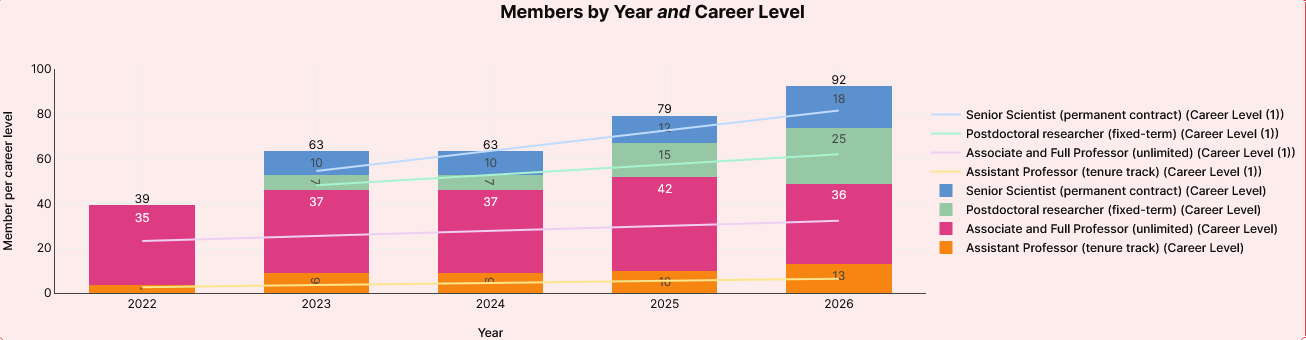
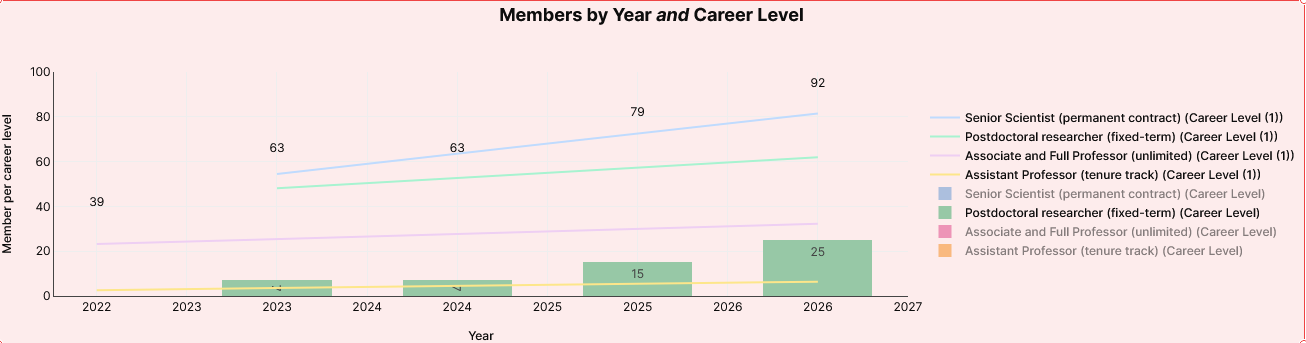
I treid to find out if theres an id of the legend items and if so let them influencethe calculation of the trendlines.
As well as rerunning the transformer(actually the query I reference at the top of the transformer) and use a js instead of a transformer to trigger it.

Currently Im at the end of my wits and would appreciate any help.
Thank you in advance!
Hi - how about this approach?

Step 1 — track hidden segments in a temp state

Create a Variable for storing the hidden levels, e.g. tmp_hiddenLevels (default []).

On the chart, add a "Legend clicked" event handler (the Plotly chart exposes this).

Use this code in the event handler:

const trace = arguments[0].fullData[arguments[0].curveNumber];
const name = trace.name;
const currentHidden = tmp_hiddenLevels.value || [];
const newHidden = currentHidden.includes(name) ? currentHidden.filter(n => n !== name): [...currentHidden, name];
tmp_hiddenLevels.setValue(newHidden);

This mirrors Plotly's own hide/show into Retool state so the transformer can see it.

Step 2 — update the transformer to exclude hidden levels

const data = {{ count_expertPerYearCareerLevel_db.data }};
const hidden = {{ tmp_hiddenLevels.value }} || [];
const grouped = {};
data.year.forEach((year, i) => {
  const level = data.career_level[i];
  if (hidden.includes(level)) return;          // <-- skip hidden
  if (!grouped[level]) grouped[level] = { years: [], counts: [] };
  grouped[level].years.push(year);
  grouped[level].counts.push(data.member_count[i]);
});

const stackOrder = Object.keys(grouped);
const stackBase = {};
data.year.forEach((year, i) => {
  const level = data.career_level[i];
  if (hidden.includes(level)) return;          // <-- skip hidden
  if (!stackBase[year]) stackBase[year] = {};
  stackBase[year][level] = data.member_count[i];
});

Sorry for the late reply, I had some more workload so this went on a bit of a back-burner.

Thank you for your answer!
Unfortunately, even after implementing the code, this doesnt quite work.

I had been troubleshooting also with the help of AI and it seems to me, that ChartWidget2 does not have the capability to determine which elemtn was hidden.

also Fyi I get the following error:

can't access property "undefined", arguments[0].fullData is undefined

rt_yearCareerLevel_chart2

in run script, line 4(rt_yearCareerLevel_chart2)

in rt_yearCareerLevel_chart2 legendClick event handler(rt_yearCareerLevel_chart2)

from user interaction

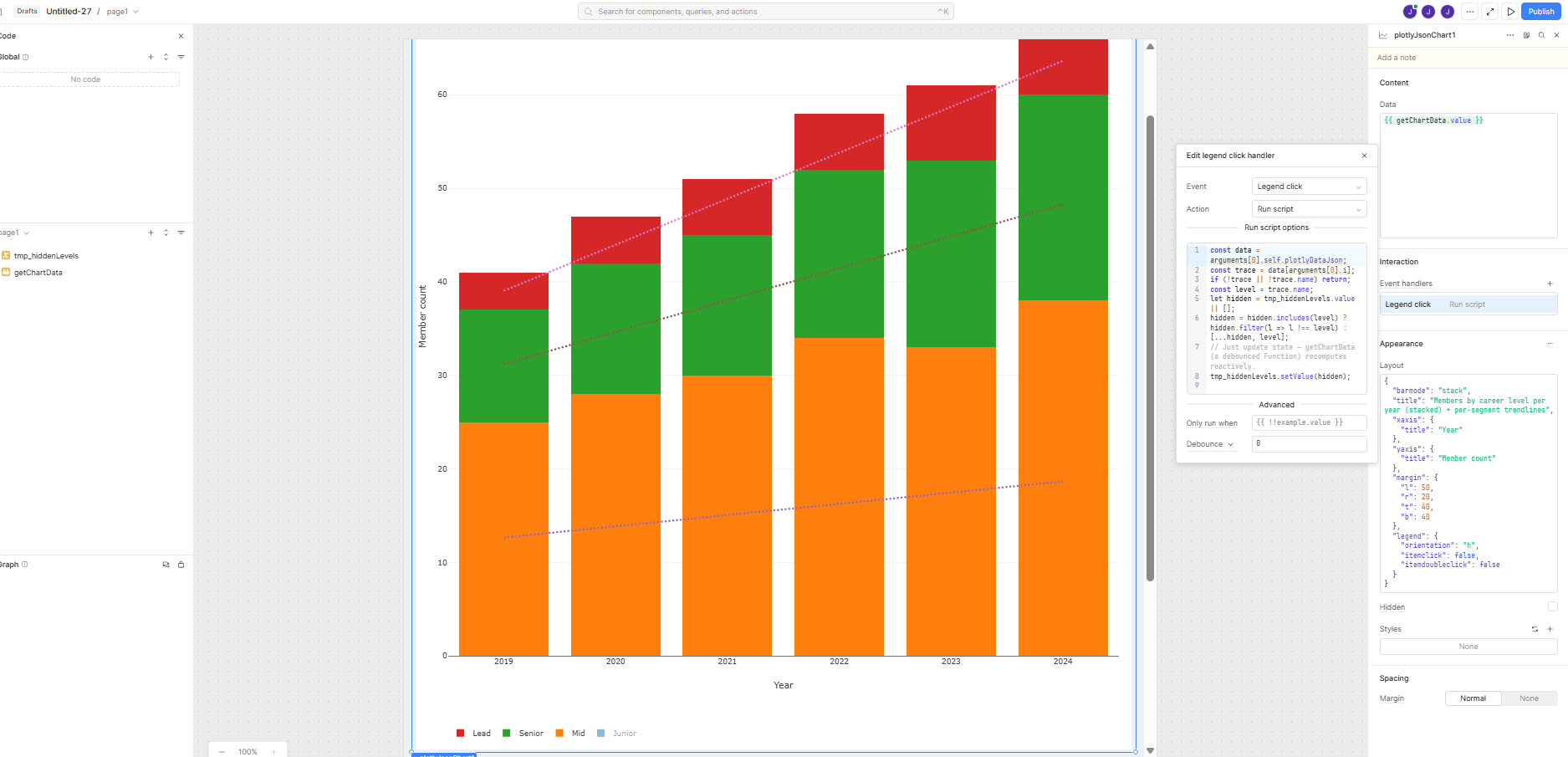
const data = arguments[0].self.plotlyDataJson;
const trace = data[arguments[0].i];
if (!trace || !trace.name) return;
const level = trace.name;
let hidden = tmp_hiddenLevels.value || [];
hidden = hidden.includes(level) ? hidden.filter(l => l !== level) : [...hidden, level];
tmp_hiddenLevels.setValue(hidden);

Try this instead —^

See screenshot - I got this working using this, so it definitely works.

Good luck!

1 Like
{
  "barmode": "stack",
  "title": "Members by career level per year (stacked) + per-segment trendlines",
  "xaxis": {
    "title": "Year"
  },
  "yaxis": {
    "title": "Member count"
  },
  "margin": {
    "l": 50,
    "r": 20,
    "t": 40,
    "b": 40
  },
  "legend": {
    "orientation": "h",
    "itemclick": false,
    "itemdoubleclick": false
  }
}

This was my Layout also —^

1 Like

Untitled-27 (2).json (13.0 KB)

Here is the JSON to import the app.

1 Like

This looks great, @Jon_Steele - thanks for jumping in! Let us know if you have any additional questions, @Katunga. :+1: