Current plan level (Free, Team, Business, or Enterprise: Pricing | Retool):
Bussiness
Monthly/Annual (if Team or Business):
Monthly
Version of Retool (if self-hosted):
Cloud
Question / Description:
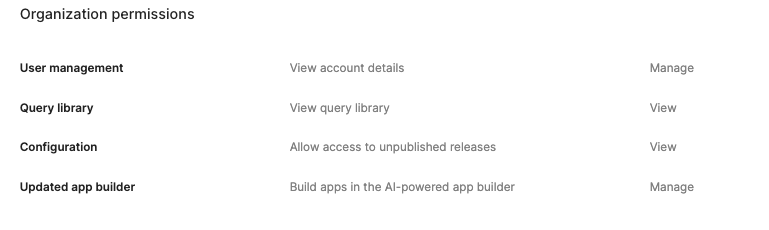
As of today, i see a new design for the Users List, when i navigate to
Username → Organization Permissons,
There are inactive Links (they are not clickable), so i cannot edit users.
Please advise ASAP!
Thank you
Summary
On a Business (Cloud) org, a newly rolled-out design for the Users list makes the links under Username → Organization Permissions inactive/non-clickable, so individual users can no longer be edited the way they were before.
AI Response
This reflects Retool's rebuilt permissions model, which began rolling out to Cloud organizations in August 2026 — not a bug. In the new model, object permissions (apps, resources, workflows, etc.) are no longer edited per-user on the Organization Permissions tab; that tab only supports assigning universal (organization-level) roles, which is why the object-permission links appear inactive. Object permissions are instead managed through groups and roles at /settings/groups and /settings/roles, so adjust a user's access by changing their group/role assignments there. Note that assigning role grants directly to an individual user is intentionally not available in the Settings UI and can only be done via the Retool API; also be aware that object roles and sensitive organization scopes are Enterprise-only, so some controls are expected to be disabled on a Business plan.
Sources
 Understanding the new permission system: How to use it and what changed
Retool staff post explaining the rebuilt permissions model rolled out to Cloud in August 2026, including that per-user object permissions can no longer be set on the Organization Permissions tab and must be managed via groups and roles.
Manage RBAC with the Retool API | Retool Docs
Official docs confirming that assigning role grants to individual users is not available in the Settings UI and outlining how to do it programmatically via the Retool API.
The Community Team is testing out a new automation. Let us know if it's helpful (or not) by leaving a  ,
,  , or
, or  . Or by marking this post as the "Solution"! Let us know if you have any feedback here.