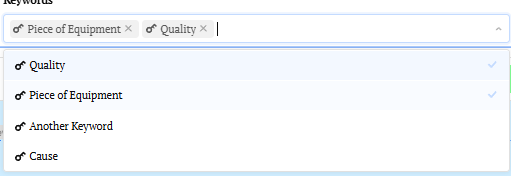
- My goal:
Store multi select values in database
- Issue:
When I add the values they are not being stored correctly.
Steps I've taken to troubleshoot:
- Additional info:
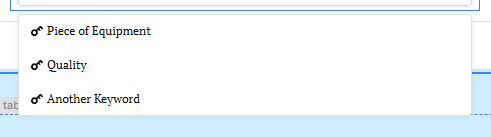
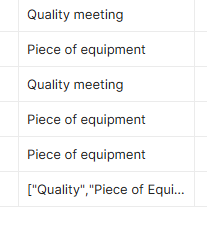
I am missing something obvious? Thanks
Store multi select values in database
When I add the values they are not being stored correctly.
Steps I've taken to troubleshoot:
I am missing something obvious? Thanks
Summary
Values selected in a Multiselect component are not being stored correctly when written to a database column.
AI Response
A Multiselect component outputs a JavaScript array, so it must be transformed to match the destination column's data type before insertion. For a JSON/JSONB column, wrap the value with JSON.stringify (e.g. {{ JSON.stringify(multiselect1.value) }}); for a text column, join it into a string (e.g. {{ multiselect1.value.join(',') }}); and for a native Postgres array column, format it as an array literal or pass the array to an ANY()/array parameter so it isn't inserted as a malformed literal. Confirm the column type matches the format being written, since a mismatch is the most common cause of values appearing incorrectly.
Sources
How do I format Multiselect data for JSON field when submitting a form?
Solved thread showing how to format Multiselect array output before writing it to a JSON database field.
Solved thread covering how to correctly insert Multiselect array values into a database column via GUI-mode queries.
The Community Team is testing out a new automation. Let us know if it's helpful (or not) by leaving a  ,
,  , or
, or  . Or by marking this post as the "Solution"! Let us know if you have any feedback here.
Hi @James_Gould! Thanks for your patience - were you able to figure this out?
From the info that you have shared, it looks like your query is inserting the raw array value or as a stringified array.
I can't see how your query is set up, but it is worth double-checking if your query is inserting the value into your DB as a string or as an array/JSON format.
You can also inspect the multiselect component's value (e.g. {{ multiselect.value }} in the State or Debug panel to see what it is returning.
Let me know if you're still running into issues with this!
-Jen
Hi Jen,
i’m using a form to send the the value to the DB using this code to send it:
{{'{'+keywordsInput10.value.toString()+'}'}}
I used a quick text component to check the values being returned
{{ multiselect.value }}
The correct value are being returned, however they in
{ } brackets.
Hi @James_Gould - thanks for your patience!
I'm having trouble reproducing this on my end, so I will need more info 
How did you want to store the value(s) in the database? Could you give me an example of what it should look like in the database if you select more than 1 option? Maybe DM me a screen recording of the values being saved?
It seems like you are storing the value with brackets because of the plus signs:
{{ '{' + keywordsInput10.value.toString() + '}' }} The plus signs join/concatenate onto your value, and if you remove them they won't be stored with the values you select.
Hope this helps! I would also recommend joining our live Zoom Community Office Hours on Tues and Thurs so we can troubleshoot together!
-Jen
Hi Jen,
I want to store the values as an Array.
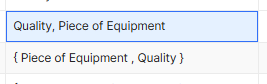
The top one is how I want it stored, the bottom one is how the values are being stored at the moment.
An additional issue I’m hitting is that the multi-select field on the following page (‘m making a multipage app) isn’t displaying the values despite the values appearing in the DB.
James
Hello @James_Gould! I'm moving your other threads here so I can keep track:
Hello again @James_Gould!
If you store the value as {{ keywordsInput10.value.toString() }} would this be what you're looking for?
Also, could you confirm the following:
Thanks!
-Jen
Hi Jen,
I'm using a Retool DB
I’m not 100% sure but I think a multi-select list requires an array to display values in the DB.
Thanks,
James
Hi @James_Gould ,
Could you please share a screenshot of your query showing how the data is being stored in the database and how you are displaying it in the Multi-select component?
This will help us understand the setup and troubleshoot the issue more effectively. If possible, you can also export the app in JSON format and share it with us, so we can review the configuration and understand the issue more clearly.
I’m storing the values using a form:

The Input field:
How they are Stored in the DB:

App In JSON:
Deviations (1).json (755.7 KB)
What is the DB field type?
Text
Are you looking to create multiple records? One for each value selected?
I’m looking to one record with either -
0, one or multiple for the same record.
So just to make sure I understand: you want the field to support null, a single value like "option a", or multiple values like ["option a", "option b"].
Is the issue that the database is currently storing the multiple-value case as a text string that looks like an array, rather than as an actual array? If so, that would explain why the multiselect doesn’t recognize it properly when you read the value back into the app.
The cleanest solution would probably be to change the database column to a type that naturally supports multiple values, such as a Postgres text[] or possibly json/jsonb. Then you can store the multiselect value directly without converting it into a specially formatted string.
If you need to keep the column as plain text, that can work too, but you’ll need to transform/parse the stored string back into a JavaScript array when you select it from the database before passing it to the multiselect.
Hmm, I’m getting the error Error: invalid input syntax for type json when I try to change Column type.
That’s probably because the existing values in the text column aren’t valid JSON. If they’re currently stored as plain text like:
foo
or:
foo, bar
then Postgres can’t simply cast those values to JSON. You would first need to turn the comma-separated text into an array, then store that array as JSON.
The two quickest approaches I can think of are:
1. Add a new JSON field
Add a new JSON/JSONB column, populate it from the existing text field, then update your Retool components/queries to use the new field.
For example, if the current values look like foo, bar:
UPDATE your_table
SET new_json_field =
  CASE
    WHEN old_text_field IS NULL OR trim(old_text_field) = '' THEN NULL
    ELSE to_jsonb(
      regexp_split_to_array(old_text_field, '\s*,\s*')
    )
  END;
That would convert:
foo
to:
["foo"]
and:
foo, bar
to:
["foo", "bar"]
The advantage is that this is relatively safe: you can populate the new field, inspect the results, update the app to use it, and only remove the old field once everything is working.
The downside is that you have to remap references to the old field. But you will probably need to revisit those anyway, since the old queries/components currently expect text and the new value will be an array.
2. Keep the existing field name
If preserving the existing column name is important, you could instead:
Add a temporary text column.
Copy the current values into it.
Change/recreate the original column as JSON/JSONB.
Populate the original column from the temporary values using the conversion above.
Verify the results.
Delete the temporary column.
For example, once the original field is JSONB:
UPDATE your_table
SET original_field =
  CASE
    WHEN temporary_field IS NULL OR trim(temporary_field) = '' THEN NULL
    ELSE to_jsonb(
      regexp_split_to_array(temporary_field, '\s*,\s*')
    )
  END;
Personally, I’d use the new-field approach first. It gives you an easy way to verify the migration and roll back if you discover some values that don’t follow the expected foo, bar pattern (like if you have some {”foo”, “bar”}" values).
Once the field is JSON, the important part on the Retool side is to store the multiselect’s array value directly rather than converting it back into a comma-separated string.
I tried new-field approach, but when I ran the code the new field remained empty 
Can you share the code you ran?