I’m making a multipage page app and I’m trying to create a form connected to a database then use a multi select list to update the database with the selected options.
Next when I navigate to the next page I want the form to be populated with the selected options
Issue:
Only when I navigate to the next page only shows the one of the option.
Steps I've taken to troubleshoot:
I’ve tried using the code to ensure the that the values are being imported into the database:
In a multi-page app, a form-connected multiselect writes its selections to a database using JSON.stringify(multiselect1.value), but when navigating to the next page the field only displays one of the previously selected options instead of all of them.
AI Response
This is a data-formatting round-trip issue, not a bug. JSON.stringify() saves the selections as a single serialized string (e.g. '["Road","Canoe"]' or a Postgres array literal like {"Road","Canoe"}), but the multiselect's default/value property expects an actual array of strings. When it receives a string it renders only one (or none) of the values. The fix is to parse the stored value back into an array before binding it to the default value — use {{ JSON.parse(query.data.accessible_by) }} if it was stored as JSON, or split the Postgres array literal into an array (e.g. .split("'").filter((_, i) => i % 2 == 1)) so the component receives ["Road","Canoe"] rather than a string. Confirm the stored column format first, then match the parse method to it.
Sources
How do I format Multiselect data for JSON field when submitting a form?
Solved thread that is the source of the exact JSON.stringify(multiselect1.value) storage pattern, confirming how multiselect data should be written to a JSON/JSONB column. Multiselect default value not loading
Solved thread covering the identical symptom — values saved to the database but not displaying on load — where the accepted fix is parsing/splitting the stored string back into an array for the multiselect.
The Community Team is testing out a new automation. Let us know if it's helpful (or not) by leaving a , , or . Or by marking this post as the "Solution"! Let us know if you have any feedback here.
Thanks for reaching out! JSON.stringify(multiselect1.value) writes a string into the column and unless you parse it back on read, the multiselect on page 2 receives a string where it expects an array so it matches at most one option.
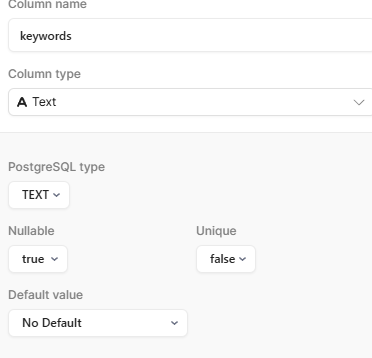
Would you be able to show the column type you are using in this situation?
Depending on the type, you could either drop the JSON.stringify entirely and pass the array directly or you could use another method such as {{ JSON.parse(query.data.accessible_by) }} if the value is stored in a JSON format.
Thanks for reaching back out! The JSON.stringify is fine here since the column is a text type. Something additional to add here based on the way Retool shows query results is that you’ll need to parse the text back into an array so all of the results show.
Since your options are coming from a separate table, the values you store must match the option values exactly, including type.
If that options query returns numeric IDs (1, 2, 3) but your saved array contains strings ("1", "2", "3"), the multiselect could silently drop the non-matching values.
Just to confirm you’d get the data back you’d desire on the second page, you can add a temporary text component on page 2 and compare the values like so:
{{ multiselect1.values }} vs {{ JSON.parse(getRecord.data.accessible_by[0]) }}
You could then change the multi-select default value on page 2 to include the parse above if it retrieves the values you desire. It may be worth including it into a script that grabs the data as an array and returns that back into the second page as a string.
Thanks for verifying. Just confirming that using {{ multiselect1.values }} is retrieving all of the DB keywords? This would be expected since that means the query is resolving.
Does {{ JSON.parse(getRecord.data.accessible_by[0]) }} bring back a separate result? I wanted to verify if we see a separate result between the records to understand the data that is being brought back.
My apologies. The getRecord was a placeholder name on my end, not a real query. Swap it for whatever your page 2 query is called (the one that fetches the saved record), and the ReferenceError will clear.
I do have a question based on that error though. Does page 2 have a query that reads the record back from the database. The multiselect1 on page 2 is a separate component from the one on page 1, and page 1's data doesn't automatically carry across.
To populate the form on page 2 you need to re-read the row from there like so:
Pass the record's ID to page 2 when you navigate
Add a query on page 2 that fetches it like select * from your_table where id = {{ urlparams.query.id }}
Point the multiselect's Default value at that query. You should be able to script this out to grab the data as an array and returns that back into the second page. Happy to provide an example of what this could look like should you need.
Would you also be able to screenshot of the query list in your page 2 left panel if one exists? If not, one would need to be constructed.
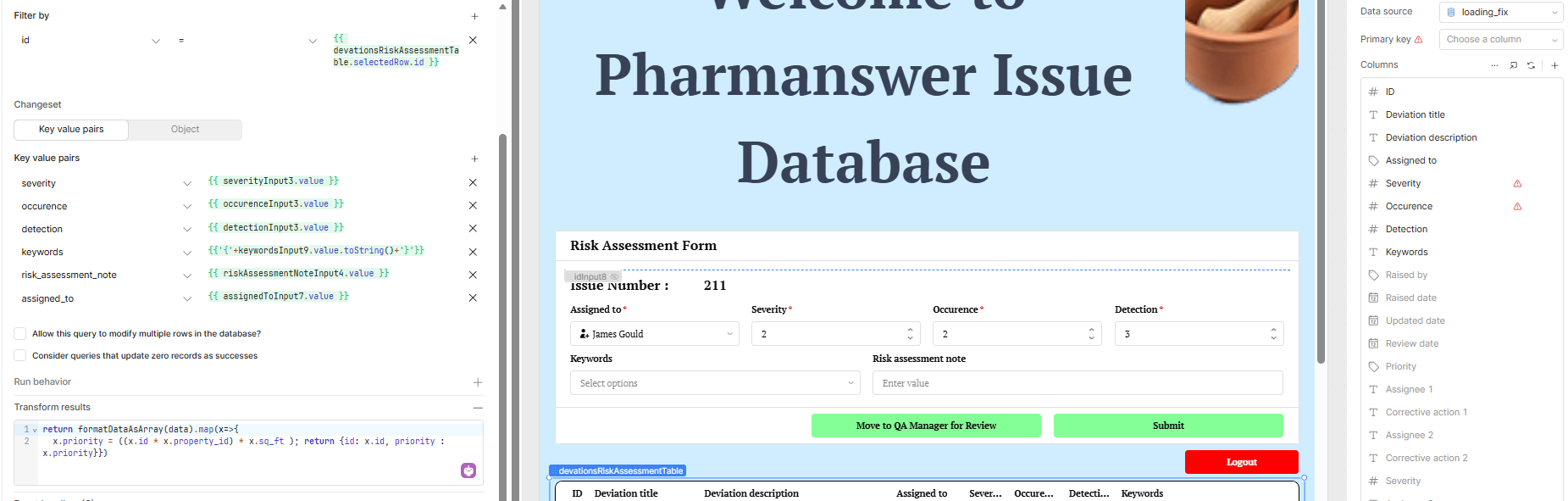
I use a form generated from a table connected to the DB (see screenshot). On page2 the DB is loaded into a table again which populates the form. I’ve normally use selectedRow (by default the most recent record is loaded) I’ve connected a simplified version of my DB here instead that still experiences the same issue.

 ,
,  , or
, or  . Or by marking this post as the "Solution"! Let us know if you have any feedback