UPDATE deviations
SET keywords =
CASE
WHEN keywords_temp IS NULL OR trim(keywords_temp) = '' THEN NULL
ELSE to_jsonb(
regexp_split_to_array(keywords_temp, '\s*,\s*')
)
END;
1 Like
Hi @James_Gould ,
I think the issue is with how the existing text value is being converted/stored rather than the regexp_split_to_array() itself.
Before running the UPDATE, I’d first verify that keywords_temp actually contains the old values and that the new keywords column is JSON/JSONB.
Could you try this first?
SELECT
    id,
    keywords_temp,
    regexp_split_to_array(
        trim(keywords_temp),
        '\s*,\s*'
    ) AS converted_array,
    to_jsonb(
        regexp_split_to_array(
            trim(keywords_temp),
            '\s*,\s*'
        )
    ) AS converted_json
FROM deviations
WHERE keywords_temp IS NOT NULL
  AND trim(keywords_temp) <> ''
LIMIT 20;
If that returns the expected values, for example:
foo          → ["foo"]
foo, bar     → ["foo", "bar"]
then the conversion itself is working.
After that, assuming keywords is a JSONB column, this should populate it:
UPDATE deviations
SET keywords =
    CASE
        WHEN keywords_temp IS NULL
          OR trim(keywords_temp) = ''
        THEN NULL
        ELSE to_jsonb(
            regexp_split_to_array(
                trim(keywords_temp),
                '\s*,\s*'
            )
        )
    END;
I’d also check the column types with:
SELECT
    column_name,
    data_type,
    udt_name
FROM information_schema.columns
WHERE table_name = 'deviations'
  AND column_name IN ('keywords', 'keywords_temp');
Ideally it should be:
keywords       → jsonb
keywords_temp  → text
If keywords is still a Text column, I would keep it as a text field only as a fallback and store the MultiSelect value with:
{{ JSON.stringify(keywordsInput10.value) }}
rather than constructing {foo,bar} manually.
So I’d first run the diagnostic SELECT above. If you share its result and the two column types, we can pinpoint why the UPDATE is leaving keywords empty.
Hmm,
Keywords isn’t being populated when I ran the code, the first the first code code is working though.
1 Like
Could you run this query to confirm the column types?
SELECT
    column_name,
    data_type,
    udt_name
FROM information_schema.columns
WHERE table_name = 'deviations'
  AND column_name IN ('keywords', 'keywords_temp');
If you send me the result, I can give you the exact migration query based on your current column setup.
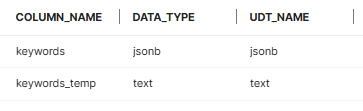
Perfect — that confirms the column types are correct: keywords is jsonb and keywords_temp is text.
Since the conversion SELECT is already working, let's do the migration with RETURNING so we can verify the rows are actually being updated.
Please run this exact query:
UPDATE deviations
SET keywords = to_jsonb(
    regexp_split_to_array(
        trim(keywords_temp),
        '\s*,\s*'
    )
)
WHERE NULLIF(trim(keywords_temp), '') IS NOT NULL
RETURNING keywords_temp, keywords;
This should return something like:
keywords_temp    | keywords
-----------------|--------------------
foo              | ["foo"]
foo, bar         | ["foo", "bar"]
foo, bar, baz    | ["foo", "bar", "baz"]
If this returns the converted rows, the migration is complete. We can then verify with:
SELECT
    keywords_temp,
    keywords
FROM deviations
WHERE NULLIF(trim(keywords_temp), '') IS NOT NULL
LIMIT 20;
I prefer this version over the previous UPDATE because RETURNING will tell us immediately whether PostgreSQL actually updated the rows. It also avoids unnecessarily setting keywords to NULL for rows where keywords_temp is empty.
Hi Again,
A couple of the values are incorrect, but they were stored incorrectly in keyword_temp:
[" Quality "," Piece of Equipment "]
is being stored in keywords as:
[ "[\" Quality \"", "\" Piece of Equipment \"]" ]
I hope it’s won’t be an issue going forward since the new entries will insert correctly formatted value formatted into it.
I'm now getting an error when running trying my submit my form to update the DB run the :
Insert into deviations failed: you must satisfy the constraint 'Deviations pkey'
Clearly the Json format is where the issue is occurring, as it being past a String.
I used the same code and altered it for the table, confirming the format of each column. I tried updating it however the multiple select then stopped displaying any options to select and the field to Json format using the above code modifying it for the table. However this has broken the multi-select component.
I think there are actually two separate issues here.
First, the odd conversion:
[" Quality "," Piece of Equipment "]
becoming:
[ "[\" Quality \"", "\" Piece of Equipment \"]" ]
happened because that particular keywords_temp value was already stored in a JSON-like array format. The migration query we were using was intended for values like:
Quality, Piece of Equipment
and therefore split the text on commas. So it also split the JSON-looking string on its comma.
For those existing rows, we should handle them separately rather than running the comma-splitting logic against them.
Second, this error:
Insert into deviations failed: you must satisfy the constraint 'Deviations pkey'
is not a JSON error. That is a primary-key constraint failure. It means the form’s INSERT is either not supplying the required primary key or is attempting to insert a primary-key value that already exists.
I would stop changing the keywords field for the moment and look at the form’s database action.
Can you show:
- The Retool query/form action that runs on submit
- The columns being inserted
- Which column is the primary key on
deviations - Whether this form is intended to create a new row or edit an existing row
If it is editing an existing row, it may simply need to be doing an UPDATE rather than an INSERT.
Separately, for the Multiselect, the JSON column itself should be fine as long as Retool is receiving an actual array like:
["Quality", "Piece of Equipment"]
rather than a string containing that JSON. If the selectable options disappeared entirely, I’d also check the component’s Options source separately from its selected/default Value, because changing the storage field should not normally remove the list of available choices.
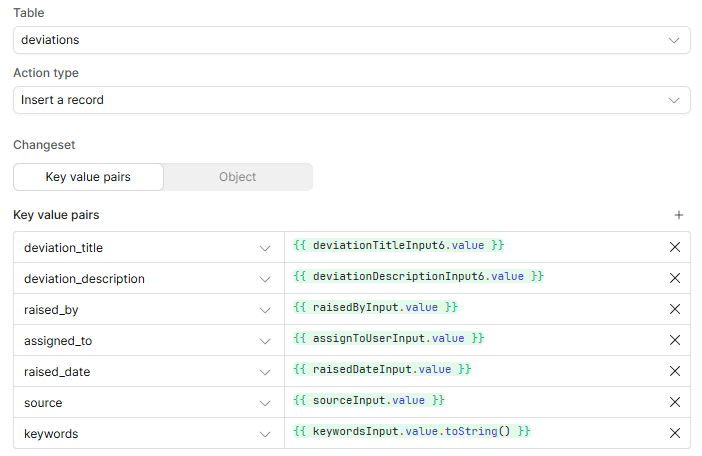
- This is the first form that is creating the row:
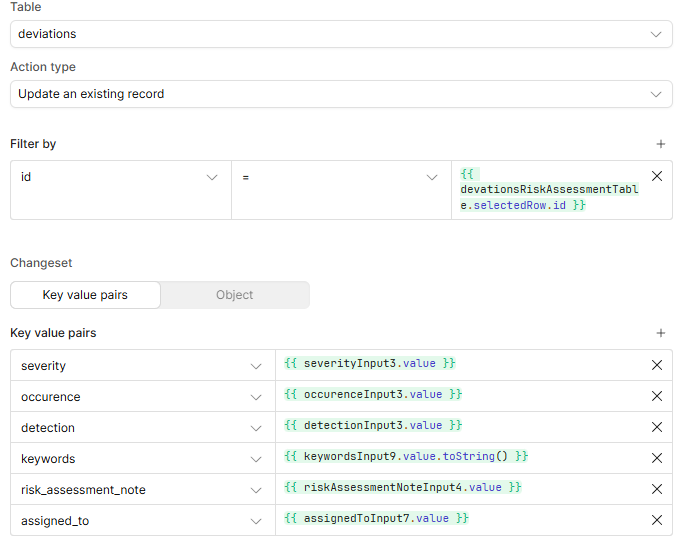
- The submissions on the following pages are updates:
- The Primary key is named ‘id’
1 Like
Got it. You changed keywords to JSON, but both of your Retool queries are converting the Multiselect value to text:
{{ keywordsInput.value.toString() }}
and
{{ keywordsInput9.value.toString() }}
For a JSON field, you want to pass the Multiselect's actual array directly:
{{ keywordsInput.value }}
and:
{{ keywordsInput9.value }}
(Remove .toString().)
If the component's value is:
["Quality", "Piece of Equipment"]
that is exactly what you want Retool to send to the JSON column. Calling .toString() turns it back into:
Quality,Piece of Equipment
which puts us back into the original problem.
I still don't think your Deviations pkey error is related to JSON. Your first screenshot does Insert a record, with no the primary-key field, which is fine if id is configured to generate automatically in the database. If it isn't, the INSERT has no value with which to satisfy the primary-key constraint, an that would be a problem.
Your update form appears to identify the existing row using:
id = deviationsRiskAssessmentTable.selectedRow.id
so that part looks conceptually right.
If the Multiselect itself still doesn't display correctly after removing .toString(), show us its Options and Default value / Value settings. That's a separate component-binding issue from the database insert.
1 Like
The dropdown it’s self is empty, the keyword value is returning:
“Quality”
The same for the label.
The default value for the multi-select is empty.
Hi John,
I’m still having this issue, it’s one of the last parts I need to fix before my app is finished, any other ideas?
Thanks
Can you post a screenshot of the Multiselect configuration showing:
-
Data source / Options
-
Value
-
Label
-
Default value
It would also be helpful to show the raw output of whatever query/expression is feeding the options.
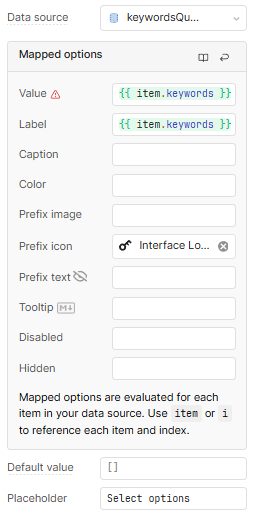
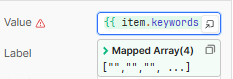
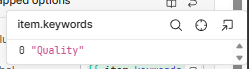
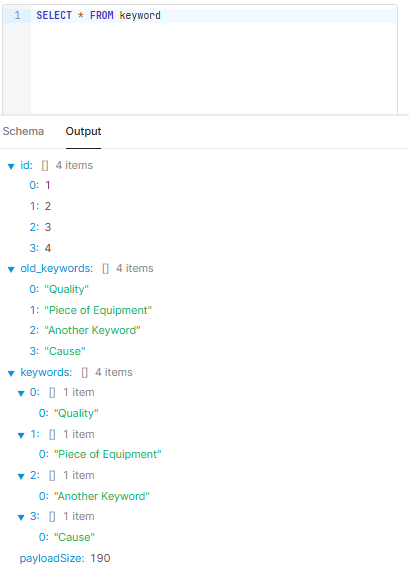
Is the keyword table supposed to be the master list of available keyword options? If so, each row should contain one normal text value such as "Quality", not a JSON array like ["Quality"].
The JSON array should be on deviations.keywords, because that is where one deviation can have multiple selected values.
So the source of the drop down is the list of possible values from the master list, and then the values selected are stored in the deviations record.
Is that what you are trying to do?
Hi again,
Yes that’s exactly what I’m trying to do 
Thanks
Were you able to do it? Any part of the setup giving you trouble?
For what it’s worth, I think the structure should be:
keywordtable: one row per available option, stored as plain text
| id | keyword            |
|----|--------------------|
| 1  | Quality            |
| 2  | Piece of Equipment |
| 3  | Another Keyword    |
| 4  | etc.               |
deviations.keywords: JSON/JSONB array containing the options selected for that deviation, for example:
["Quality", "Piece of Equipment"]
Then your Multiselect should use the keyword table as its option source:
SELECT id, keyword
FROM keyword
ORDER BY keyword;
With:
Value: {{ item.keyword }}
Label: {{ item.keyword }}
For the selected/default value, use the JSON array stored on the current deviations record.
And when saving, pass {{ keywordsInput.value }} directly into deviations.keywords (no .toString()).
Hi John,
When I execute the code:
SELECT id, keyword
FROM keyword
ORDER BY keyword;
I get response:
1 (1,Quality)
2 (2,"Piece of Equipment")
3 (3,"Another Keyword")
4 (4,Cause)
It’s then displaying each value in that format when selected in multiselect list.