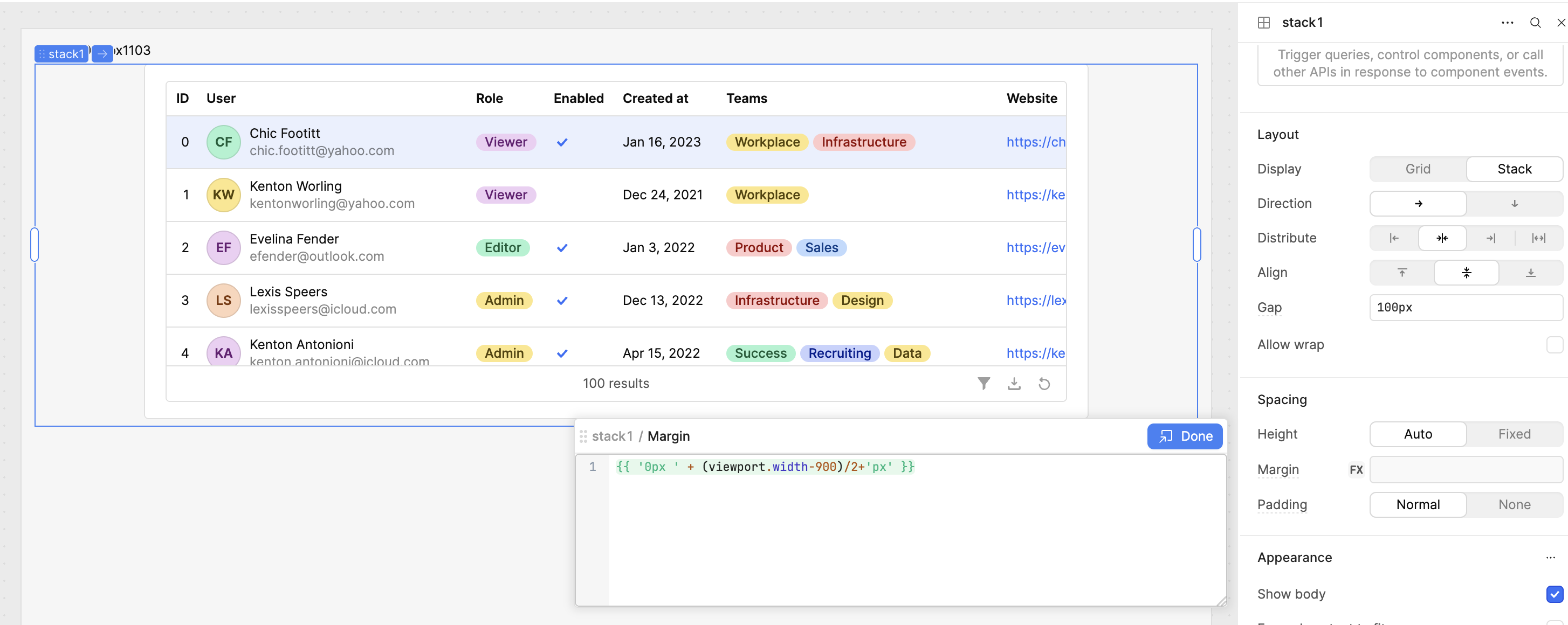
In a horizontal stack, when the content in the stack is wider than the stack container, the left side gets cut off. I believe the issue only occurs when the distribution is set to "center" or "end". This is problematic because if someone resizes their window they might not be able to see all the page content, even though the scrollbar appears.
As you can see in the screenshot, the scrollbar is all the way to the left, but the ID column and beginning of the User column are not visible. I have the table in a stack container with center distribution
Hi, I've been able to replicate the issue although it wasn't very easy to do at first!
What is the layout you're trying to achieve here and what other requirements do you have regarding the viewport size, columns to display etc.
There might be other options to consider for your layout if this wide table and center stack layout isn't working for you.
I would like to display a table in the center of the page, with whitespace on the left and right, and when the window size shrinks it should shrink the whitespace first and allow the table to take up the full width of the screen. That's why I'm using a stack; if I use the grid view then the large white page margins are maintained even at the cost of shrinking the table. The other solution is that I could just make the table the full width of the screen, but it looks pretty bad and stretched out on a wide window.
You'd want to have something a little more sophisticated than this, and probably have breakpoints for the margin similar to how you'd do this in CSS but perhaps this is an option that might be a workaround for you?