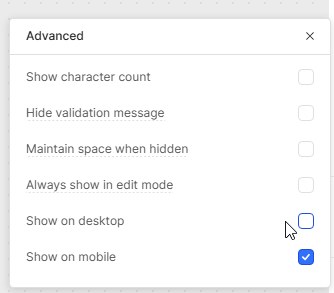
I’m building a mobile-friendly app in Retool and I’m repeatedly encountering an issue: whenever I add or modify components, some other components seemingly randomly lose their “Show on desktop” or “Show on mobile” checkbox selections.
I’m wondering:
Is this a known bug or expected behaviour in Retool?
Are there best-practices or work-arounds to stabilise these checkboxes so I don’t have to keep re-selecting them?
I’m also experiencing this issue. It looks like duplicating your app will permanently save anything you want to show on mobile but I’m hoping for an official fix soon.
FWIW I ended up building the mobile version first then checking the boxes for desktop as there is more space. This works a little better but I am still constantly checking both versions to make sure a component doesn’t disappear on one.
This sounds like a bug, I am fairly certain this should not be expected behavior for component's to lose their “Show on desktop” or “Show on mobile” checkbox selections
I can bring this to the attention of the mobile team.
The UI engineer got back to me and said "I don't see this happening on my end except for when I copy/paste a widget that's been toggled on Mobile. I wonder if that's a common action for them. "
Are you by chance using copy/paste with the components?
I am wondering to what extent we can go into your app's logs to see when it is hitting a/save endpoint that is saving the checkbox to a reset state...
Or if this is a browser specific issue where the state being stored in the front end is somehow resetting the toggle. Very tricky bug.