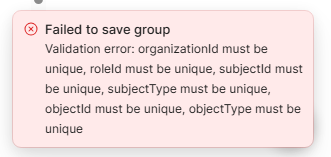
Just happened on my end. Full wipe of all settings, and getting a wombo of:
“internal server error”

and
“X must be unique”
Sometimes it saves an app or a resource, but there doesn’t seem to be a pattern.
Just happened on my end. Full wipe of all settings, and getting a wombo of:
“internal server error”
and
“X must be unique”
Sometimes it saves an app or a resource, but there doesn’t seem to be a pattern.
Update from trying to resolve:
Update 2:
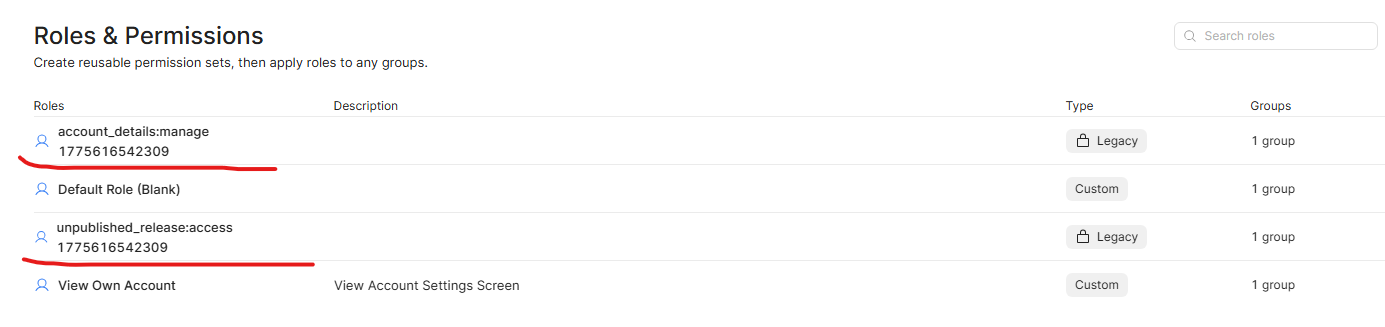
Creating a new Group revives/creates 2 Roles and automatically self-assign to new group
Assigning these 2 roles to a group that previously had problems with apps/resources does not resolve the issue - the internal and unique errors still come up.
Still, having new groups auto-assign themselves legacy roles is a bad.
EDIT 2 hrs later:
Last one. As a stop-gap to allow use, I had to re-create every group from scratch. For each new group, I had to assign the 2 highlighted ‘Legacy’ roles above, plus one of the ‘Custom’ ones. This didn’t remove all the issues, but minimised them.
A few things noted during last couple of hours:
So, as per OP, the Roles seem to mess with Groups. This is the second permissions wipe for us in as many months, so I really do hope there’s progress made on these.
 Same here - the described behavior matches what we observed as well. One additional data point: updating resource access one at a time works consistently, whereas attempting to update access to multiple resources simultaneously reliably triggers an Error.
We are talking about a new issue separate from the original post!
You can currently reproduce this on Cloud, updating resource access for groups fails most of the time, at least when updating multiple resources at the same time.
Hey @TobiasOhlsson I apologize, my mistake, I misread it, I have moved these concerns into a new topic, so we can address this issue separately!
Good morning @ChiEn, thanks for moving to new.
We’re on Cloud, and these seem pretty trivial to reproduce, at least in our instance.
The issues had SOME overlap with the previous OP, but whatever was fixed there, remains here. The original dealt with Roles resetting Groups, and I believe this is what kicked off our current host of issues. If I remember the sequence correctly, before I noticed the problem and the issues started, I:
When I got back to groups list, it was all apps / resources on 0, and the issues described in the posts above started.
Good morning @Kaneski, we have deployed the fix in Retool Cloud version 3.369.0 can you check again if things are working well on your end? Can you verify as well @TobiasOhlsson?
Good morning @ChiEn,
Some progress it seems. The internal errors and the uniques were gone enough to restore the permissions from before the wipe. I really don’t want to try and replicate the original cause - the deleting of Roles.
I did, however, notice a new issue - if both Roles and Resources are added to a Group, it can remove Roles and Resources from a group previously opened. Eg:
No issues on saving/internal/unique errors.
The only consistent way to get everything needed is to do Roles and Resources, one at a time, saving and going back to main list between each selection.
And again, while it’s great that the internal/unique errors are gone, I don’t want to try and replicate deleting a Role, which is what I think caused the original.
Hey @Kaneski and @TobiasOhlsson, we have rolled back the feature flag that may be causing this issue so you should no longer be seeing this issue, can you please verify again? Thanks so much for your patience! 
Good morning @ChiEn ,
Created new groups and attempted to replicate without success. So the latest thing appears gone, the save issues appear gone, so seems OK there.
No idea on idea on the ‘missing dependencies’ feature as I stopped using it.
No idea if deleting Roles still messes with Groups.
As far as trying to restore the access setup, things are working.
@Kaneski just checking in, is everything still working well on your end? Let me know!
Good morning @ChiEn,
The restored permissions have not been affected since, so all good there.
I’m likely to need a new Group/Role combo in the next few weeks, so I’ll be sure to record the changes, and make the appropriate praises to the Omnissiah, before I do.