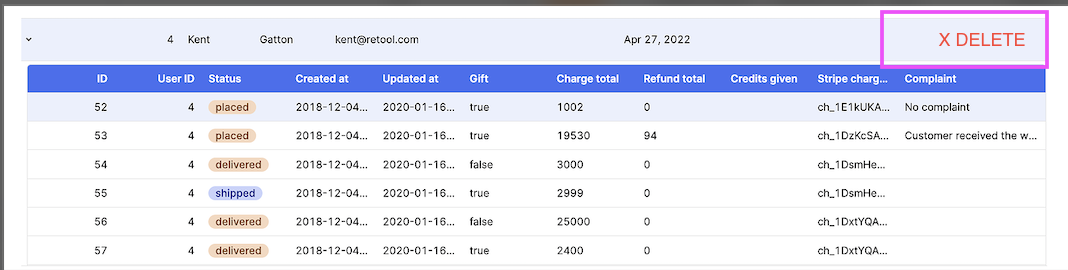
hey, Retool, Do you know the way, how to only display the action row button (e.g delete) if it’s nested table has data? Or it has not - but display row action button in parent conditionally, based on nested/child state 
how to reference child/parent relations for nested components.
There is nested table for each row.
image
Hey @Anna123NW,
It is not possible to access the nested table's data directly. You would need to access the source data being used for the nested table (assuming it is not loaded upon row being expanded).
E.g. in your Row Action (which is different from a Button column, for which this is not applicable) you can set the hidden status to {{ !getInfo.data.filter(x => x.id === currentSourceRow.customer_id).length > 0 }}
Here is a breakdown of what that inline JavaScript expression does:
getInfo.data
getInfo: This is the name of the Query or Resource that fetches the entire dataset for your nested table..data: This accesses the actual array of objects (rows) returned by the getInfo query.
What it represents: This is the complete, unfiltered list of all possible nested rows.
.filter(x => x.id === currentSourceRow.customer_id)
.filter(): This is a standard JavaScript array method used to create a new array containing all elements that satisfy a provided test function.x: This is a temporary variable representing each individual object (row) in the getInfo.data array as the filter loops through it.x.id: This is the unique identifier within the nested table's data.currentSourceRow.customer_id: This is a magic variable available within a Table Row Action context. It represents the data object of the currently selected or expanded parent row.===: This is a strict equality comparison.
What it represents: This creates a new array containing only the rows from the getInfo dataset that are associated with the currently expanded parent row. It matches the child rows' ID (x.id) to the parent row's ID (currentSourceRow.id).
** .length > 0**
.length: This property returns the number of elements in the new, filtered array from Part 2.> 0: This checks if the length of the filtered array is greater than zero.
What it represents: This returns a Boolean value:
true: If the filtered array has one or more rows (meaning data exists for the current parent row).false: If the filtered array is empty (meaning no data exists for the current parent row).
Part 4: ! (The Not Operator)
!: This is the logical NOT operator. It inverts the Boolean result of the entire expression that follows it.
What it represents: This inverts the result from Part 3:
- If the result of Part 3 was
true (data exists), the ! turns it to false.
- If the result of Part 3 was
false (no data exists), the ! turns it to true.
Summary of the Entire Expression
The expression {{ !getInfo.data.filter(x => x.id === currentSourceRow.id).length > 0 }} is used to set the hidden property.
- If data exists for the parent row, the result is
false, so the action is NOT hidden (it's visible).
- If no data exists for the parent row, the result is
true, so the action IS hidden.
This is a way to conditionally show an action button only when there is associated nested data.
Hope this helps!
perfect! works great. thank you!
1 Like