tl;dr:
Retool seems to work good OOTB for presenting requests that return [{key:value}] or [{key:{key: value}}]
but
Whenever request contains [{key:value, additional_objects:[{key: value},{key: value}]}] it either requires haxes or significantly degrades UX.
Hi!
In the past I’ve made Retool apps that only ever handled back-end responses containing arrays with nested objects that at worst had relation of 1:1 (each row/array’s object had exactly one child object) so displaying, styling and editing it wasn’t ever an issue due to me always being able to reference parent table (via currentRow/selectedRow, self or item) for everything. Aside from a known Retool bug on styling hidden vs disabled due to different contexts  )
)
My usual flow was:
- parent table, with togglable rows
- child tables (inside of tabbed component,) for (every) nested object (using
{{currentSourceRow.subarrayKey}})
However recently I needed to create apps that aimed to showcase more complex relations where each row contained an array of related objects and setup of:
- parent table, with togglable rows
- child tables (inside of tabbed component,) for (every) nested array of objects
and above setup doesn’t seem to cooperate well with Retool table component assumptions.
Examples:
1. 1:1 relation
(here everything works, since you can easily reference parent table and just drill down to a specific key-value)
BE response pattern:
[{"id": 1,"credentials": {"id": 111,"inserted_at": "2025-08-05T13:38:34",},"inserted_at": "2025-02-13T13:54:38","workspace_id": 6720,"project": {"id": 2119,"location": "United States","inserted_at": "2025-01-07T12:27:52"},"map": {"id": 8858,"state": "done","inserted_at": "2026-02-18T16:37:16"},"last_edited_at": "2026-02-18"},...]
Things I need:
- Button components outside of child table that trigger per row actions (ex. getting map’s id for request using
{{tableName.selectedRow.map.id}}) - styling of parent rows based on child table rows
Things that work:
tl;dr - here all works smoothly. 
- Button components outside of child table that trigger per row actions (ex. getting map’s id for request using
{{tableName.selectedRow.map.id}}) - styling of parent rows based on child table rows (using references like
{{currentRow.project.location}}for row color)
2. 1:n relation with specific UX/styling requirements
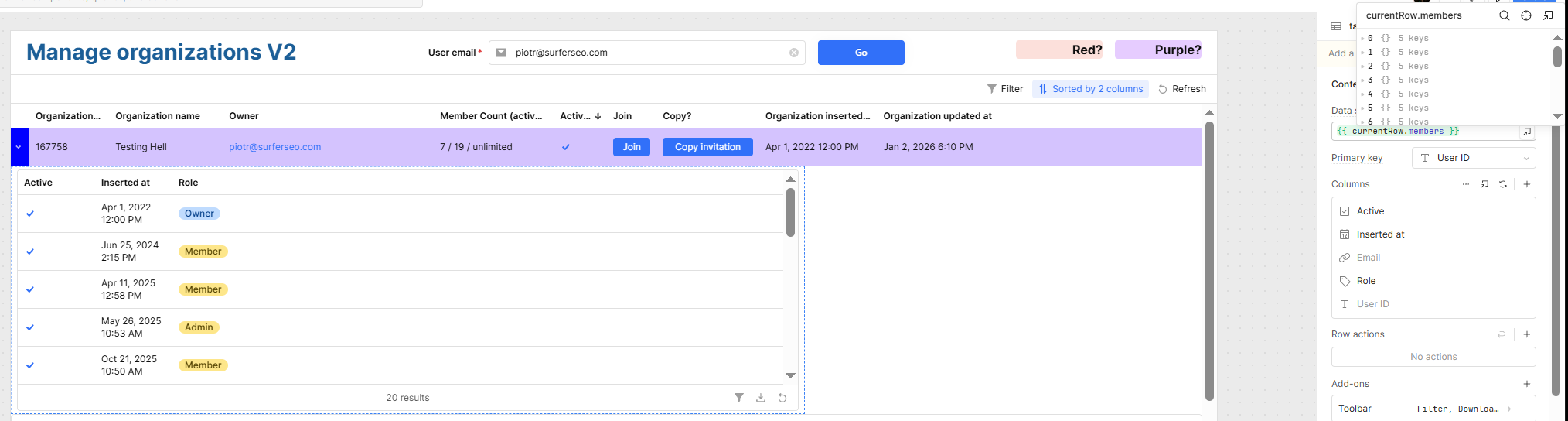
(here’s where most of things aside from listing breaks, since using {{currentRow.arrayName}} as data source still makes table work in context of entire parent table instead of just currentRow data)
BE response pattern:
[{"members": [{"active": true,"inserted_at": "2023-07-03T11:33:11","email": "test1@gmail.com","role": "owner"},{"active": true,"inserted_at": "2023-11-06T14:33:15","email": "test2@gmail.com","role": "member"},...],"organization_id": 16202,"workspaces": [{"id": 11765,"name": null,"inserted_at": "2023-10-16T15:07:50"},{"id": 53175,"name": "Say my name","inserted_at": "2026-01-12T11:13:26"}],"organization_name": null},{"members": [{"active": true,"inserted_at": "2023-10-25T13:41:30","email": "test+20@gmail.com","role": "owner",},{"active": false,"inserted_at": "2024-08-05T14:09:24","email": "test1@gmail.com","role": "member",},...],"organization_id": 16658,"workspaces": [{"id": 12217,"name": null,"inserted_at": "2023-10-25T13:41:30"}],"organization_name": null},...]
Things I need:
- multiselect on child table
- styling of parent rows based on child table rows
- styling of child rows based on child rows
- styling custom column Buttons of child rows based on child row data
- not running custom column Buttons event handlers depending on child row data
- running per row actions
- styling Button components next to child table based on child table row data
Things that don’t work:
- multiselect on child table and batch actions always points to the same table (when referencing
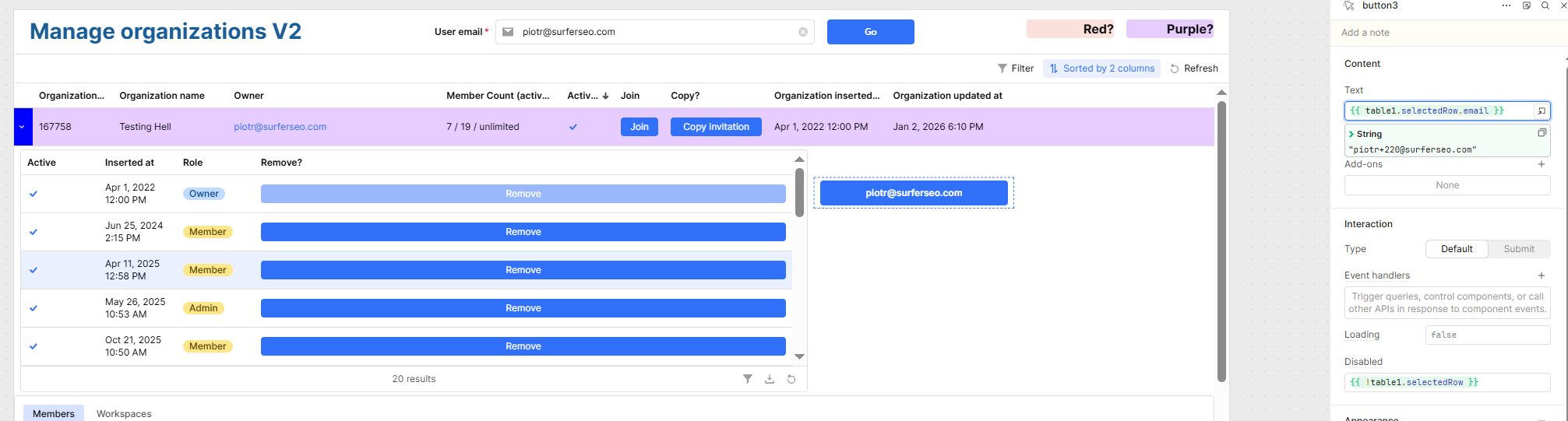
{{childTable.selectedRows}}will always point to one specific child table or beundefineddepending on the exact place you place the reference, regardless of the true selected row/rows origin) - styling of child rows based on child rows (as despite child table having it’s own data source, styles are computed based on parent table’s complete array)
- styling custom column Buttons of child rows based on child row data (again child having parent table’s complete array)
- styling Button components next to child table based on child table row data (impossible to get this context?)
Things that work:
- not running custom column Buttons event handlers depending on child row data (different available context that’s more local?)
- running per row actions has same issues as multiselect, but can be haxed around using intermediary variables (so instead of request relying on
table.data.keydirectly, I have a custom row button in child’s table, that grabs{{ currentRow.id }}via Event handler, saves it to app-wide variable, and then request uses{{ appWideVarName.value }} - styling of parent rows based on child table rows works only as a
.filter/.maphax if you have within parent and child same exact data point to match it within JS snippets
3. 1:n relation with full CRUD requirement, including moving child objects between parents (which again breaks whenever you want to use 2 components for displaying purposes)
BE response pattern:
[{"id": 291,"name": "optimization","inserted_at": "2025-12-18T13:12:20.832Z""prompts": [{"id": 1293,"text": "What questions do you ask AI?","inserted_at": "2025-12-18T13:12:20.832Z"},...]},{"id": 299,"name": "apple","inserted_at": "2025-12-18T13:12:20.832Z""prompts": [{"id": 1299,"text": "Why Macbooks have stupid NAND memory integration designs?","inserted_at": "2025-12-18T13:12:20.832Z"},...]},...]
Things I need:
- adding a new object to parent table/array (including cases where rows can have incomplete kvs)
- adding a new object to child table/array (including cases where rows can have incomplete kvs)
- editing values on parent table
- editing values on child table
- moving objects between child tables/arrays
- deleting objects in child table
- deleting objects in parent table
Things that don’t work:
(to attempt full CRUD without multiple different UX actions and multiple saves I attempted to make a app-variable that would have working copy of data I modify with UI elements, instead of using request.data and Retool’s built-in change sets)
- adding a new object to parent table/array (not compatible with how Retool handles select editable columns, as appending new data to variable that’s table source triggers edit mode automatically?)
- adding a new object to child table/array (-||-)
- moving objects between child tables/arrays (not supported?)
- deleting objects in child table (impossible if attempted within same move as add?)
- deleting objects in parent table (-||-)
Things that work:
- flattening BE output into cartesian object and then redoing object layout back up before sending update POST request (*maybe would work, but is very error prone in my PoC attempts)
- editable JSON field (but that heavily depends on users requiring JSON editing knowledge and providing logic and syntax-wise a correct code on every edit )
I’ve been attempting to gracefully solve both 1:n nested arrays cases and I’m kinda lost, hopefully I’m missing something obvious - thank you in advance for any insights/suggestions. 
Cheers!

 behind for test purposes):


 That's almost definitely a bug and, on top of that, the linter is plain wrong.