+1
@kent is there any update on this? would love to have this feature update so that we can make model fram to open at a particular location in the app and not in the middle
+1, would be awesome to use that kind of modal as an overlay/widget while still being able to use the app behind
Hi all, there are currently no updates on making the Modal Frame movable yet.
Have you @Ashish_Agarwal tried using a Drawer Frame? It can help if you would like the popup to appear on the side of the screen instead!
Is there maybe a chance for us to have a modal where the background can be transparent and accept clicks through that background @ChiEn ?
We have successfully managed to make a custom react component acting as a “floating”/”draggable” widget and tried to insert that in a full screen modal + transparent background, but unfortunately that doesn’t click the window behind.
That would be very nice to have a floating react component for our use cases!
Hey @Jeje - the current modalFrame does allow you to disable the overlay and prevent outside clicks from closing it, but that might not make a difference if you are technically making it occupy the entire screen.
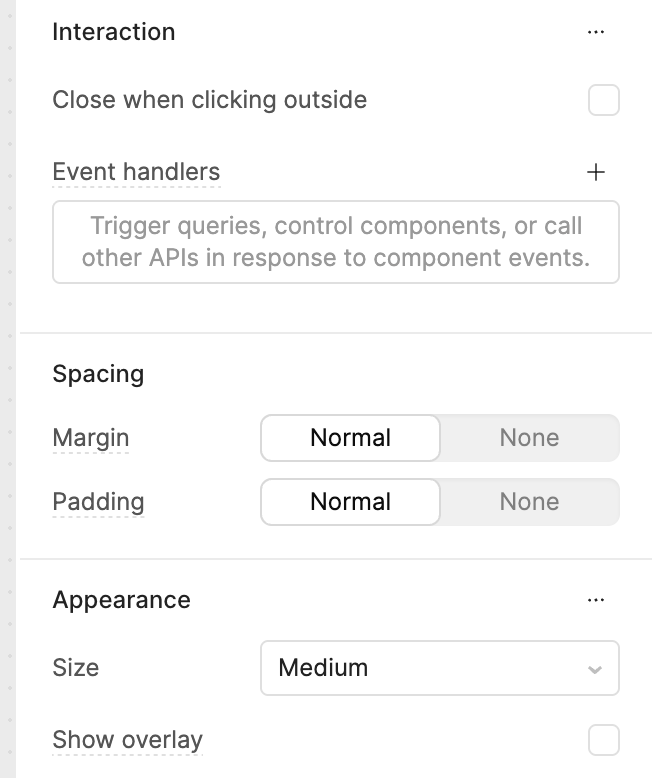
@Darren sorry just seeing this!
Correct we would want the widget to be “moveable” by the user so they can place it anywhere on their screen (that part works if we go modal + fullscreen + transparent background) while still being able to click on all the elements behind (so where the widget is not, that’s the part that’s not feasible yet as the click is still considered on the modal).
Our users have small mac screens most of the time, so we wanted to offer them the option to always put the widget wherever they want while still being able to resize their windows/tables on the rest of the screen.
If you're able to share the source code for the component that you've built, I'd be interested in playing around with it!
Sorry @Darren for some reason I’m not getting direct notification on this thread.
Of course, let me find a backup that we used for those tests (we removed it in the most recent updates as it was not working) and I’ll share that with you in the coming days.
Jerome
1 Like
Yeah, this is a classic limitation of how modal overlays work in most UI frameworks.
What you’re describing basically runs into the fact that once something is a modal (even with a transparent background), it still sits on top of the event layer and captures pointer events for the whole viewport. So even if visually you only “see” the widget area, the rest is still technically inside the modal’s hitbox.
If the requirement is:
widget is freely movable (like a floating panel)
AND clicks must pass through to underlying app elements
…then a modal is probably the wrong primitive for it.
1 Like