The Issue:
As of today (Dec 23, 2024), there seems to be a regression in how the Retool Mobile HTML Component renders standard
tags.
Previously, an HTML table wrapped in a div with overflow-x: auto would render correctly: columns would sit side-by-side, and the user could scroll horizontally if the table was too wide.
Current Behavior:
The renderer now appears to be aggressively forcing display: block (or similar native behavior) on
and
elements. This forces every single table cell to stack vertically into a "card" layout, making tabular data impossible to read.
Timeline:
This was working correctly earlier today. Without any code changes on our end, the rendering changed on a page reload, suggesting a platform-side update to the mobile renderer or the underlying react-native-render-html library configuration.
Steps to Reproduce:
Create a Retool Mobile app.
Drag in an HTML Component.
Paste the following "Minimum Reproducible Example" (Static HTML) into the value field:
Adding display: table !important or display: flex to rows/cells (Styles appear to be stripped or ignored).
Using strict pixel widths (e.g., width: 600px).
Converting
tags to
tags with Flexbox (even divs are stacking, suggesting a very aggressive layout override).
Request:
Can the team confirm if an update was pushed to the Mobile renderer? We need a way to opt-out of this "Card View" enforcement or a workaround to restore horizontal scrolling for data grids.
Let me ping the mobile team and see if there were any changes made that could have caused this regression.
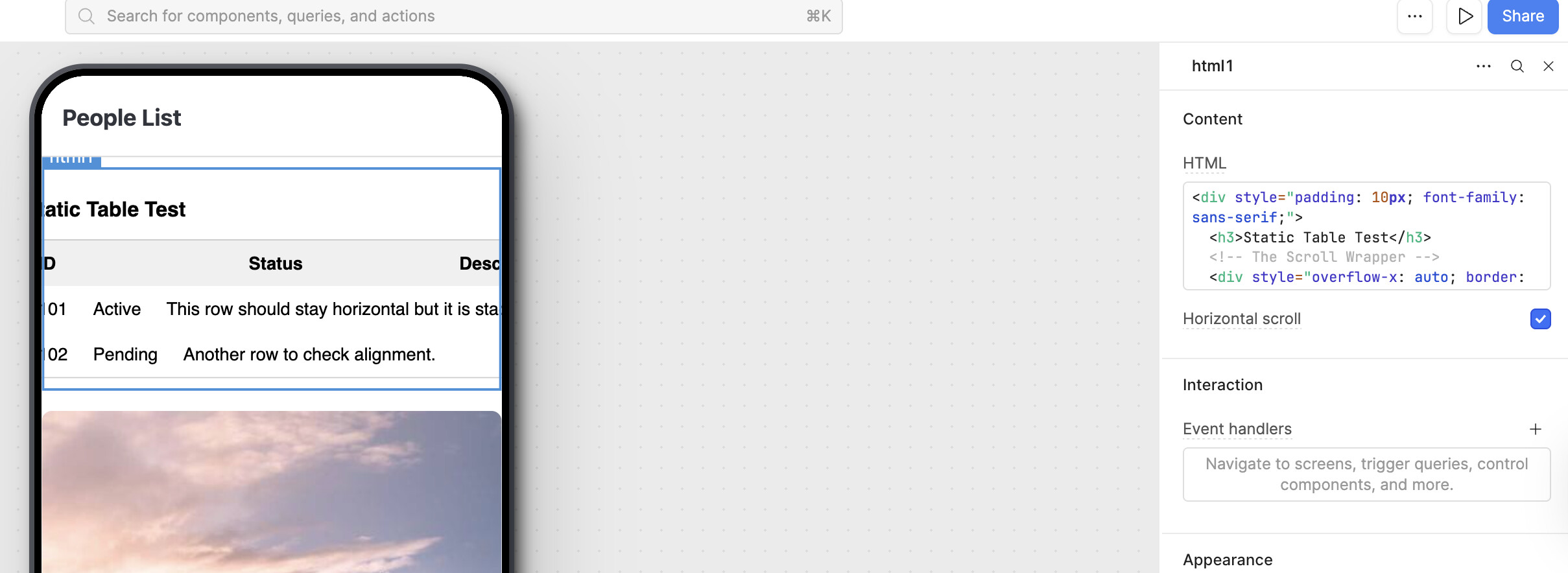
I just tested out the code snippet and it looks as shown below, it was not initially having horizontal scrolling but after clicking the check box in the component inspector I can scroll horizontally.