Step-by-Step Implementation
1. Create Your Agent Tool
Configure your AI Agent with a tool that accepts Plotly JSON format. Example tool definition
// Tool name: showGraph // Parameters: { "GraphPlotly": { "data": [...], // Plotly data array "layout": {...} // Plotly layout object } }
2. Create a Transformer to Extract Graph Data
Create a transformer called getGraphPlotly with this code
function getLastGraphPlotlyData() {
const tryParse = (v) => {
if (!v) return undefined;
if (typeof v === 'string') {
try {return JSON.parse(v);} catch (_) {return undefined;}
}
return v && typeof v === 'object' ? v : undefined;
};
const extractDataAndLayout = (t) => {
let p = t?.toolData?.toolParameters;
// Data a layout jsou v toolParameters.GraphPlotly if (p?.GraphPlotly !== undefined) { const graphPlotly = p.GraphPlotly; let data = graphPlotly.data; let layout = graphPlotly.layout; // Pokud je data string, parsuj to if (typeof data === 'string') { data = tryParse(data); } // Pokud je layout string, parsuj to if (typeof layout === 'string') { layout = tryParse(layout); } return { data, layout }; } return { data: undefined, layout: undefined };
};
const candidates = ;
const considerTrace = (t) => {
if (!t || typeof t !== 'object') return;
// Hledáme TOOL_END s nástrojem "showGraph" const isToolEnd = t?.spanType === 'TOOL_END'; const isShowGraph = t?.toolData?.toolName === 'showGraph'; if (!isToolEnd || !isShowGraph) return; const { data, layout } = extractDataAndLayout(t); if (data === undefined) return; const ts = typeof t.timestamp === 'number' ? t.timestamp : null; candidates.push({ ts, data, layout });
};
const invoke = {{ agentChat1_query1 }};
const t1 = Array.isArray(invoke?.data?.trace) ? invoke.data.trace : ;
t1.forEach(considerTrace);
const agent = {{ agentChat1 }};
const msgs = Array.isArray(agent?.messages) ? agent.messages : ;
msgs.forEach((m) => {
const tr = Array.isArray(m?.runData?.trace) ? m.runData.trace : ;
tr.forEach(considerTrace);
});
if (!candidates.length) {
// Nenašlo se: [false, null, null]
return [false, null, null];
}
// Najdi poslední podle timestamp
const withTs = candidates.filter((c) => typeof c.ts === 'number');
let result;
if (withTs.length) {
withTs.sort((a, b) => a.ts - b.ts);
result = withTs[withTs.length - 1];
} else {
result = candidates[candidates.length - 1];
}
// Vrať: [true, data, layout]
return [true, result.data ?? , result.layout ?? {}];
}
return getLastGraphPlotlyData();
Important: Replace agentChat1 and agentChat1_query1 with your actual Agent Chat component IDs, and showGraph with your tool name.
3. Add a Plotly Chart Component
Add a Mixed Chart component and configure it:
-
Chart type:
plotlyJson -
Data:
{{ getGraphPlotly.value[1] }} -
Layout:
{{ getGraphPlotly.value[2] }} -
Hidden:
{{ !getGraphPlotly.value[0] }}(optional - hides chart when no graph exists)
How It Works
-
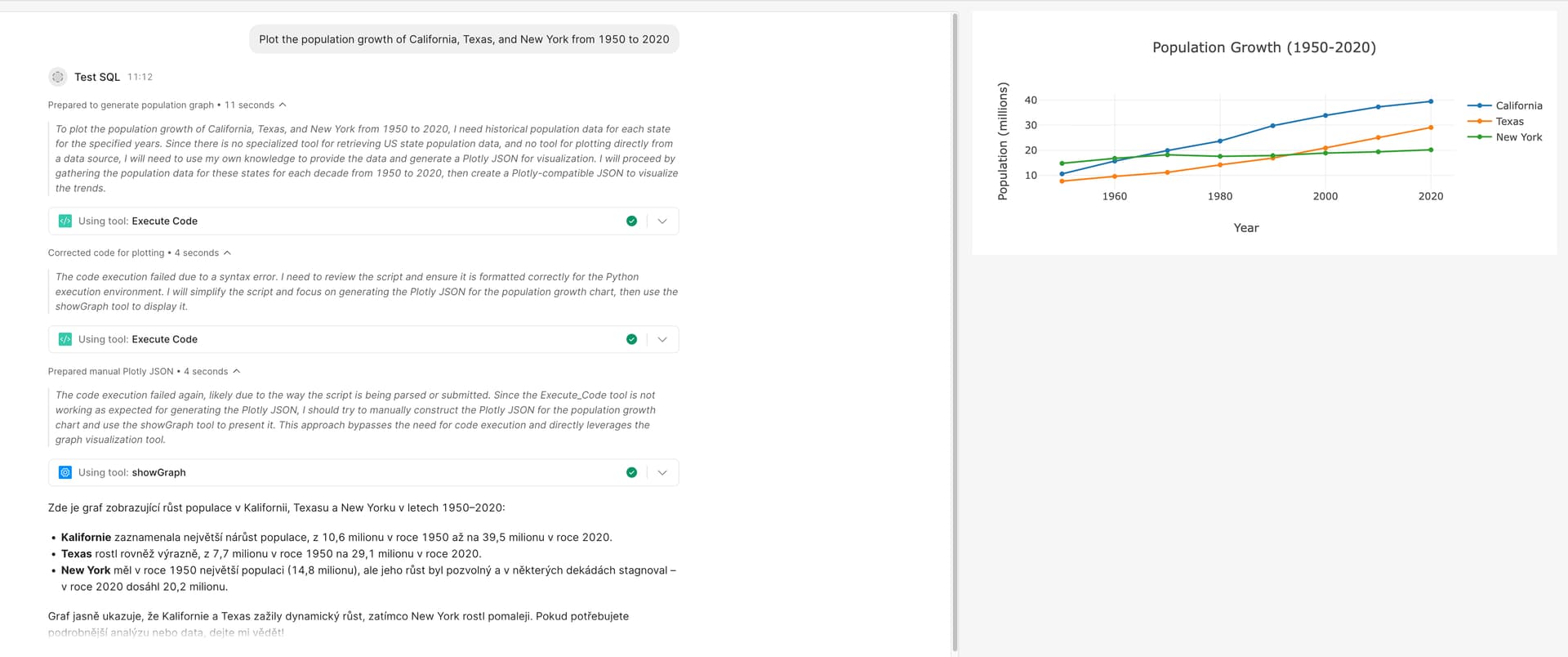
User asks agent: "Plot the equation y = x/2 for x from 1 to 5"
-
Agent generates data and calls the
showGraphtool with Plotly JSON -
Transformer monitors the agent's trace logs
-
Finds the latest
TOOL_ENDspan wheretoolName === 'showGraph' -
Extracts
toolParameters.GraphPlotly.dataandtoolParameters.GraphPlotly.layout -
Returns array:
[true, data, layout] -
Chart component automatically updates with the new graph!
Return Format
The transformer returns an array
[found, data, layout]
-
found(boolean):trueif a graph was found,falseotherwise -
data(array): Plotly data array -
layout(object): Plotly layout object
Usage:
-
{{ getGraphPlotly.value[0] }}→ true/false -
{{ getGraphPlotly.value[1] }}→ graph data -
{{ getGraphPlotly.value[2] }}→ graph layout
Result
 Users see real interactive Plotly graphs instead of just text responses
Graphs automatically update when the agent creates new visualizations
Chart is hidden when no graph exists
Customization Tips
-
Different tool name? Change
'showGraph'in the transformer to match your tool -
Different parameter structure? Adjust the
extractDataAndLayoutfunction -
Multiple agents? Create separate transformers for each agent or parameterize the agent ID
Happy graphing! 
 Community Show & Tell