 1. Getting Started and Initial Setup
What is the Retool Agents feature?
The Retool Agents feature allows users to build powerful, AI-driven applications and automations by connecting Large Language Models (LLMs) with their data sources and tools. Agents can perform complex, multi-step tasks that traditionally required manual coding.
How do I access the Agents feature?
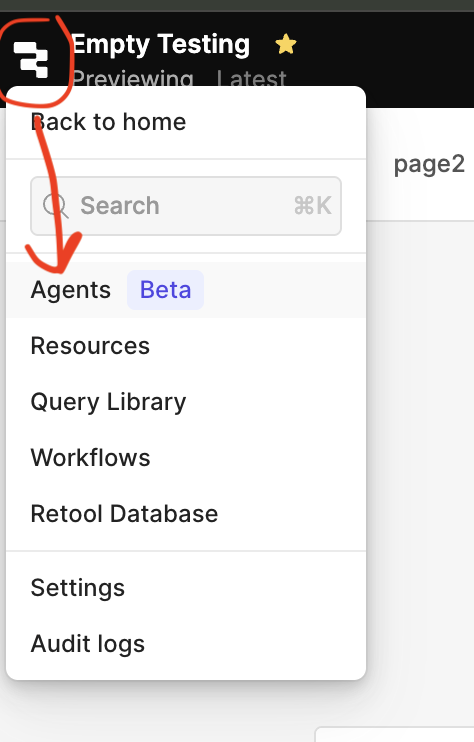
The Agents feature is available within the Retool platform. You can access it through the main navigation menu.

As well as under the Retool Icon when inside of an app.
What are the prerequisites for using Agents?
Check out our Quickstart Docs here!
How do I configure my LLM Provider?
You can configure your LLM provider by navigating to the Resources section in Retool. You will need to add a new LLM Resource, specifying your API key and selecting the model you wish to use.
 2. Building Your Agent
What is an Agent Tool?
An Agent Tool is a specific, actionable function or API endpoint that your Agent can call to perform a task. Examples include "Search Database," "Send Email," or "Update CRM Record." Tools are what allow the Agent to interact with your external systems.
Under the hood, a Tool is a Retool Workflow, which will be executing Query blocks for a resource that the tool has been configured to support. And thus, tool customizing and debugging will more or less be the same process as for a Retool Workflow.
How do I create a new Tool for my Agent?
Tools are built using Retool Queries or custom JavaScript functions. You define the Tool's name, a detailed natural language description (crucial for the LLM to know when to use it), and the underlying logic (the query or function).
How do I define the Agent's objective?
The Agent's objective is defined in its configuration. This is a high-level instruction that guides the Agent's behavior, for example, "Act as a customer service representative who can check order statuses and update shipping addresses."
Can I limit which Resources my Agent can access?
Yes. When configuring your Agent, you explicitly grant it access only to the specific Tools that you have created. Since Tools are linked to Resources, this controls the data and systems your Agent can interact with.
 3. Deployment and Integration
How do I deploy my Agent?
Agents are automatically deployed when you save their configuration.
How do I integrate an Agent into a Retool App?
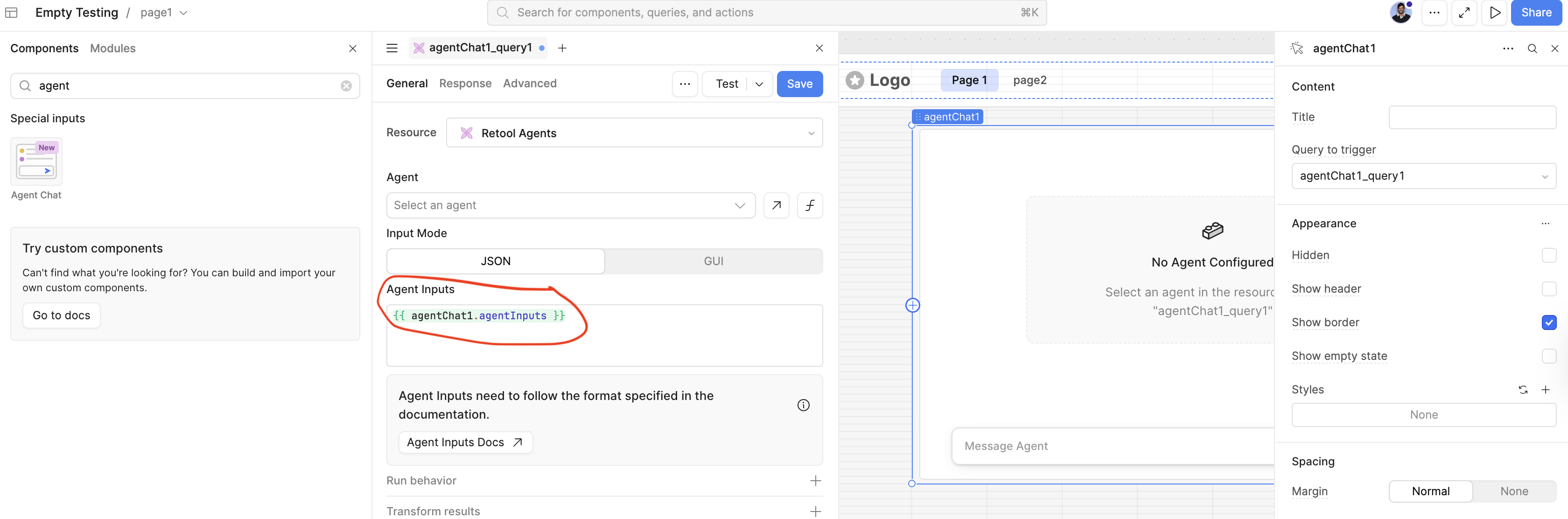
Drag and drop the Agent component onto your Retool App canvas. You can then configure the input (e.g., a text input field for the user's prompt) and handle the output (e.g., display the response in a text component).
Can I secure permissions for my Agent?
Yes. You can set permissions for Agents the same way you would for other features. To do this you must be an admin.
Check out our docs here on configuring these permissions.
 4. Troubleshooting and Advanced Usage
Why is my Agent choosing the wrong Tool?
This is usually due to a poor or ambiguous Tool description. Ensure your Tool descriptions are detailed, clearly state the required inputs, and explicitly describe the scenarios in which they should be used.
Retool provides a Core Tool Description guide for built in tools. As well as these docs for creating custom tools.
How can I debug my Agent's decision-making process?
Retool provides a detailed trace log for every Agent invocation.
This log shows:
- The initial user prompt.
- The LLM's reasoning for selecting (or not selecting) a Tool.
- The Tool's input parameters.
- The Tool's raw output.
- The final response generated by the LLM.
What are the limits on Agent usage?
Usage limits depend on your Retool plan and the rate limits imposed by your configured LLM provider. Contact your Retool administrator for specific plan details.
Can Agents handle complex state or memory?
Yes.
Retool Agents support conversation history and context management.
When integrating the Agent into a UI component, you must pass the previous message history (or "state") with each new request to maintain context.
The 'Agent Chat' component in a Retool app with have this set up by default.
What's the best way to report an issue with the Agents feature?
Please report any issues or bugs through the Community Forum or Retool Support, and reference the date you first noticed the issue.