Is there any way to disable the code autocomplete?
It is not uncommon for the app editor to become super laggy, even in small pages, and as I typing the autocomplete decides to add random tabs and even new lines.
Sometimes it takes 10 minutes just to write 8 lines and it's It is beyond me how this has been happening for months and no one is raising this issue.
Hey @unexpectedvoid, welcome back to the Community! I hear you, this can definitely be frustrating. I have not seen other reports yet and I could not reproduce it on my end. A few quick questions to help narrow this down:
Which browser are you using?
Are you on Retool Cloud or self hosted If self hosted, which version?
Does the autocomplete issue appear in all apps or only some?
Which editors show it most? (For example JavaScript queries, transformers, or SQL editors)
Does it persist after clearing your cache or using an incognito window?
Can you share a short Loom video showing the behavior?
Chiming in for visibility. For me, the code autocomplete issue is part and parcel with the runaway CPU issue I've been experiencing for the last year. Whenever the CPU goes haywire (as I've posted about before, for me this usually happens when deleting components or working on a page that includes a ListView component), then autocomplete also becomes a drag on usability.
1 - Browser: Chrome, Safari, etc. Doesn't really matter
2 - Retool Cloud
3 - Yes, the autocomplete/lag issue is somehow random and has nothing to do with the number of components/queries
4 - Pretty much the whole app becomes borderline unusable
5 - Yes, this issue is random but still happen a lot in a single day
6 - I'll record once it happens
7- 1 gigabit fiber optic connection via ethernet
I'm pretty sure this is an infinite loop happening within the retool editor app, I have built bigger apps myself and I can tell. Even something remove a single component that has no connections with anything else, can take 20 seconds or more.
Just commenting again to check the status of this issue.
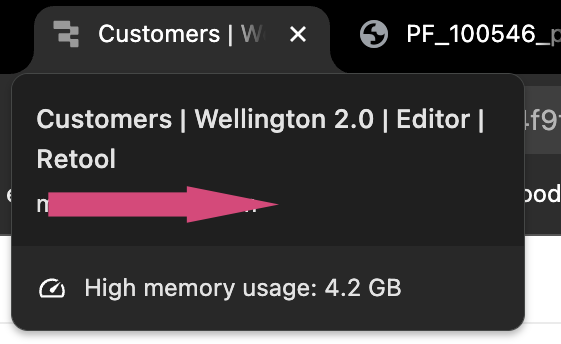
The editor continues to be unbearably extremely slow with a low data quantity, I get 300% cpu spikes on Google Chrome, between 3 and 4 gigabytes of ram used as I tried to todo basic things has adding/moving a button.
At this point I start to question if ReTool is actually being maintained, I can’t be the only affected by this since the last 4 months at least.
Hey @unexpectedvoid, thanks for the nudge! I’m surfacing this issue internally and gathering some potential ways to debug it. Really appreciate your patience on this. If you find anything else that might help me while I work on a solution, please let me know!
Hello again @unexpectedvoid, for further debugging, can you share which country you’re based in? This can help me narrow down any region-specific issues, thanks!
Hey @unexpectedvoid, thanks for waiting. There isn’t a way to disable autocomplete in our code editor at the moment unfortunately. A few things I’d love to confirm so we can narrow this down together!
Can you share the specs of your computer?
Is anyone else in your organization seeing the same behavior?
Which version of Chrome are you on and can you try updating it?
Do the same issues show up for you in other browsers?
Hey @unexpectedvoid, thanks for the report! Can you check if you have any preloaded JS or preloaded CSS in your app? I want to rule out the possibility of those being the issue.
If you’re able to replicate this consistently or happen to run into it again, can you export a HAR file from one of those sessions and send it over? You can DM it to me here on the forum. Thank you!
Hey happy new year @unexpectedvoid Just checking in to see how you’re doing. Were you able to take a look at my response above? Let me know if you need more help!


 Just checking in to see how you’re doing. Were you able to take a look at my response above? Let me know if you need more help!