Hi Daiki!
I needed the same type of visualization last week! The built-in bar chart doesn't currently support stacking or rotating the x-axis but I was able to build a simple custom component that uses chart.js, the same charting library the built in component uses, to produce attached chart. I've included code below. Once you've got it figured out it's pretty cool b/c you can use all the features of chart.js in the MODEL field and don't need to touch the IFRAME CODE field.
Hope this helps! Let me know if you have any questions.
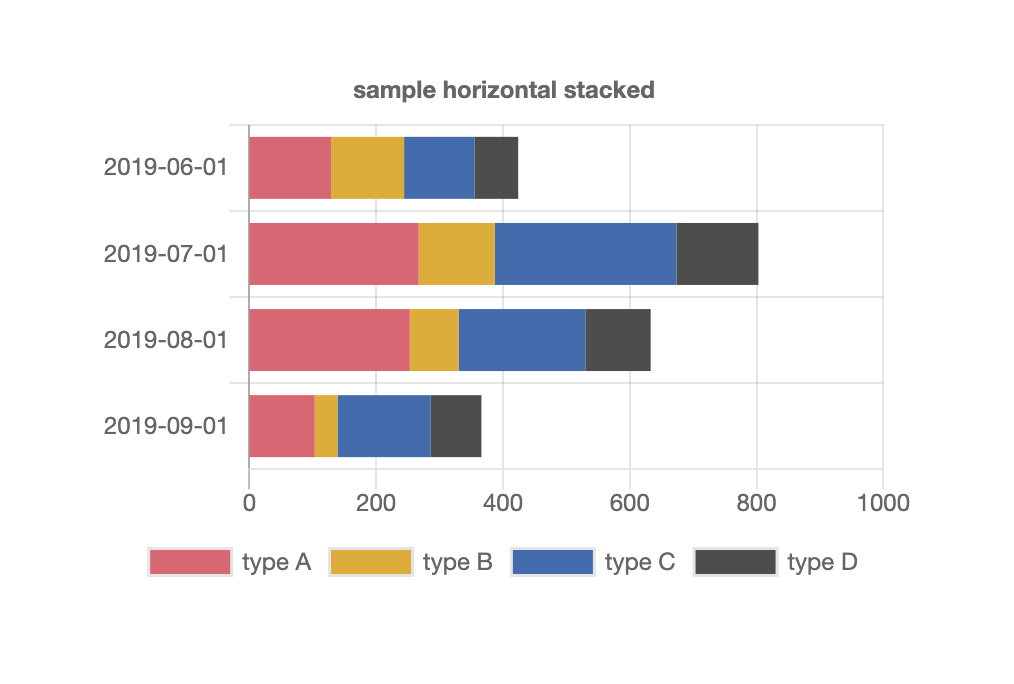
Custom Component Code
MODEL field:
{ type: "horizontalBar",
  options: {
  responsive: true,
    stacked: true,
  maintainAspectRatio: false,
  title: {text: "sample horizontal stacked",display: true},
    tooltips: {mode: "index", intersect: true},
  legend: {position: "bottom"},
     scales: {
            xAxes: [{
                stacked: true
            }],
            yAxes: [{
                stacked: true
            }]

        }},
    data: {
    labels: {{query1.data.period}},
      datasets: [
    { label: "type A", data: {{query1.data.type_a}}, backgroundColor: "rgb(231,95,112)"},
    { label: "type B", data: {{query1.data.type_b}}, backgroundColor: "rgb(230,171,2)"},
    { label: "type C", data:{{query1.data.type_c}},        backgroundColor: "rgb(56,108,176)"},
    { label:"type D", data:{{query1.data.type_d}},        backgroundColor: "rgb(77,77,77)"}
    ] }}
IFRAME CODE field:
<html>
<style>
body {
    margin: 0;
}
</style>
<script src="https://www.chartjs.org/dist/2.8.0/Chart.min.js"></script>
<script src="https://www.chartjs.org/samples/latest/utils.js"></script>
<script>
window.Retool.subscribe(function(model) {
    if (!model) { return }
    model.options.tooltips['callbacks'] = {
        footer: function(tooltipItems, data) {
            var sum = 0;
            tooltipItems.forEach(function(tooltipItem) {
                sum += data.datasets[tooltipItem.datasetIndex].data[tooltipItem.index];
            });
            return sum;
        }
    };
    var chartData = model.data;
    var ctx = document.getElementById('canvas').getContext('2d');
    if (!window.myMixedChart) {
        window.myMixedChart = new Chart(ctx, model);
    } else {
        window.myMixedChart.data = model.data;
        window.myMixedChart.options = model.options;
        window.myMixedChart.update();
    }
})
</script>
<div class="chart-container" style="position: relative;margin: auto; height:100vh; width:100vw;">
    <canvas id="canvas"></canvas>
</div>
</body>
</html>