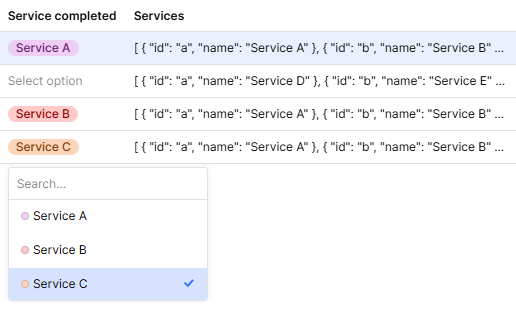
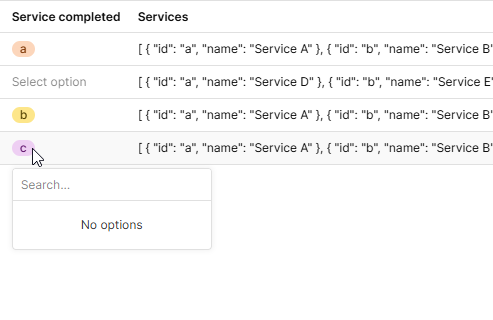
I have a table with a column service_completed. I want this to be a tag with an option list. The data for the option list is in the column services.services is different per row and is structured like this:
[
          {
            "id": "a",
            "name": "Service A"
          },
          {
            "id": "b",
            "name": "Service  B"
          },
          {
            "id": "c",
            "name": "Service C"
          }
        ]
Data source: {{ JSON.parse(currentRow.services || '[]') }}{{ item.id }}{{ item.name }}
Tag mapped value: {{ item }}
When I first enter the data source, everything looks good and the dropdown populates correctly.
However when I refresh the page, the options disappear!
How can I fix this behavior?
Hey @Shawn_Optipath ,
I reviewed similar forums regarding this issue and attempted the suggested fixes, but they didn't resolve the problem. I believe this might be a bug.
Hey @Nitesh_Jha ,
Unfortunately this isn't currently supported by the Tags or Tag column type. The Tags and Tag column types only allows for a single selection of options that will be available for every row in the table. It's not possible to configure distinct options for each row.
Reference from this post
Another similar and more recent post here
The best workarounds are either an expandable row, where you can refer to your optionsList using currentRow/currentSourceRow, or a drawer with a…
3 Likes
Paulo
January 28, 2025, 12:58am
3
A post was merged into an existing topic: Tag options are disapprearing
Paulo
January 28, 2025, 1:00am
4
Hi @Shawn_Optipath , I merged your feedback with the existing report. I'm happy to continue the conversation there.
Thanks for the link, @WidleStudioLLP !
Hi @Paulo , appreciated! Thank you @WidleStudioLLP . I have an idea for a workaround and will post once I have a working version.
1 Like