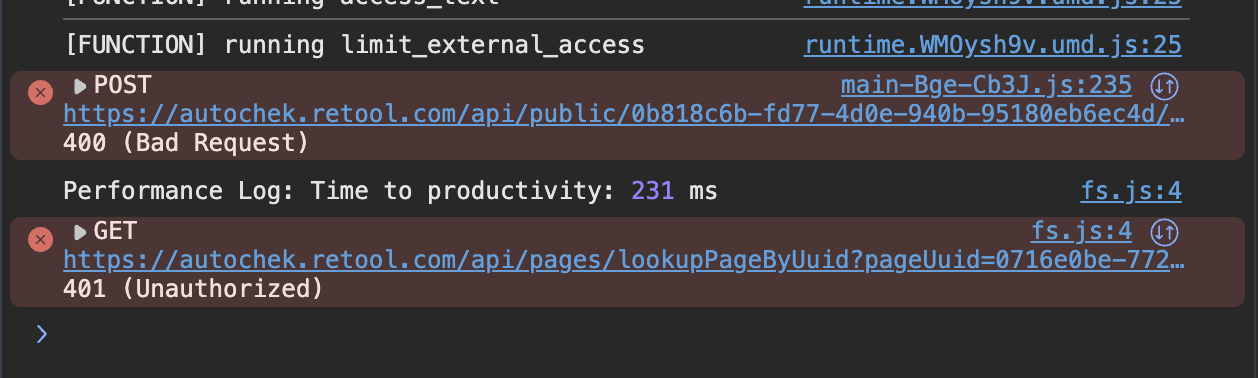
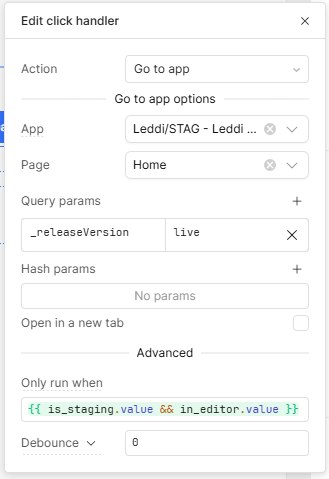
I understand this, and have had this issue before.
But all the apps involved are public. And I assume if they were not public, the utils.openUrl() would also not work, right? However utils.openUrl() is the workaround we're using now.
Just to confirm — if the URL is not public, then utils.openUrl() from a public app will not work and will not open the Retool login page. Is that correct?
utils.oepnUrl() works, which is what we’re using for now
utils.openApp() doesn’t work
I also noticed that with utils.openUrl() when query/URL parameters are used, the apps take a longer time to load. Sometime the spinner just keeps spinning indefinitely, but the page will load upon refreshing.
Something has definitely changed (or is broken):
The loading issue with query params present only started withing the last couple of weeks
The utils.openApp() versus utils.openUrl() issues have existed for at least 5 months
@Darren , @Jack_T , @ChiEn , The Retool team would be best placed to assist here and provide the correct guidance. From my testing in a Retool cloud instance:
Opening a private app via openUrl redirects to the login page
Public app links work as expected
openApp throws an error on page load for private apps (unauthorized), but works fine for public apps
Hey all, thanks for the detailed reports, it's helpful to see two different experiences here. To help me narrow this down, could you each share the exact utils.openApp() call you are using? I would especially like to understand what worked for @WidleStudioLLP and what didn't work for @iamkheme, let me know, thanks!
This is what works in editor mode only. When we use the public URL, this doesn’t work. Also note that this only happens for multipage apps. Legacy single-page apps work fine, but with another problem.
Since utils.openApp() doesn’t work for public URLs, I have to use utils.openUrl().
What we noticed is that more than half the time, the public URL opens up but is stuck with the spinner and doesn’t go beyond that. Users will have to refresh a couple of times (usually 2 to 5 times) before the page actually loads beyond the spinner.
I’ve attached a video showing this behavior. In the recording, I was lucky to have it work on the first refresh
Hey @iamkheme, thanks for waiting and for the detailed writeup and video.
A couple of updates:
utils.openApp() on public multi-page apps: you're right, this is a bug on our end. I've filed a ticket with our engineering team to get it fixed. For now, please continue using utils.openUrl() as the workaround.
The loading spinner: this is a separate issue, and we're actively looking into it. It looks tied to a browser performance condition. We're tracking it here if you want to follow along!
I'll keep this thread posted as both progress. Let me know if anything else comes up in the meantime!