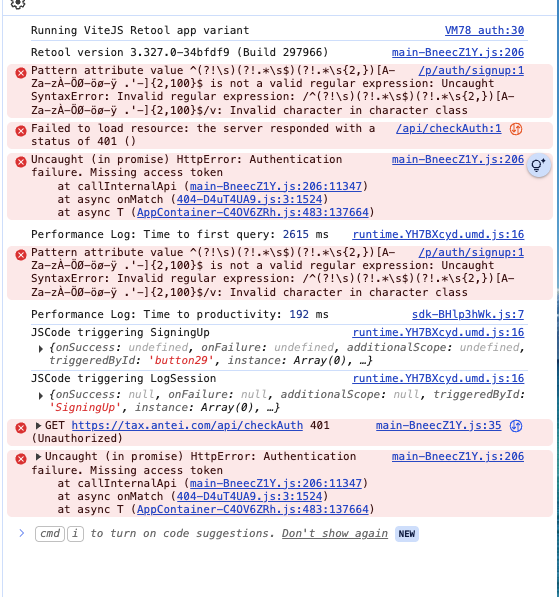
I am attaching a snapshot of the exact errors I am getting from the console. I have captured logs while trying to run the app twice which can help navigate the situation better.
I am facing similar problems in almost all the apps across retool. Nothing specific to one app.
For the office hours, the timing is a little odd for me considering my timezone. Will surely try.
The logs seem to show an authentication error and is requesting an access token from Retool but the apps are supposed to be public and should not require any authentication?
I looked at the logs on our side. I see that the original app is shared publicly, but it looks like the checkAuth request happens right after the LogSession query. Are there any event handlers on success of LogSession that are attempting to open an app that has not been shared publicly?
Any supported user login use cases would need to be set up with non-public apps.
All the apps within this process are public. The matter of fact is that Sign up and the next screen are within the same app so the chance of one being public and other not being public is actually not possible.
Post running LogSession, event handler opens a new page within the same app called verifyEmail which is within the same scope.
Please let me know if I am missing something. You can check out apps–> Authentication and Dashboard in my profile.
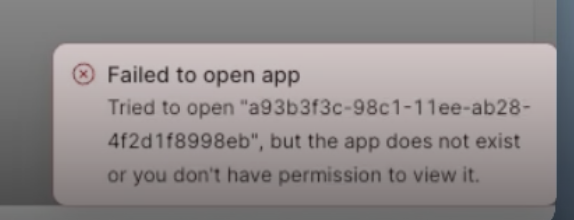
I do see that the Authentication and Dashboard apps are shared publicly. Public sharing applies to all components/views/etc within an app. Is the recording in your first post from Dashboard or Authentication? The error in the recording indicates that the app is attempting to open an app called Sign Up Login Forgot Password (in a different Retool organization)
Thank you! That is helpful context for me to try to reproduce this issue for our team. I will keep you posted if I am able to reproduce it and hopefully find a workaround
Ok, thanks! I did go to the public link, and it looks like there is an event on sign up that is no longer needed (it is attempting to open an app in another org). That said, I don't think that explains the behavior you're seeing. Also, my apologies, but it did successfully run the sign up query with my "test" information.
During my test, the sign up, log session, and get session queries all run successfully As you noted, the next page, verify, never resolves. I think it might have to do with the / in the page url field. Could you try removing the forward slash?
 As you noted, the next page, verify, never resolves. I think it might have to do with the
  are you open to sharing an export of the app? (If so, you can send via direct message)