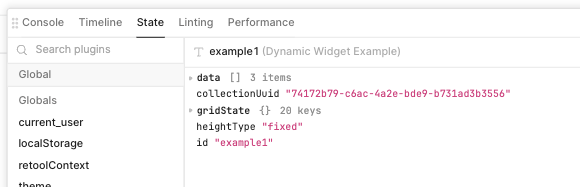
1) My goal: I have created a custom table component using a JavaScript library called AG Grid. I would like to store the state of the table (filters, selected columns, mode, etc) so that it is accessible within the Retool app so that I can later export the state into a database.
2) Issue: I am using a Retool custom React hook (Retool.useStateObject) to store the state and to make it accessible in the Retool app. However, each time I update the state to a different value the AG Grid table refreshes/resets.
-
Steps I've taken to troubleshoot: I have experimented by placing a hardcoded object into the
setGridStatefunction and the table does not reset. I have tried to use a native React hook to store the state and then use a useEffect to update Retool's React hook whengridStatechanges but the issue persists. -
Additional info: (Cloud or Self-hosted, Screenshots) Here is some example code that I wrote to isolate the issue:
import { Retool } from '@tryretool/custom-component-support'
import { useState, useMemo, useCallback, FC } from 'react'
import { AgGridReact } from 'ag-grid-react'
import { ColDef, StateUpdatedEvent } from 'ag-grid-community'

type IRow = {
  make: string
  model: string
  price: number
  electric: boolean
}

export const Example: FC = () => {

  // Retool React hook to manage the state
  const [gridState, setGridState] = Retool.useStateObject({
    name: "gridState",
    inspector: 'hidden'
  })

  // Retool React hook to hold row data
  const [rawData, setRawData] = Retool.useStateArray({
    name: "data",
    label: "Data Source",
    initialValue: [
      { make: "Tesla", model: "Model Y", price: 64950, electric: true },
      { make: "Ford", model: "F-Series", price: 33850, electric: false },
      { make: "Toyota", model: "Corolla", price: 29600, electric: false },
    ]
  });

  // Casts row data to IRow type
  const rowData = useMemo(() => rawData as IRow[], [rawData])

  // Column Definitions: Defines & controls grid columns.
  const [colDefs, setColDefs] = useState<ColDef<IRow>[]>([
    { field: "make", enablePivot: true, enableRowGroup: true },
    { field: "model", enablePivot: true, enableRowGroup: true },
    { field: "price", enablePivot: true, enableRowGroup: true },
    { field: "electric", enablePivot: true, enableRowGroup: true },
  ]);

  // Column definitions that apply to all columns
  const defaultColDef = useMemo(() => ({
    flex: 1,
    minWidth: 200,
    filterParams: {
      buttons: ["reset"]
    }
  }), [])

  // Function that updates the state each time the table is updated
  const onStateUpdated = useCallback((params: StateUpdatedEvent<IRow>) => {
    setGridState(params.state as Retool.SerializableObject)
  }, [])

  return (
    <div style={{ width: '100%', height: '100%' }}>
      <AgGridReact
        rowData={rowData}
        columnDefs={colDefs}
        defaultColDef={defaultColDef}
        sideBar
        onStateUpdated={onStateUpdated}
      />
    </div>
  )
}