- My goal: Is to show the saved values pre-populating in the form when a specific project is selected
- Issue: Currently we use biqQuery to save data when user uses Retool UI. The save data doesn't show in the UI when the fetch call is triggered. The data is fetched and the data is available on retool but looking at the Ui, there are lot of re-renders taking place in my suspicion causing the save data to disappear.
- Steps I've taken to troubleshoot: I tweaked the sequencing if the fetch calls to ensure all the data is fetched properly
- Additional info: (Cloud or Self-hosted, Screenshots)
Hi @Aditya_Sharma,
Could you provide some screen shots or even better a screen recording of the behavior you are seeing so I can best understand and help?
Is it correct to say, you have a form component which you are using to display data that exists as a row in a db table so that the user can edit this data inside the form component and then save the updated data back to the db?
If you want to retain showing the same data that has been in the form during and after the update query runs, you may need to save this data in a variable and use the variable as the data source.
If you are not seeing data in the component I have a hunch it is related to the source of the form data being a query and then the form clearing out automatically on submit.
Hi @Aditya_Sharma,
Just wanted to circle back on this to check if you are still experiencing this issue and if you could provide more details to my questions above so that I can best assist.
Hi @Jack_T ,
Thanks for reaching out. I’m currently trying to debug an issue in Retool where the error message isn’t very clear. Some of our internal users are unable to view one of our client’s projects, while others can access it without any problem.
We query project data through BigQuery and display it in a table based on the client organization. The issue appears to affect only a few users within this specific org. I’ve tested fetching the projects in my own Retool account, and it works as expected. We also reviewed the Retool permissions for the affected users, and everything appears to be configured correctly.
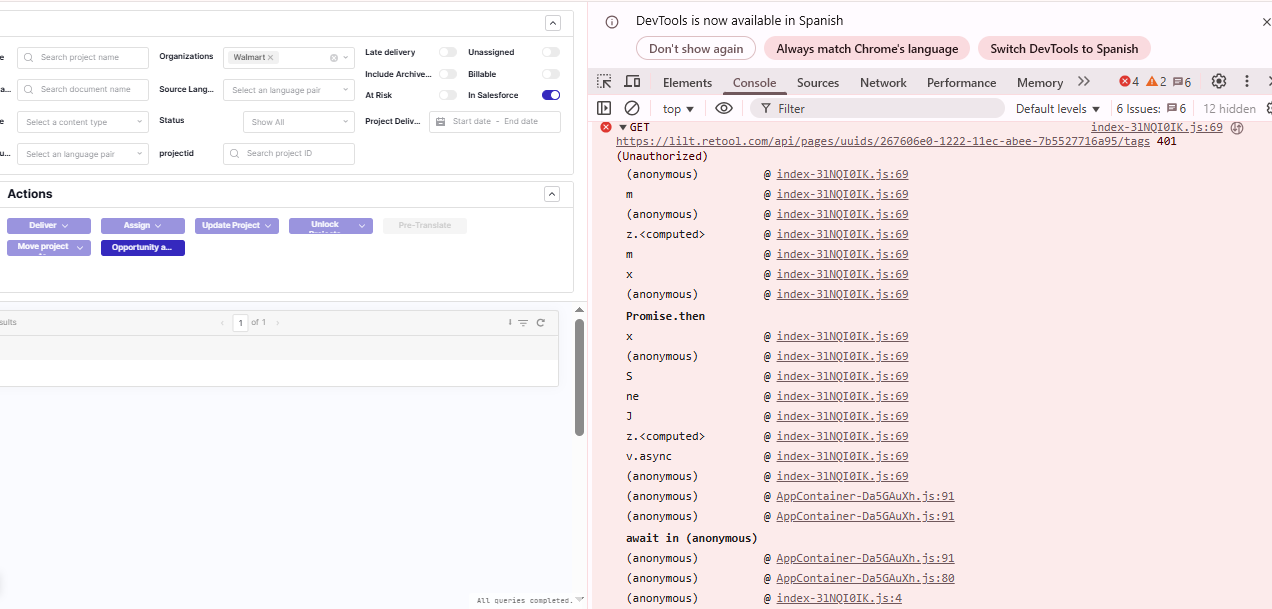
In the affected users’ accounts, we’re seeing a 401 error (screenshot attached below). Since the query and code seem fine, it’s been challenging to identify the root cause. Could you please assist with troubleshooting or suggest how we can further investigate and resolve this?
Thanks,
[Your Name]
Hi @Aditya_Sharma,
Thank you for sharing those details.
It sounds like this issue is related to user permissions. If some users can access queried data and other users are getting a 401 Unauthorized response.
Next step in troubleshooting would be to narrow down if the app is unauthenticated when those users are trying to use the resource/query or if the permissions are not configured properly at the user level inside of Retool.
Can you share how auth is set up the the BigQuery resource that you are trying to use? What org is having this issue?
Hi @Jack_T
Thanks for your response.
Authentication for BigQuery resources in Retool is typically handled via a Service Account key with the required BigQuery privileges. The private key for this Service Account is configured within the Retool resource settings for the relevant environment.
In our case, the affected users are internal members of our Lilt org who are unable to access projects within a specific client’s org. What’s unusual is that this issue only impacts a few users for that particular client: the same query works fine for other client orgs, and those users can view their projects without issue.
Actions taken so far:
-
Verified user-level permissions in Retool to confirm that affected users have access to the resource.
-
In Retool → Settings → Users & Groups, removed and re-added the affected users to their respective groups to force a cache refresh.
Next steps / Questions:
-
Can we verify that the BigQuery resource in Retool has a valid and active Service Account key configured?
-
Some help guides suggest clicking on a user and selecting “Refresh permissions” or “Re-sync” However, these options don’t seem to be available. Do you know the correct way to perform this action?
Thanks,
Hi @Jack_T
It would be much faster if we can schedule a time for a short meeting where I can share my screen and show you the above problem described. Its an internal Retool api issue and I’m hoping to resolve this as quick as possible to unblock the internal users. Can you provide your email and time you prefer for a google meet chat?
Thanks
Hi @Aditya_Sharma,
You should definitely come to our live office hours where me and other support engineers can help assist in troubleshooting and helping figure this out.