I want to ensure that when we are making updates to a Retool app, those changes remain hidden from end users until we explicitly release them.
Issue:
Currently, while editing the app, any in-progress changes are immediately visible to users—even though we haven’t released a new version yet. This is causing confusion because users are seeing incomplete or experimental updates.
Steps Taken to Troubleshoot:
I’ve tried accessing the app using sample embed URLs specifying the releaseVersion, such as:
However, even with releaseVersion set, users still seem to see the latest edits before an official release.
Additional Information:
I’m looking for guidance on how to properly configure Retool so that edits remain invisible to users until published. Any suggestions, recommended best practices, or pointers to relevant documentation would be much appreciated.
It sounds like. you are editing the live version of your app and that could by why the changes you are making in the editor are being reflected live in the app.
You likely need to create a new release version and make this live, then you can edit an older (and not live) version to test out changes. Then make the edits live
Check out our docs on version control and releases here, we have some useful tutorials as well as some explanation on what features work on which plan levels as some higher level features such as integrations with Git are enterprise only.
As the definition of the latest : The release version of the app to load. Falls back to the most recent live version or latest if not set. -
the link should give only released version changes.
Retool is not able to get the latest released version of the app irrespective of the ongoing changes on top of released version in the main branch.
Check out this video I made showing how to use release versions.
I have release 3.0 which includes a form component, I delete this and create a new release (4.0) and then based on the URL, you will see the same app but with 3.0 there is the form component and 4.0 there is no form component.
Publishing a release version will make that release live to all the end users and appear when the version is 'latest' or when there is no version included in the URL.
If your app is having changes appear that are on a non-published version then please screen record a similar video to mine.
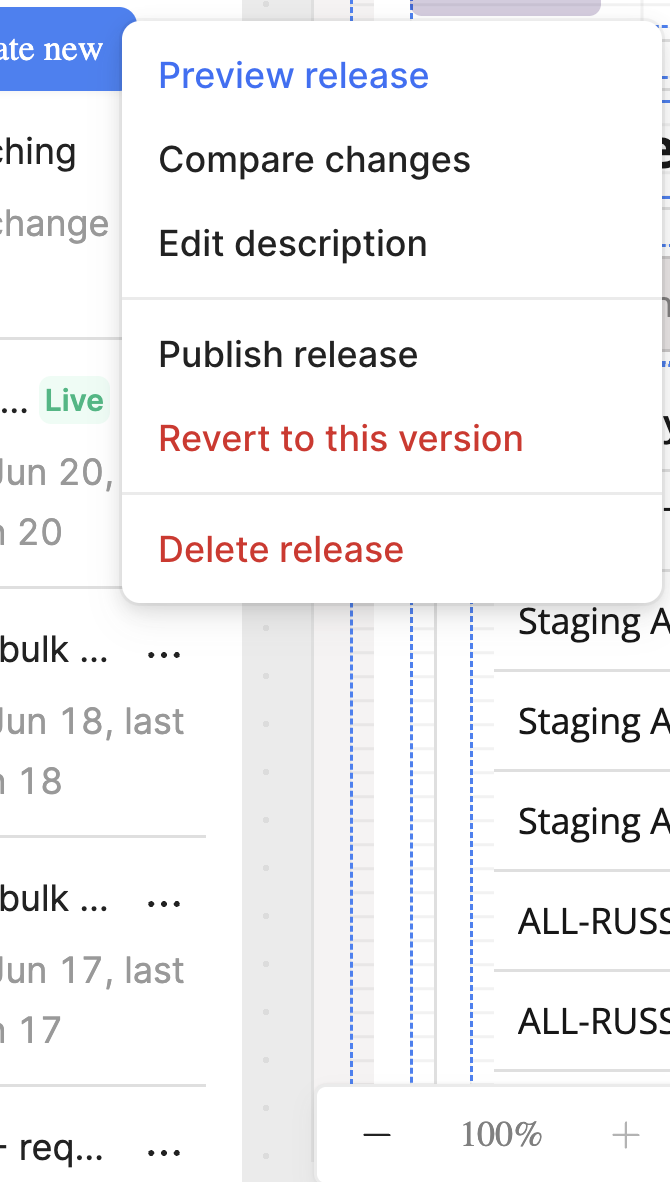
Another possible 'gotcha' would be that if you or a team mate used the 'revert to this version' option, then that would be the release that end users see, even if the green "Live" is appearing on another release. Fix that you clicking on 'revert to this version' for the release you want end users to see and then develop your app on a different release version.