Hi team,
I like the concept of being able to have notes in both queries and components!
HOwever, within queries, it's now in the way of the main row where the save/test buttons are and I'm not able to manually click on save:
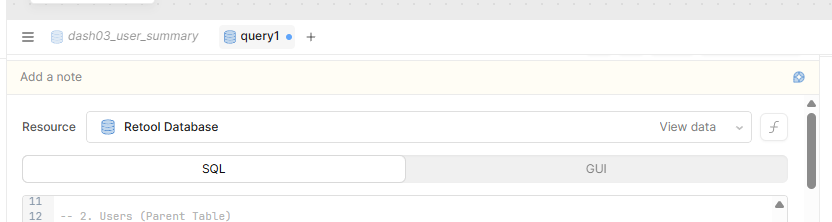
I'm on Windows / Chrome.
Hi team,
I like the concept of being able to have notes in both queries and components!
HOwever, within queries, it's now in the way of the main row where the save/test buttons are and I'm not able to manually click on save:
I'm on Windows / Chrome.
Also, I just tried using the AI Assist to generate a note on a query, and it seems to be picking another query altogether and making notes for that, and not the one I have selected and within which I clicked the button.
Hey @MiguelOrtiz,
Thank you for reporting this! I am going to track down a Windows computer for testing. I'm not seeing this issue on Mac/Chrome
Are you still experiencing this issue? I haven't been able to reproduce it or find similar customer reports
 hoping that means it was brief and already went away for you. If not, is it only happening when queries are pinned to the bottom of the IDE, or does it happen with the left/right configuration too?
Hi Tess,
It keeps happening every once in a while. What I do is save with ctrl + s, close the query, re-open it and that will fix it... a bit annoying though.
Hi @MiguelOrtiz,
My apologies that this issue is still popping up for you.
Those "once in a while" bugs are the worst since they are so hard to pin down and for us/engineering to reproduce 
I can create a bug report for this, any help with steps to reproduce or just a screen recording would go a long way with helping engineering understand why the components are behaving in a way that would lead to the notes overflowing and blocking the save button.
I will attach your screenshot 