How to reset Resource and Model for the new Updated App Builder?

Hi, I selected a Resource and Model in the new Updated App Builder in AI settings but then learned that it is better to have them as blank. How do I reset these back to the original blank value ?
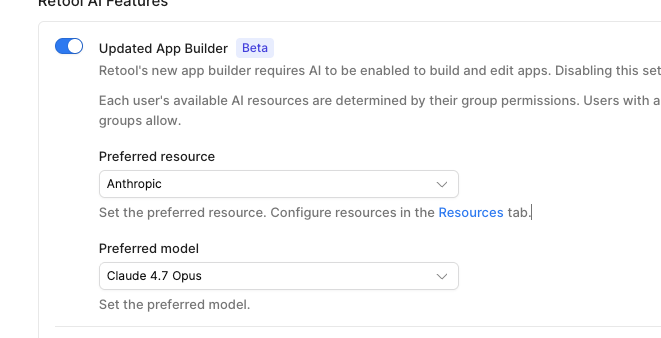
Hey there! @terrytass To get the preferred model column back to blank, you'd need to set the resource selection to "No preferred resource", once the resource is set to that, the model column will go blank too.

Unless what you're trying to do is set the preferred model to "Default to best available" while keeping the preferred resource as "Anthropic"?

Let me know if this makes sense! :folded_hands:

Thank you ChiEn!

@terrytass no problem! Did it solve your problem? If everything looks good on your end, can you mark the comment above as the solution by clicking the check mark icon :white_check_mark: below the comment? Thank you so much! :pray:

Thank you ChiEn, yes that solved my problem.

1 Like