-
My goal:
Correctly put JSON value in REST API Header -
Issue:
I have following configuration in Header:
Header Key: Dropbox-API-Arg
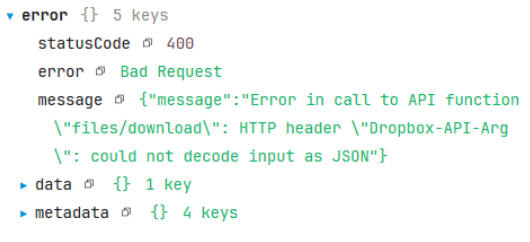
Header Value: {“path”:”something.xlsx”}But when I run the API, it gave error with following details:
-
Steps I've taken to troubleshoot:
When I put this header in Resources section without specifying it again in Workflow Query, it works.
Hi @yeftanma, can you try inputting the Header value like so:
'Dropbox-API-Arg': JSON.stringify({"path": "something.xlsx"})
Hi Mike, seems I already got the solution here by adding the value as follows:
Dropbox-API-Arg: '"path": "something.xlsx"'
Thankyou!
-
The error occurs because your JSON in the REST API header uses curly quotes (“ ”) instead of standard double quotes (" "). Most APIs require strict JSON formatting with standard quotes.
-
To fix the issue, always use standard double quotes in your header value like {"path":"something.xlsx"}, or use JSON.stringify [Dropbox-API-Arg: JSON.stringify({ path: "something.xlsx" }) ]to generate the header value. This will ensure your request is accepted by the API.
1 Like