-
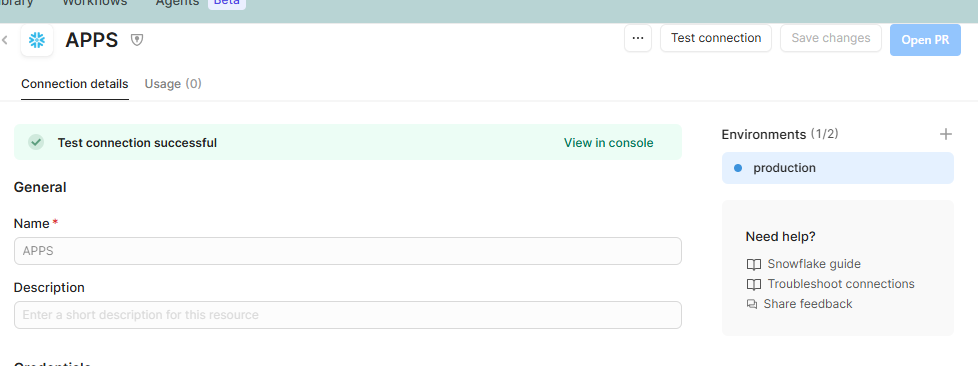
My goal: edit name and description on a protected resource
-
Issue: I protected a resource, and I want to add a description to it, but that field is greyed out from withing the Retool interface, so I can't create a PR to change it.
-
Steps I've taken to troubleshoot: edit the description in the
resource.jsonfile in source control - which works - is this the correct approach? I was also able to edit the resource name by editing the folder name in source control. Will this cause issues in my apps or spaces that use this resource? -
Additional info: cloud
1 Like
Hi @sgodoshian,
It looks like you are on the right track in your approach! Here are a couple more details.
Will renaming the resource cause issues in your apps or spaces?
It could, but usually it’s okay if done properly. Renaming a protected resource from source control must match exactly what apps reference. Otherwise, apps referencing the previous name will break.
If you rename the resource folder and update the JSON, make sure to also update any references in your apps (like resource name in queries or components).
3 Likes
Thank you, @Shawn_Optipath!
So sounds like if I have an existing resource used across a couple apps, I'd make a PR in my repo (outside of Retool) that updates the resource name as well as all the references to that resource? I'll have to give this a try and report back.
1 Like
Hey all, just adding a +1 to @Shawn_Optipath. How did it go @sgodoshian?
Hey @Mike_M! I ended up creating new resources instead, so I didn't try it.
1 Like
All good! I went ahead and marked that response as a solution, since it does answer the original question, but I'll just add for anyone checking out this thread that creating new resources is also a completely valid solution 
1 Like