-
Hello! My cloud-based application has been in use for the majority of this year, and in the last few months I’ve had random complaints of odd behavior I was not able to replicate. Users were seeing the app “hang” with the spinning circles (waiting on fetch) that never complete, and now they’re seeing selectors and fields on the page not updating - but it appears to be the same root cause. The application is “stuck” and your only recourse is to reload. I was not able to replicate these problems with either my Admin or a test user ID. Today I worked with another person and we found that while his ID was working in the past, he is now able to replicate the issues consistently with his user ID. When I login with my test (or Admin) ID, everything works fine. If I login with his ID (Same browser, same computer, etc.), I get the lock up situation, consistently. What would cause different behavior like this between user IDs? We have tried flushing browser cache, disable/re-enable the user, updating permissions. The behavior is the same even on two completely different PCs - use one ID it works fine, use a different ID and you have problems - even though the IDs have the same permissions. Thank you.
Michael
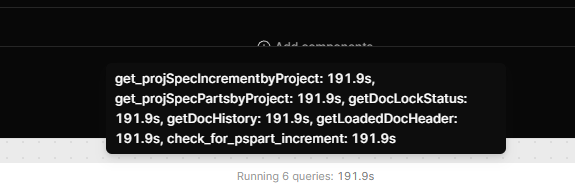
I updated one of the “Broken” users to be an Admin so I could see what’s going on in the developer UI. When I attempt to use the application, some of the queries will start and never finish. It is not the same queries. Sometimes 2, sometime 4 or more.. They will run as long as I let them, and I have to reload the browser twice to get it to stop. These queries respond very quickly for other users, and are not pulling user-specific information or relying on user context. All users have “Use” access to all resources as well. These all happen to be querying the same database, but again, with another Retool user there is no problem at all. They run very quickly and return, even running at the same exact time. I can use a different user and perform the same actions on the same document, while this session is waiting indefinitely (over 500 sec now) for these queries to stop.
After much digging, we found a potential solution. There is one main table on the application screen, and it has a control for how many rows are visible, adjustable by the user. The default was “0” for all rows and no pagination, but this seems to cause problems. Adjusting this to any other value (even a large number on a large document) allows the application to work correctly. Changing it back to 0 causes the problem to occur. Don’t know why, but that is the fix we are testing at this time.
It appears this was caused by an infinite loop. There were clues that were overlooked due to the reports being specific to users and inconsistent. In addition, once in the UI, there was no indication that the query with the infinite loop was actually still running. Regardless, bad code strikes again and this one is fixed, I believe .
Hey @mhowellAI, good to hear you were able to find the culprit! Feel free to reach out again if you have any other questions!