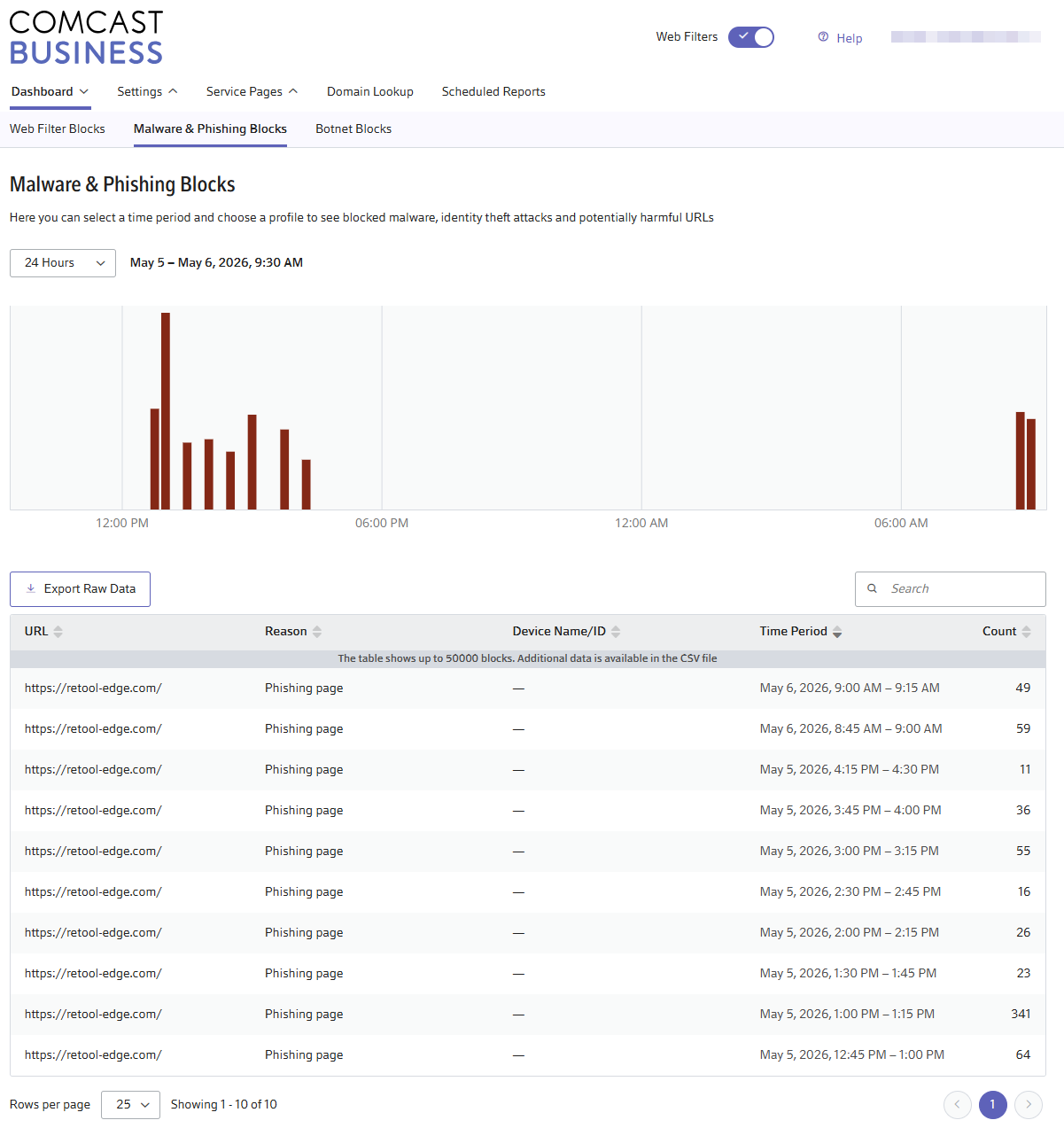
Retool broke for our office network yesterday and it turns out Comcast must have flagged it as Phishing. You need to go go business.comcast.com and whitelist the domain.
You're already in SecurityEdge — go to:
Settings (top nav, next to Dashboard) → look for Allow List / Trusted Domains / Exceptions / Bypass List (Comcast's UI calls it different things depending on the version)
Add: retool-edge.com
Also add *.retool-edge.com if it accepts wildcards
Whitelisting doesn’t seem to work and Comcast doesn’t allow turning off the Phishing blocking, so we’re connecting through our iPhone cellular data plans for now. Also no way to report a domain to Comcast, so it may be down for awhile.
Hey there @nickroz1 Thank you for your patience while we investigated this issue! We want to provide you with a complete understanding of our investigation thus far.
On May 5th, some Internet Service Providers (ISPs), specifically Comcast Business and Optimum (Altice USA/Cablevision), incorrectly flagged retool-edge.com as a phishing domain and began blocking it at the network level around 6 PM UTC. The domain retool-edge.com is the Content Delivery Network (CDN) that Retool uses to deliver front-end assets such as JavaScript and CSS. When this domain is blocked, applications fail to load completely, resulting in a white screen or an infinite loading spinner.
This was a false positive by those ISPs, and we want to assure you that Retool's infrastructure has not been compromised. We have submitted removal requests directly to the affected ISPs and are actively working to lift the block.
Workaround:
While we work toward a permanent resolution, switching to a public DNS resolver can bypass the ISP-level block and restore access immediately. You can find full instructions on our status page.
Quick Instructions:
Mac: Go to System Settings → Network → Select your connection → Details → DNS tab → Add1.1.1.1→ Click OK.
Windows 11: Go to Settings → Network & Internet → Select your connection → DNS server assignment → Edit → Manual → IPv4 → Add1.1.1.1 → Click Save.
If your devices are managed by your IT team, they will need to implement this change. Alternatively, switching to a hotspot (a non-Comcast/Optimum network) is also a quick test.
Not sure if you have a firewall or not, but we were having the same issue on a Spectrum connection even when changing our DNS settings. Turns out the Meraki Firewall was blocking retool-edge.com for Phishing and Spam so had to whitelist there as well and then things started working again even without the DNS changes.
May 6, 2026 - 20:51 UTC — TALOS has reclassified our domain. We have escalated directly to affected ISPs to have the block fully lifted and are actively working toward a resolution. We will provide another update once full resolution is confirmed.
May 7, 2026 - 18:47 UTC — We are seeing reports of some users returning to normal operation. We are continuing to work with ISPs to remove the block on retool-edge.com and will keep you posted on our progress. If you are still experiencing issues, the workaround below remains available.
May 8, 2026 - 00:26 UTC — We are no longer receiving new reports of users being affected. We will continue to monitor this incident over the next 24 hours before marking it as resolved.
Yes - we’re all set. Ours was affected by the Cisco Talos categorization which our firewall uses for blocking sites. Once that classification was resolved on Cisco’s end, we were good to go again. Our ISP never had any blocks in place.