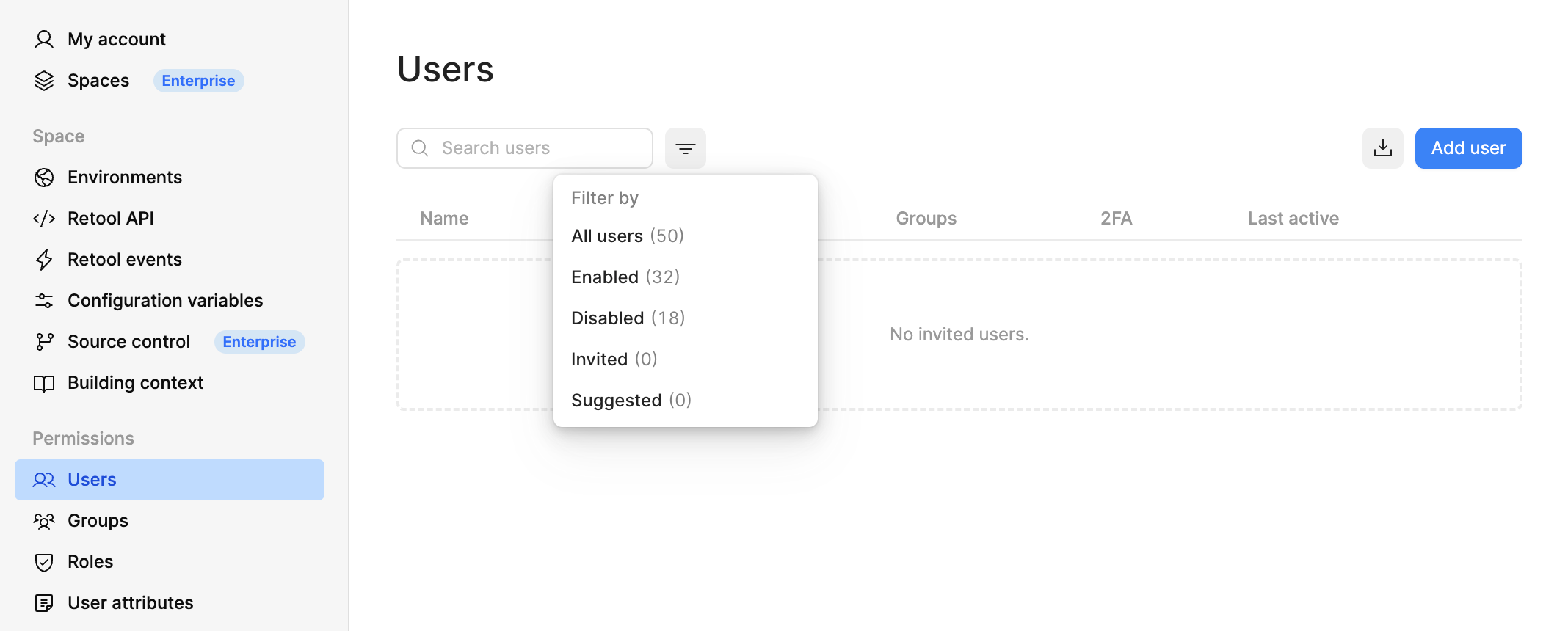
I believe you recently updated the Users page in Settings. Since this change, I no longer see any Pending users any more. I had a number of users that were invited but had not accepted their invites yet and they are no longer listed. Do I need to re-invite them? I’m on the business plan of retool cloud.
After a recent update to the Users page in Settings, invited users who had not yet accepted their invitations (Pending status) are no longer appearing in the Users list on a Retool Cloud Business instance, raising the question of whether they need to be re-invited.
AI Response
Per current Retool documentation, invited users are still expected to appear in the Settings > Users list with a Pending status until they accept, so their invitations should remain valid and re-inviting them should not be necessary. It's worth confirming that no status/search filter on the redesigned Users page is narrowing the view and hiding Pending entries. If the invites still don't surface, they can be managed (including revoked or re-sent) from an individual user's detail page via the Manage menu — but the underlying invitations should not have been lost by the page update itself.
Sources
Manage users | Retool Docs
Confirms that invited users appear in the Settings > Users list with a Pending status until they accept, and explains how to revoke or manage those invites from a user's detail page.
The Community Team is testing out a new automation. Let us know if it's helpful (or not) by leaving a , , or . Or by marking this post as the "Solution"! Let us know if you have any feedback here.
Hello @Steve_Crawford, thanks for the screenshot, that helps a lot!
Quick question to help narrow this down: do you know roughly when those invites were sent? Specifically, were any of them sent within the last week, or were they all older than that?
Invite links expire after one week, so knowing the timing will help us figure out whether this is related to expired invites or something on the new Users page itself.
In the meantime, if anyone needs access urgently, re-sending their invite via Add user is safe and will give them a fresh link.
These would have been invites that were sent longer than 1 week ago. I understand the links themselves expire after 1 week, but my understanding was the invites still show up in the Users list as Pending even after the one week. That way at least they aren’t lost and we don’t know what happened to them.
Hi @Steve_Crawford, good question. So the invite isn't deleted (the row stays in our database), it just was never visible as "Pending" past 7 days, even before the redesign. Resending via Add user is still the right fix, it creates a fresh 7 day link.
Let me know if any of your re-invites don't land and I'll dig further!
Ah ok thanks for the information. I will resend the invites then.
I would say though as feedback that it would be more useful for those users to stay visible in the list so they don’t get forgotten about. Maybe there’s a practical reason why these invites need to disappear but I know for me I would prefer them to remain there so I could easily resend the invites without having to go look up all the emails again, cross reference against the ones I can see in the system, and resend the ones I don’t see.

 ,
,  , or
, or  . Or by marking this post as the "Solution"! Let us know if you have any feedback
