- My goal:
If API responds with 401/403 status code the refresh auth workflow should get triggered and the token should get refreshed - Issue:
When the token expires the Refresh Auth Workflow not getting triggered at ALL - Steps I've taken to troubleshoot:
I’ve set the custom auth steps and the user is authenticating fine, but when the user is idle for a while till the token expires and tries to query the resource (API) he gets back a response code (403/401) and based on Retool docs the Refresh Auth Workflow should get triggered and run the endpoint that will refresh the session/token and run again the endpoint that the user tried to run at first and it should succeed. - Additional info: (Cloud or Self-hosted, Screenshots)
- On the browser console → Network the status code is 400 instead of 401/403, not sure why? but even though it should trigger it
- I tried to run my endpoint that refreshes the session/token manually by clicking a button and it succeeded, so my API works fine.
- I am using SuperTokens
CC!
Can someone explain how it should be done or it’s me who is making the mistake?
Hi @CoderNadir,
You’re not wrong in how you expect it to work – with Custom Auth, Retool should:
-
Send the request using the resource
-
If the response is non-200 (401/403 is just the common example), run the Refresh auth workflow
-
If refresh succeeds, retry the original request once Retool Docs+1
So if your refresh flow is never running, it usually means one of these is happening:
1. The failing query isn’t actually using the resource’s auth
Make sure, on the query that fails when the token expires:
-
Resourceis set to your Custom Auth resource -
Authenticationis set to Use resource’s authentication -
You are not overriding the
Authorizationheader manually in the query (if you hard-code the header, Retool won’t inject or refresh it)
If you’re calling the API directly via a REST query or JS fetch instead of using the resource, the refresh flow won’t ever run.
2. The 400 you see in DevTools is Retool’s own error, not the API’s 401/403
The status code in the browser Network tab is for the call from your browser → Retool, not necessarily the call from Retool → your API.
Open the query in Retool and look at the Response / Preview panel:
-
If you see your API’s 401/403 there, refresh should be eligible to run.
-
If you see a 400 with a Retool-level error (config issue, CORS/proxy error, etc.), then the request never reached the point where the custom-auth refresh can trigger.
In that second case, fix whatever is causing the 400 (base URL, headers, CORS with SuperTokens, etc.) so that the actual 401/403 from your API reaches Retool.
3. Refresh flow runs, but doesn’t update your tokens
The refresh workflow not only has to call SuperTokens successfully, it also has to overwrite the same variables your main auth flow uses.
On the resource page:
-
Click Test auth workflow → note the values/timestamps of your defined variables (
ACCESS_TOKEN,REFRESH_TOKEN, etc.). -
Click Test refresh auth workflow → check that those variables get new values. If not, add Define variable steps in the refresh flow so it writes back to the same variable names. Retool Forum+1
If the variables don’t change, the second attempt will still fail with 401/403 and it’ll look like “refresh never ran”.
4. Make sure you’re not testing this only from a Workflow
Right now, resources with custom auth/refresh are supported when used from apps; usage from Workflows has limitations and the refresh flow generally does not run the same way there. Retool Forum+1
Quick checklist
-
Query uses the Custom Auth resource and “Use resource’s authentication”
-
No manual
Authorizationheader in the query -
In the query Response tab, your API actually returns 401/403 (or another non-200)
-
Testing the refresh auth workflow updates the token variables
-
You’re reproducing the issue from an app, not only from a Workflow
If all of the above looks correct and the refresh flow still never fires, then this might be a bug.
If anybody from retool can help check if there’s anything specific about SuperTokens here, or inspect logs for this resource? It would be great to confirm whether the non-200 responses are reaching the custom auth layer and whether the refresh workflow is being invoked server-side.
Hi @Saurabh_Panja
Thank you for you explanation and help
Re-1)
- I can’t find this!? →
Authenticationis set to Use resource’s authentication
Re-2)
Here is a SS and see how statusCode is 400, and in metadata object the status is 401.
is everything seems good?
Note: This ran after the token expired and this is the response I get back from my API (custom auth).

Re-3)
-
The refresh flow seems not running at all, see how in the console we don’t have it and also checked it out on the Network panel and nothing is there!
Note: ignore the: Error: operation is not defined.Also I believe I should see something like this if it ran!


Re-4)
Yes, I tested it from the app itself, and I tried to refresh the token manually by clicking a button within the app and it succeeded. but the auto refresh of token not getting triggered when the resource returns 403/401 or what it returned in the SS above 
Q: What do you think?
Thank you in advance for your help, hope we can find a solution!
@Saurabh_Panja so any idea/solution?! or this is a bug?!
@Darren cc!
Hi @CoderNadir,
That is very odd that the refresh flow is not running at all. I can check with engineers on the resource team and see what could be the cause for this.
It looks like the resource is a REST API, correct? Is your Retool instance self hosted or on cloud?
Hello @Jack_T any news 
Seems like you forgot me 

Hi @CoderNadir,
Can you share some screenshots of how you have the auth flow and refresh auth flow set up on your REST API resource?
Could you share how you have your Refresh Auth Trigger set up?

Also are you using a test URL to get a non-200 response from your API that would trigger a token refresh?

I believe that we have built in refresh for OAuth 2, but we may not have that auto refresh for 'custom auth' configurations.
Hi @Jack_T
I’ve taken 1 SS that covers everything 

@Jack_T did you check the SS?
@Jack_T Hellooo! 
Hi @CoderNadir,
Just got back from holiday break. From my initial look through of the screenshot there doesn't appear to be a glaring or obvious issue with how you set up the refresh flow.
Let me check with another team member who is more familiar with refresh flows. Not sure if the resource is in a corrupted state and needs to be rebuilt but it looks like it should work as expected 
1 Like
Hi @CoderNadir!
I think I found the issue, it seems that you have the 'Refresh Trigger' set to 'None'.
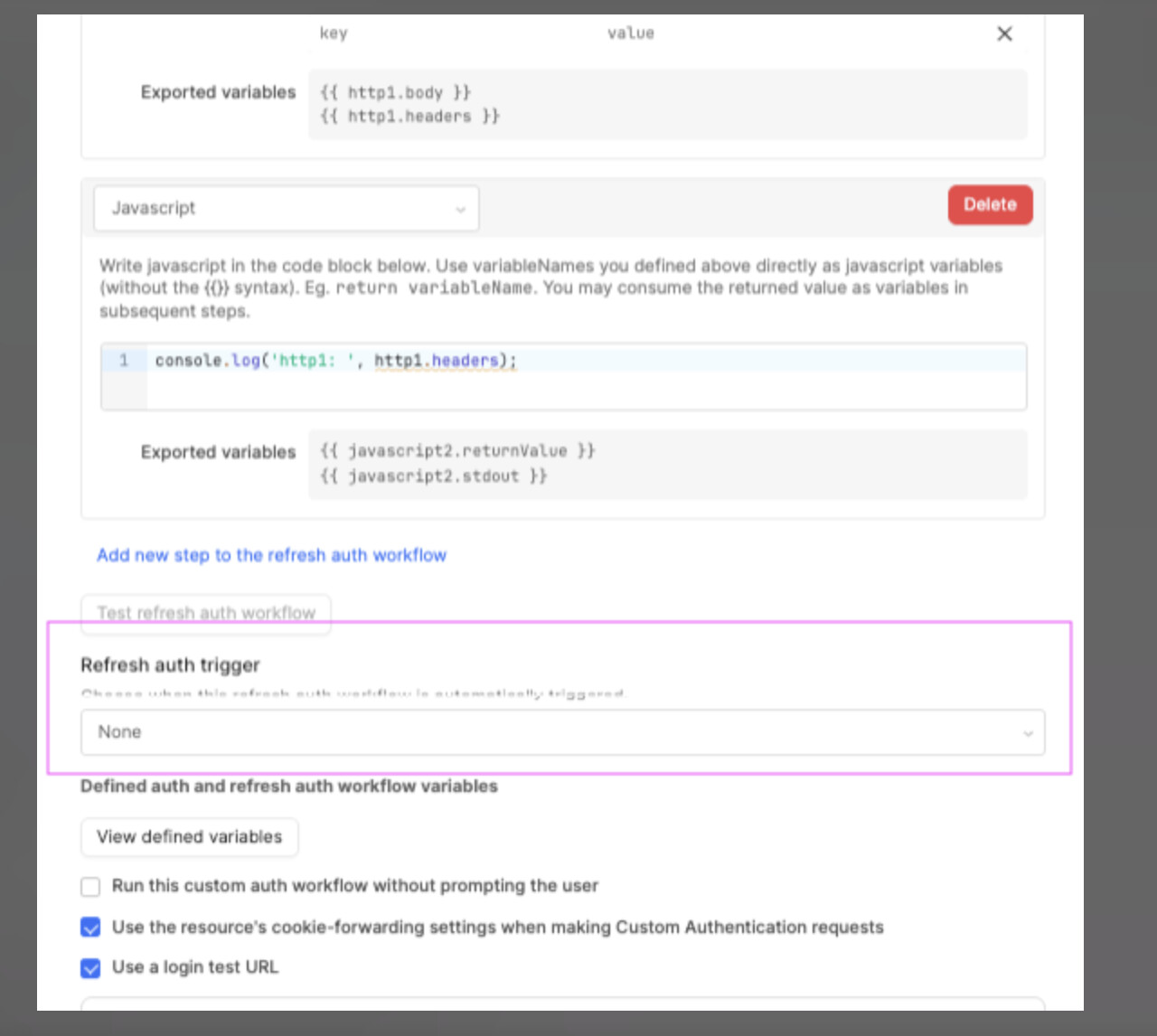
Can you try setting that to a time-based option or even better, "on every query", and see if that fixes it?
I also noticed that you seem to not actually be setting any variables in the custom auth flow and using those variables in the resource headers.
I may be missing something on where those variables are defined that you are using in the resource headers but we can tackle that once the refresh trigger has been set 
Hi @Jack_T
I tested those options and nothing worked!
Please can you try to create one on your end so you know exactly what is the issue!
Notes:
- the API is authenticating with Supertokens
- Check with the colleague you said he is more familiar with custom auth
let me know if you agree!
Hi @CoderNadir,
I was doing some testing and I was able to get cookies to be updated via the time based re-auth, but I was not able to find this event in the browser networking tab which makes it difficult to troubleshoot why this is not working for you and if Retool is sending the auth token as a cookie to the re-auth endpoint
Let me check with our engineering team to see if I can get more ideas on what we can do to further trouble shoot or if there might be any alternatives we can try.
1 Like