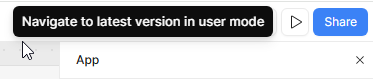
When developing an app that makes use of query parameters, clicking the preview button from the editor breaks the URL because it inserts retool's ?_releaseVersion=latest at the end of the URL, but if there are already query parameters in the URL it should append with an & instead. The current method breaks the app preview and the URL has to be manually edited every time when previewing.
Expected resulting URL: ?myvar=test&_releaseVersion=latest
Actual URL: ?myvar=test?_releaseVersion=latest
Hi @connorjan ,
When you say "preview button" are you referring to this (the double arrows)?
Try the arrow to the right:
No, I'm referring to the play / triangle button:
It seems this is a bug and hasn't been fixed yet.
As a workaround, you could have a button for testing and hide it when needed. Add something like this:
// JS query: previewFixed
(function () {
  // 1) Start from your org + app info
  const orgBase = "https://yoursubdomain.retool.com";
  const appId = "yourUUID";
  const appName = "Testing";
  const page = "Link%20actions/page1"; // url-encoded path segment(s)

  // 2) Build the correct URL
  const u = new URL(`${orgBase}/apps/${appId}/${appName}/${page}`);

  // 3) Add your own params first
  u.searchParams.set("myvar", "test");

  // 4) Then add Retool's release flag safely
  u.searchParams.set("_releaseVersion", "latest");

  utils.openUrl(u.toString(), { inNewTab: true });
})();
1 Like
Darren
August 20, 2025, 11:57pm
5
I've updated our internal tracking document with this additional context, @connorjan ! As soon as there is news to share, I'll provide an update here.
2 Likes