-
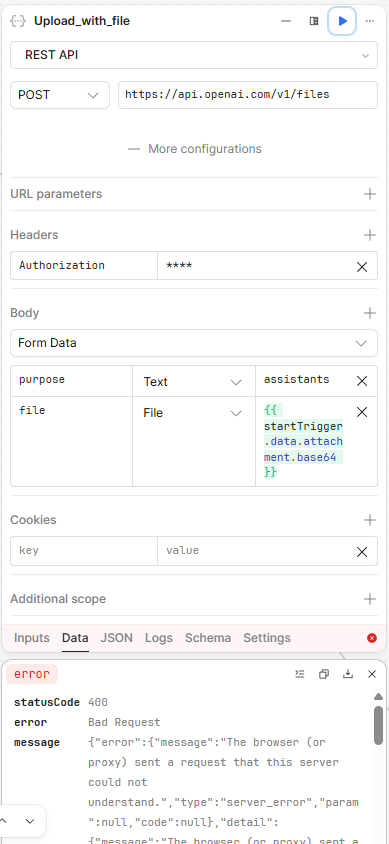
My goal: Upload a file to the OpenAI API using the files endpoint from a REST API query in a workflow.
-
Issue: OpenAI server is returning various errors, depending on how im sending the file object
-
Steps I've taken to troubleshoot: Tried sending a base64 string, tried sending the file object itself, tried adding/removing the content-type header even though the body type is set to formdata, tried removing ‘data:image/png;base64,‘ from the beginning of the base64 string.
-
Additional info: Bashing my head against a wall a bit here!! Any guidance would be much appreciated. Test JSON params are as follows
{ "prompt": "here is some text", "attachment": { "name": "test.png", "type": "image/png", "size": 123, "base64": "data:image/png;base64,iVBORw0KGgoAAAANSUhEUgAAAQAAAAEACAIAAADTED8xAAADMElEQVR4nOzVwQnAIBQFQYXff81RUkQCOyDj1YOPnbXWPmeTRef+/3O/OyBjzh3CD95BfqICMK0CMK0CMK0CMK0CMK0CMK0CMK0CMK0CMK0CMK0CMK0CMK0CMK0CMK0CMK0CMK0CMK0CMK0CMK0CMK0CMK0CMK0CMK0CMK0CMK0CMK0CMK0CMK0CMK0CMK0CMK0CMK0CMK0CMK0CMK0CMK0CMK0CMK0CMK0CMK0CMK0CMK0CMK0CMK0CMK0CMK0CMK0CMK0CMK0CMK0CMK0CMK0CMK0CMK0CMK0CMK0CMK0CMK0CMK0CMK0CMK0CMK0CMK0CMK0CMK0CMK0CMK0CMK0CMK0CMK0CMK0CMK0CMK0CMK0CMK0CMK0CMK0CMK0CMK0CMK0CMK0CMK0CMK0CMK0CMK0CMK0CMK0CMK0CMK0CMK0CMK0CMK0CMK0CMK0CMK0CMK0CMK0CMK0CMK0CMK0CMK0CMK0CMK0CMK0CMK0CMK0CMK0CMK0CMK0CMK0CMK0CMK0CMK0CMK0CMK0CMK0CMK0CMK0CMK0CMK0CMK0CMK0CMK0CMK0CMK0CMK0CMK0CMK0CMK0CMK0CMK0CMK0CMK0CMK0CMK0CMK0CMK0CMK0CMK0CMK0CMK0CMK0CMK0CMK0CMK0CMK0CMK0CMK0CMK0CMK0CMK0CMK0CMK0CMK0CMK0CMK0CMK0CMK0CMK0CMK0CMK0CMK0CMK0CMK0CMK0CMK0CMK0CMK0CMK0CMK0CMK0CMK0CMK0CMK0CMK0CMK0CMK0CMK0CMK0CMK0CMK0CMK0CMK0CMK0CMK0CMK0CMK0CMK0CMK0CMK0CMK0CMK0CMK0CMK0CMK0CMK0CMK0CMK0CMK0CMK0CMK0CMK0CMK0CMK0CMK0CMK0CMK0CMK0CMK0CMK0CMK0CMK0CMK0CMK0CMK0CMK0CMK0CMK0CMK0CMK0CMK0CMK0CMK0CMK0CMK0CMK0CMK0CMK0CMK0CMK0CMK0CMK0CMK0CMK0CMK0CMK0CMK0CMK0CMK0CMK0CMK0CMK0CMK0CMK0CMK0CMK0CMK0CMK0CMK0CMK0CMK0CMK0CMO0TAAD//2Anhf4QtqobAAAAAElFTkSuQmCC"}, "attachments": [] }
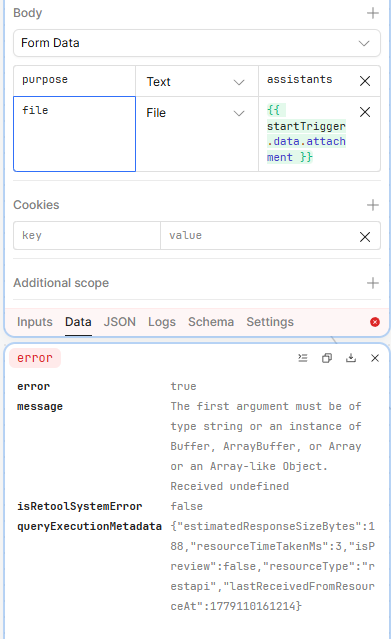
This might help you - if using the File type on a Form Data POST request, I think it needs to be an object with certain properties, not just the base64 encoded string, something like this:
{{ {
name: startTrigger.data.attachment.name, // e.g. "test.png" — REQUIRED, becomes the filename
type: startTrigger.data.attachment.type, // e.g. "image/png"
base64Data: startTrigger.data.attachment.base64 // base64 WITHOUT the "data:image/png;base64," prefix
} }}
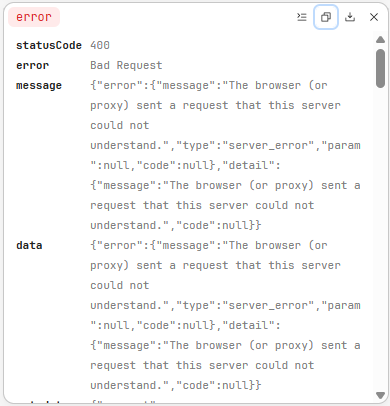
This got me very excited when i read it as i thought it was one of the combos i hadnt tried! Unfortunately it is still giving me an error. Below is the data input so you can see it. I’ve also tried it with and without the ‘size’ value in the file object.
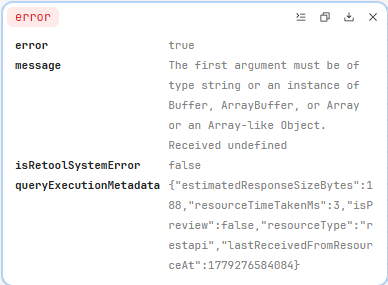
I am confused by the error though. For some reason, it is receiving ‘undefined’ as the first argument.
Lastly, i tried using json.stringify on the file object and it gives the second error screenshot below…
Ive had to do some wrangling before with submitting multipart form data to APIs but this feel excessive!!
Any ideas anyone?!?!?
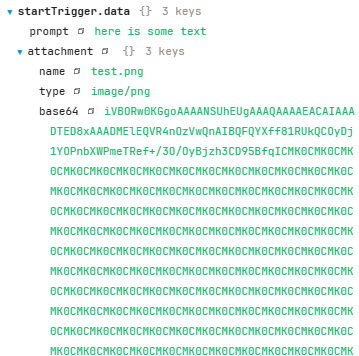
Hi, you need to use base64Data (not base64) - also I didn’t specify that you also need to include sizeBytes for the File type to work. You need to calculate it from the length of the data using the following code:
return {
    name: startTrigger.data.attachment.name,
    type: startTrigger.data.attachment.type,
    base64Data: startTrigger.data.attachment.base64Data,
    sizeBytes: Math.floor(startTrigger.data.attachment.base64Data.length * 3 / 4)
}
Thanks
You, sir, are an absolute legend! Headache over and I am very very much obliged!
Thanks so much - have a great day!