Bumping this since it seems this bug has not been resolved yet.
I am still experiencing issues similar to this and this.
I am uploading images to S3 and want to set the correct Content-Type (image/jpeg, image/png, etc.). Whenever I set a custom value, it does not get stored in S3. Instead, the value is empty. This leads to the images not being displayed properly when accessed via URL.
When I select a value from the dropdown instead (e.g. "Binary"), the value gets stored correctly.
The issues only persists using the native iOS app. I am using Retool Mobile v3.194.0 Build 2182 on iOS 18.7 on an iPhone 13 Pro. When using the IDE or the browser, the value for S3 Content-Type gets stored correctly. I am on Retool self-hosted v3.196.4
I tried the following as a workaround:
- Set
S3 Content-Typeto a fixed string, e.g.image/jpeg, - Set
S3 Content-Typevia additional scope, - Set
S3 Content-Typevia variable
None of the above worked for me. I want to avoid sending the images to a workflow that can sets the content type correctly since this would double the distance the data has to travel (device -> Retool hosted -> S3).
Here is my S3 query:
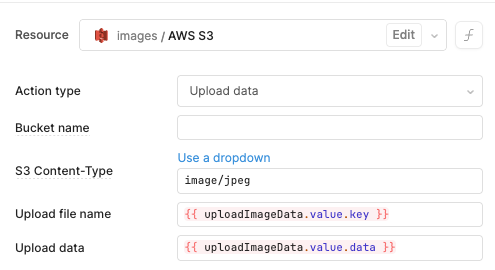
This feels like the value of S3 Content-Type gets sanitized against the dropdown values, leading to any other value being ignored.
Thanks for any updates regarding the fix of this issue!