I have a table with an editable tag column with manual options, but when I click on the cell the dropdown shows enough space for the options, but only the last one has a coloured tag and none has text! (It is a large table with many columns) It has worked but it doesn’t seem to work any more and I’m not sure where to start to debug anything like this.
1 Like
Summary
An editable Tag column configured with a manual option list has stopped rendering correctly in a large table with many columns — opening a cell shows a dropdown with space for the options, but the option text is missing and only the last option displays a colored tag. It previously worked.
AI Response
This matches a known client-side rendering glitch with the Tag column dropdown in tables, where the option list fails to paint its labels/colors correctly. A reliable workaround reported by the community is to force the option list to re-render: with the cell's dropdown open, type a search term that returns no matches (triggering the 'no results' state), then delete that text so the full list re-renders, and move the cursor. Others have hit similar Tag column rendering issues in tables and confirmed the same re-render trick resolves the display. This behavior has been flagged internally as a bug, so it is not a configuration error on your end.
Sources
Issue with Tag Dropdown on Expanded to Fit Table
A solved topic on Tag dropdown rendering problems in a table where a contributor documents the exact re-render workaround (search for a non-existent term, clear it, then move the cursor) to force the options to display.
A solved, bug-tagged topic corroborating that Tag column contents can fail to render in tables and pointing to the same community workaround thread.
The Community Team is testing out a new automation. Let us know if it's helpful (or not) by leaving a  ,
,  , or
, or  . Or by marking this post as the "Solution"! Let us know if you have any feedback here.
Hi @jclutterbuck,
I understand the issue you're facing. I tested the same scenario on my end, and I found that the simplest approach is to use a Transformer and bind its output to the Mapped option of the Tag Options property.
With this approach, the tags are populated automatically and work correctly with the Editable Tags component.
Transformer Code:
return [
  {
    label: "Add (inc VAT)",
    value: "add_inc_vat",
  },
  {
    label: "Add (Ex VAT)",
    value: "add_ex_vat",
  },
  {
    label: "New (inc VAT)",
    value: "new_inc_vat",
  },
  {
    label: "New (Ex VAT)",
    value: "new_ex_vat",
  },
];
Then, in the Tag Options property, select Mapped and bind it to your transformer output.
This worked correctly in my testing and the list is populated automatically in the Editable Tags component.
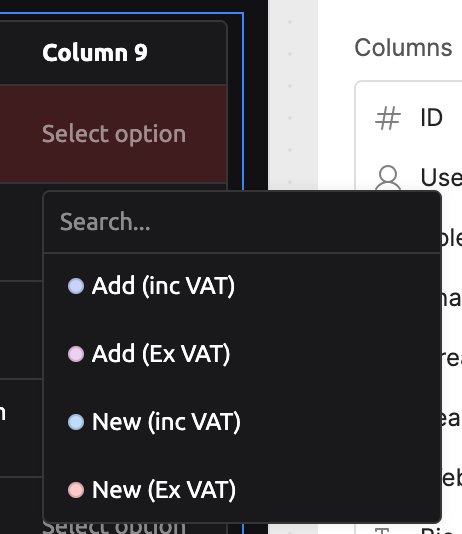
I hope this helps! If your use case is a little different, feel free to share more details or a screenshot of your current configuration, and I'll be happy to help further.
Hi @jclutterbuck!
Sorry that you ran into this problem with your table's tag column not rendering correctly, and appreciate you sharing the video recording for more context.
Just checking in if you were able to try out @WidleStudioLLP 's suggestion and/or checked out the links that were suggested by our @Resource_Bot ?
Since you mentioned that it is a "large table with many columns," it is also worth checking whether this only breaks on that specific table (vs. a smaller test table). Does it also happen on other smaller tables?
If things are working fine on a small table but break in the large one, it may be a rendering/performance case tied to table size, so the mapped-transformer approach would be worth trying.
Let me know if you're still running into issues!
-Jen
1 Like

1 Like
Thanks for checking in, the work around worked!
~Jeremy
2 Likes
Awesome to hear that @jclutterbuck! If you need anything else, feel free to let us know!
-Jen
1 Like