- My goal: To ensure that people can horizontally scroll tables on windows laptop when they have a large number of columns
- Issue: Currently, by default, the table widget does not show a horizontal scroll bar. In mac OS, for the users using touchpad, they are able to swipe left/right and scroll. This is not possible for users who are using a mouse.
- Steps I've taken to troubleshoot: We tried using custom css, and searching on the forum but could not find anything related to this
- Additional info: Cloud
Hi team
Any update on this
Hey @achou welcome back to the Community and thanks for bringing this up! There's no built-in table setting today to keep the horizontal scrollbar permanently visible, the scrollbar only appears on hover, which makes it easy to miss on Windows with a mouse.
I've submitted a feature request for a built-in always-visible scrollbar option. No timeline yet, but I'll update this thread if that changes! 
Hi,
Thanks for considering this. We have a large team that works on windows laptops, and the columns to the right are currently cannot be viewed due to the scroll behaviour.
Any work around or css hacks would be welcome!
Hey @achou, good news! 
The always-visible horizontal scrollbar option for tables is now live on Retool Cloud version 4.49.0. Your instance should be updated automatically, so you and your team on Windows laptops should be able to see and use the scrollbar without needing to hover.
Give it a try and let me know if it's behaving the way you'd expect. 
This is awesome,! thank you!
Is there an option that I need to enable on the table widget, or in the theme, or is this update rolled out automatically to all tables without having to do any changes?
Hey @achou, it's a per-table setting, so it won't switch on automatically. Here's how to turn it on:
- Select your Table component
- In the Inspector on the right, open the Appearance section
- Toggle on Always show scrollbars
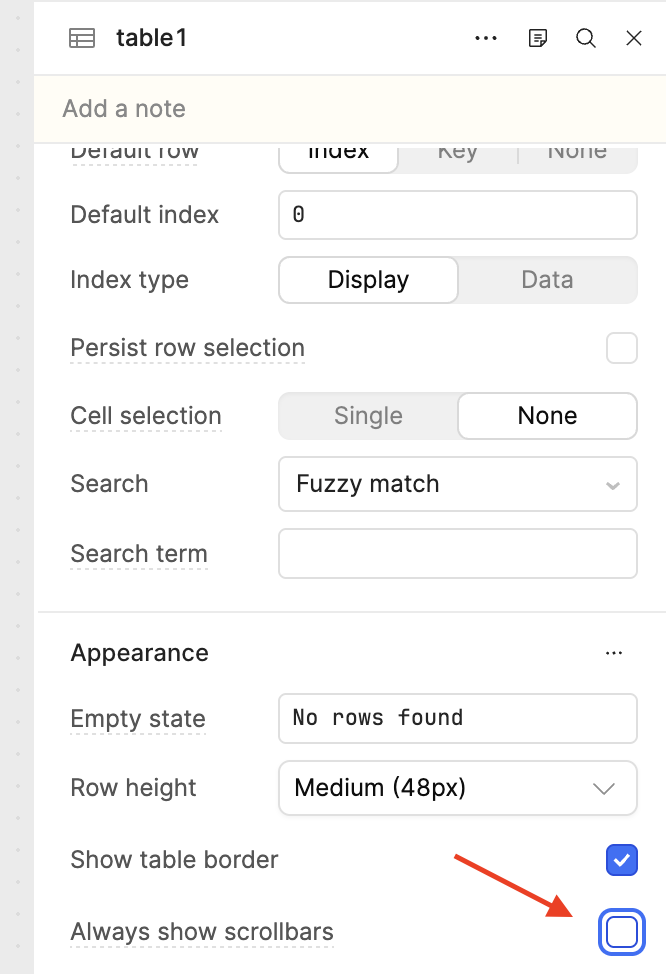
It's off by default, so you'll flip it on for each table where you want the scrollbar to stay put. It lives on the component itself rather than in the theme, so there's no global switch today, you set it table by table.
Once it's on, the horizontal scrollbar stays visible for your team on Windows without needing to hover. 
Let me know if you have any trouble finding the toggle!
Great, found it. Thanks a ton!
1 Like
I am glad, enjoy! 