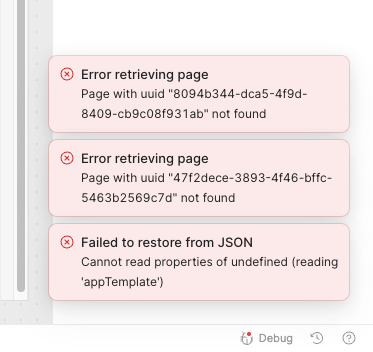
a while ago, I have successfully cloned few Retool applications with their modules (some applications using the same modules) to another account using JSON export and import (though I had to create resources used by them myself beforehand). However, when I try to upgrade one of them using the same method, I get bunch of „Error retrieving page” errors. The already existing applications and their modules have the same names.
After manually fixing the UUIDs in the JSON file, I am able to upgrade the application. Another problem is that the exported and manually fixed JSON will update only the application and not its modules.
I am also asking you for an option to create or replace existing app with an earlier exported JSON file using Retool CLI.
Thank you in advance for solving my issue and considering my suggestion
Quick question, when you said that you are "trying to upgrade one of them" could you elaborate more on this action that is causing the errors?
Are you upgrading the app my making changes, or are you upgrading the self hosted version of Retool?
It sounds like there are some collisions with the naming
For your feature request to import in apps via export JSON file using the Retool CLI, how would this be different from importing the same JSON file using the GUI?
When I say that I try to upgrade one of apps, it means the following:
exporting a JSON file of an app’s instance that contains changes from one account
loading that JSON file in the production instance of the same app using the “Replace app with JSON/ZIP” option, on the second account
The naming of queries from query library and resources is identical between two Retool accounts. The only problem seems to be with the UUID identifiers of modules that seem to be generated once again while uploading app’s JSONs to another account. That way the compatibility between two instances of the same app (and its modules) is broken.
When I import an app on a new account, I see that required modules load automatically. Is a similar behavior possible while upgrading an app, as explained above? (i.e. replacing modules linked to an app alongside with it)
The feature of importing apps from JSON using the Retool CLI would help me automate the process of upgrading and deploying our solution consisting of multiple apps.
Thank you for clarifying. I just tested things out on my end and this appears to be a bug. Adding a module and import replacing the exact same app with the same app+modules does not work and generates those error messages. I can create a bug ticket for this.
Unfortunately I fear this ticket may not be highly prioritized, as our source control functionality is the preferred method for ent orgs to achieve the same "edit then merge to prod" functionality and that “Replace with JSON” is accomplishing.
I understand that we should have some type of feature parity but this may be lumped in with a larger module overhaul that has been growing in size and scope. My best advice for a work around would be to not use modules so that the "replace with JSON" functionality does work as intended.