We are running the edge release of Retool Agents and I have an agent that has access to an MCP server (2 tools) and 4 workflow tools.
What I notice is that sometimes the agent uses/calls the tools but does not show in the UI that they have used/call the tool. This can cause confusion to the user.
In the monitor screen, it looks like there is a zero count for "tools called" but I have confirmed in the workflow logs that the 2 of the tools/workflows was executed.
Also interesting to note that the timestamps for 'Started' and the workflow run history is also a little off by 1-2 minutes. I am 100% they are for the same run as I am the only user.
Hey @eric-cheng, thanks for reporting this! Looks like this has been fixed last week! When you get a chance, can you check the single agent run view on your monitoring page and see if the “tool calls” count is showing up correctly now? Would love to confirm it’s all working for you, thank you!
Thank you. I have now updated to the latest Edge release (3.256) and tried a few tests but it appears that the tool count may now be overreporting.
Test 1
I invoked a single tool using the agent, but monitor indicates it made 5 tool calls. I have confirmed this via the workflow run history logs it only made 1.
Test 2
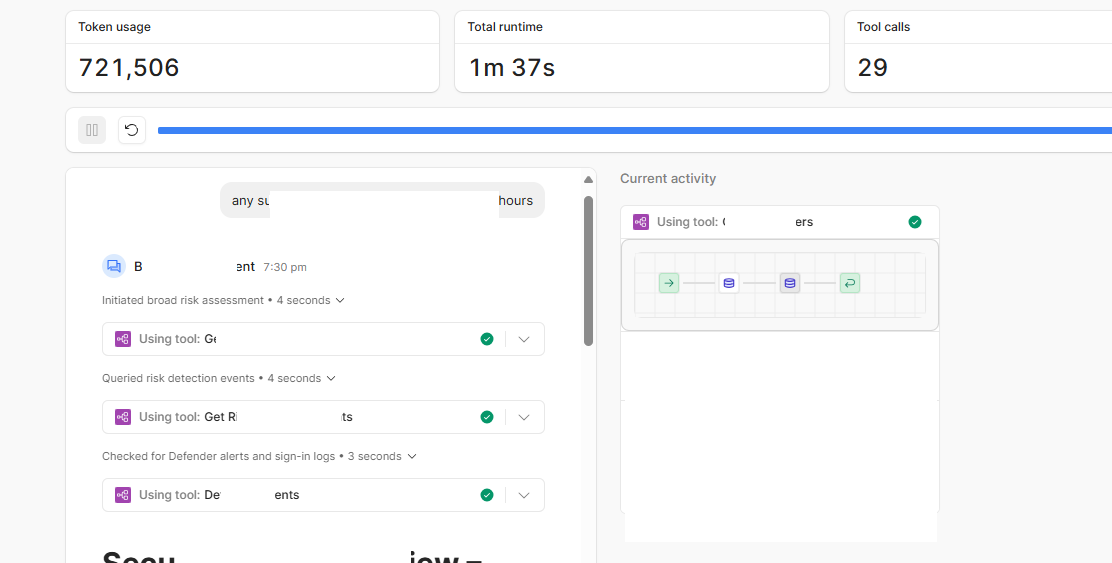
I had the same agent invoke 5 tools but it returned 29 tool calls in monitor. In the agent chat UI, it .showed 3 tool calls were made where it made 5.
I should add that this doesn't affect the functionality of the agent. It is mostly cosmetic but it would be nice to have it accurately report the tool usage to the end users and for reporting purposes.
In the agent chat UI, it only shows 3 of the 5 tool calls made. It would be great if this could show all 5 tool calls so the end user can know what the agent did.
In the tool call count, it says there are 29 tool calls instead of 5.
Hey @eric-cheng, thanks for checking and for providing such a helpful report and screenshot, I really appreciate it! It does look like this might be a regression. I’ll log it internally and keep you updated. In the meantime, please let me know if anything changes on your end!
Hello again @eric-cheng, thank you for your patience! All self hosted versions at or after 3.273.0 include the fix. Can you check if you are on a version that includes the fix and let me know? Thanks!
@eric-cheng I think we finally got to the bottom of this. There was a bug where if the tool description was > 2000 chars, that tools usage would not be written to postgres and thus not display in the frontend.
I’m guessing that the 2 tools that were missing from the UI, all had long descriptions > 2000 chars, right? Let me know if I’m on the wrong track.
In any case I have a fix ready and it should be available in the next edge release (will let you know the version once I have it). Apologies for the trouble and slow response with this.
As of edge release 3.300.0 which went out Nov 5, this should be fixed. If you’re on that version or later, you should NOT have to shorten your tool descriptions in order to work around this.
Thanks so much for the fix and update, @njdelima! @eric-cheng, can you try again and let us know if everything works as expected? Just a quick reminder:
If everything is working as expected, please mark @njdelima’s comment above as the solution so others can see that it’s resolved. Thank you for your patience, as always!
Hey @eric-cheng happy new year I’m marking @njdelima’s comment as the solution for visibility. Let me know if things aren’t working as expected and I’m happy to take another look. Thank you!!






 I’m marking