-
My goal: To view and download the submitted form data on the form
-
Issue: The response summary section now shows a different table to the submissions table with no apparent way to change it.
-
Steps I've taken to troubleshoot: The table which is shown is one that is used in the form as a dynamic source for a dropdown menu. It did initially show the right table.
-
Additional info: Cloud hosted. Screenshots to illustrate.
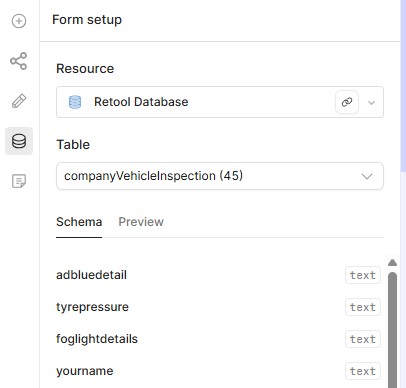
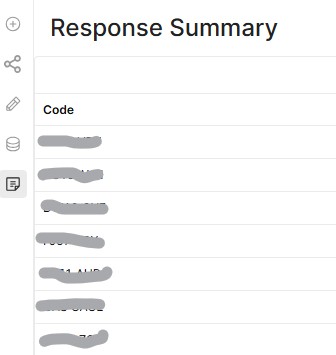
Anyone know how to tag this as a bug?
Hey @DannyT, welcome back to the Community, it's been a while! 
That's definitely odd behavior. I want to make sure I have all the details before filing this as a bug. A few questions:
- Did anything change around the time this started happening, like renaming a table, adding a new field, or republishing the form?
- Can you reproduce it with a brand new form that also uses a separate table as a dropdown data source?
Hi ChiEn,
Thanks for getting back to me.
-
There were quite a few edits happening on the form, so I can’t recall every exact step. The form was originally created by a colleague, and I later went in to make some edits. When I opened it, the select field had become unbound from the source table. I reconfigured that field by adding the resource, table, and column again. After doing this, the submissions table shown in the response summary appeared to change, and there doesn’t seem to be any way to switch it back.
-
I’ve tried to reproduce the error just now, but it didn’t occur again. It’s difficult to recreate because I’m working on it alone now and can’t remember the exact sequence of edits. However, the problem is still present. I also have a different form that no longer submits after a table rename, which makes me wonder if something might be going wrong with how the forms stay bound to their underlying tables.
Happy to provide more details if it helps.
Thanks,
Danny
Hey @DannyT, thanks for your patience! Looks like Jay has been responding to you in email. 
This looks like a one-off issue specific to your form rather than a platform-wide bug. Your data is all still safe in RetoolDB! In the meantime, you could use Retool Assist to build a custom view of your form responses, it's pretty easy to set up and will give you more flexibility than the built-in response summary. Let us know if this workaround works well for you! Thanks! 
Hi @ChiEn
Yes, I was pretty disappointed with the response from Jay, he's misdiagnosed the issue as it only showing the first column of the table rather than a table form a completely different resource. It's clearly broken, yet if it "only affects you, tough luck!"
I'm planning to have many forms and want a consistent way of viewing the responses. I don't want to have to go to the effort of creating and maintaining an app for every single form or to have one single form where the responses are viewed differently.
Thanks,
Danny
Unfortunately, Retool Forms isn't something we're prioritizing right now, so your best bet is using the form component in the app building canvas instead. Assist has also recently had some really solid improvements specifically around building form components, so getting something up and running is faster than ever. Here's the announcement.
For your use case specifically, I would recommend building a single Retool app with Assist: one app, one consistent UI for all your forms and responses. You would describe what you want to Assist (e.g. "a tabbed app where each tab is a form, with a shared response viewer"), and it scaffolds everything for you. Adding a new form down the line is just adding a new tab, no new app to build or maintain. More flexible, more control, and built to scale with you. What do you think? Let me know!
Hi @ChiEn
Sounds like a lot of work.
Can the AI assist build the "forms app" in a mobile layout?
Cheers,
Danny
Hey Danny @DannyT totally understandable, it can feel like a lot at first! Have you tried using Assist yet? Here are some videos to help you get started! 
How to Prompt an App in Retool (How to use Assist)
Form Component Step by Step (This shows you how the Form component works in Retool app building!)
To answer your question about mobile: Assist works within the standard web app builder, and the apps it generates can be designed to be mobile-friendly for users accessing them on a phone or tablet via a browser. So if you need an app accessible on mobile browsers, Assist is a great fit!
That said, Assist doesn't currently work within the Retool Mobile native app builder (iOS/Android), just something to keep in mind depending on your use case. Let me know if you have any other questions!
Quick note to remember @DannyT:
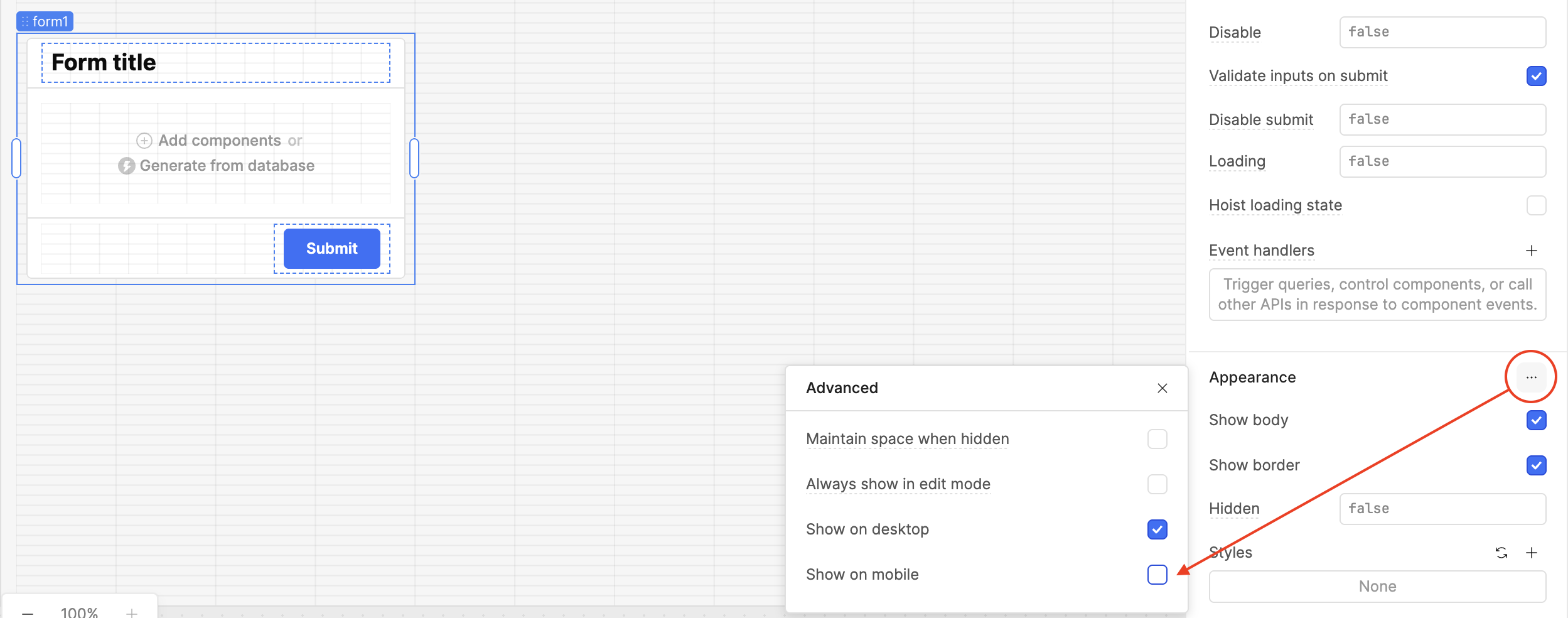
When working with forms, please note that you'll need to manually toggle "Show on mobile" for each Form component you created using Assist, as Assist is currently unable to do this automatically.
Hi @ChiEn
So the reason support won't fix my form is that there is apparently a work around using AI assist, but really the AI assist isn't fit for purpose for this use case as it won't do mobile?
Cheers,
Dannny
Hey @DannyT, you can do this - use Assist to create the Form component then manually toggle it!