Pipe '|' characters in Agent output when using markdown tables

Hello retool forum,

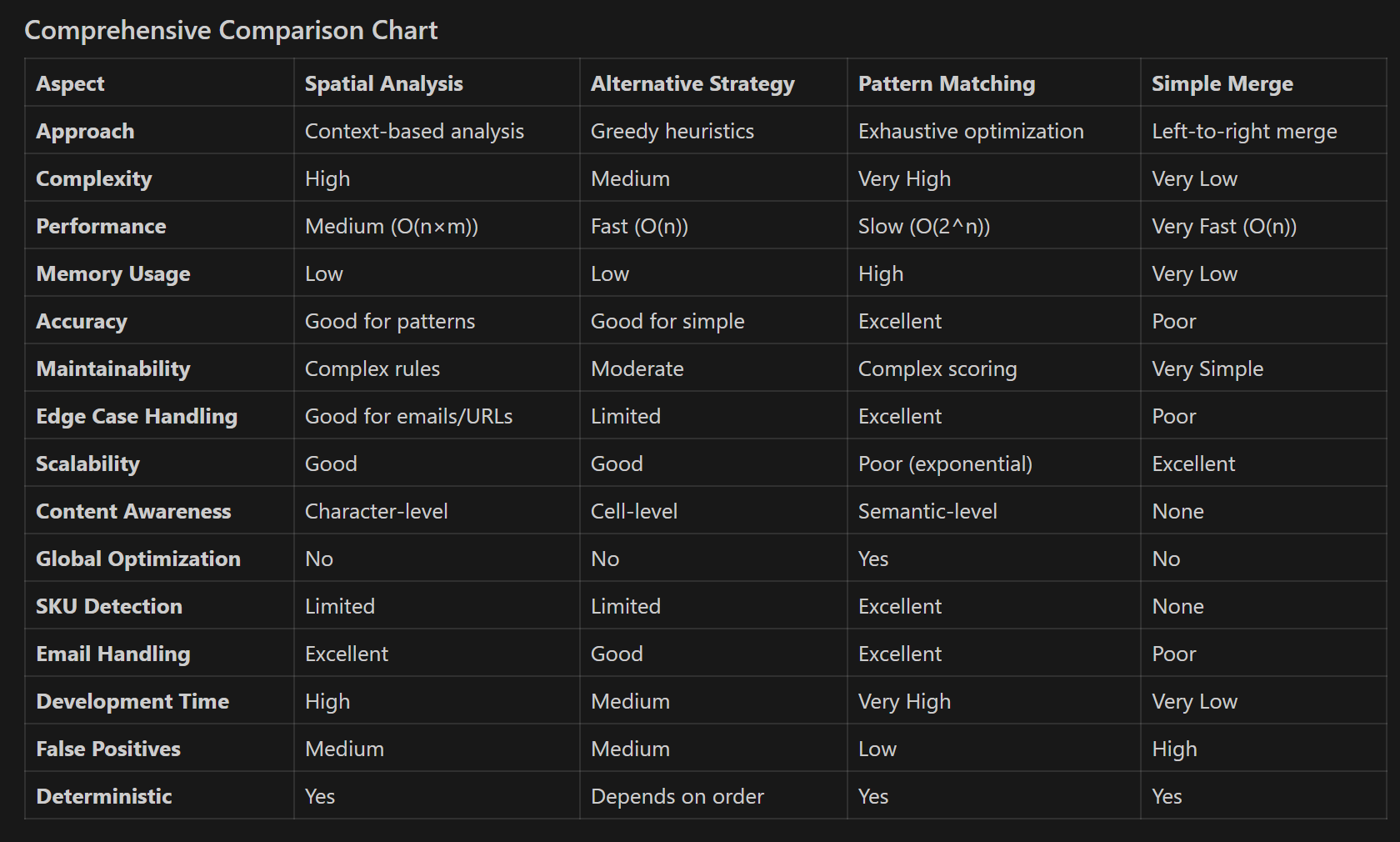
I am seeing an issue with the output from Agents. The agents tend to use markdown tables in their output, but when the data contains pipe '|' characters it breaks. Has anyone had any success getting the agent to correctly handle these characters?

I have tried:

  • adding a line in the instructions about formatting the data for markdown.
  • having output instructions in a vector telling it to escape the pipe characters in markdown
  • adding the instruction to escape the pipe characters to the description of the tool itself

However, it continues to output broken Markdown tables. I was able to get it to escape the pipe characters correctly once by asking it directly in the chat to provide the same output with the pipes escaped. But in subsequent tests, when I asked it to do the same thing, it simply dropped the pipe character and everything after it in the data.

what do you mean by 'it breaks'? does the run fail or does it not display correctly?

you could try putting the following in your prompt:

"Always use the HTML entity number for any non-alphanumeric characters in your output. Do not use the actual characters.
Example:
- Instead of `|`, use `|`
- Instead of `©` , use `©`
- Instead of `™` , use `™`
- Instead of `&` , use `&`"

depending on how your prompt is designed there are places and ways of adding the above that are better than others:

  • If you have a highly structured prompt with defined sections
### Instructions and Constraints:
1. Always represent all non-alphanumeric characters using their HTML Entity Number (e.g., &#38; for &, &#60; for <) in your output. Do not use the actual character.
2. ... (other rules)

### Task:
[Your main task description...]
  • If you start out with assigning a role you can try one of the following:
You are a [your stuff here]

IMPORTANT: Always use the HTML entity number for any non-alphanumeric characters in your output. Do not use the actual characters.
Example:
- Instead of `|`, use `&#124;`
- Instead of `©` , use `&#169;`
- Instead of `™` , use `&#8482;`
- Instead of `&` , use `&#38;`

Analyze and understand the instructions in full before following in order:
[instructions/steps to acomplish something]
IMPORTANT: Always use the HTML entity number for any non-alphanumeric characters in your output. Do not use the actual characters.
Example:
- Instead of `|`, use `&#124;`
- Instead of `©` , use `&#169;`
- Instead of `™` , use `&#8482;`
- Instead of `&` , use `&#38;`

You are a [your stuff here]

Analyze and understand the following instructions in full before following in order:
[instructions/steps to acomplish something]
1 Like

Thanks for the reply @bobthebear. I will try the HTML entity and get back to you. This is what I mean about the markdown breaking

In this example we have the listing skus: 08213-10W30 | 2 and A0008 | 4 which when put into markdown ends up shifting the data over a column.

ahhh I see, the HTML entity might not work correctly in this context, or it might be sort of iffy. technically it should work? but what the Agent does is sorta up to it..... a more targeted solution might be better here since we can guarantee we won't modify any of the actual data, just its formatting. occassionally complex prompts with lots of small details some of the small things can get skipped, you might also have to deal with hallucinations from when it thinks a rule must be applied somewhere but it can't figure out how so it forces it (like cutting and gluing random puzzles pieces from different puzzles together and using it as a replacement for a lost piece.... you technically finished the puzzle... but did you?)

since this is a rendering issue, not a model response issue (technically it's outputting correct Markdown, the | is just being read as a column separator instead part of a column value. Instead of trying to stick a formatting/escaping instruction in the prompt it might be more reliable to give the agent a tool named 'process_response' or something and pass along the full response.

The Simple Solution (not flexible)

.... ok so I was gonna just leave it at that, but then I realized I could actually make use of something like this. There's actually a really interesting problem here since we don't know what column(s) can have a | in their value. I eventually noticed your first column is for SKUs and the other 2 are numerical.... so the solution is simpler if we know for a fact only the left column can contain spare |'s.
markdown_table_processor_simple.csv (13.3 KB)

"""
processes markdown text that may contain tables with problematic pipe
characters within cell content. It intelligently distinguishes between structural
pipes (table separators) and content pipes (data within cells) to preserve table
structure while escaping problematic pipes as HTML entities.

Args:
    text (str): Input markdown text that may contain one or more tables with 
               pipe characters in cell content
    
Returns:
    str: Processed markdown text with:
         - Pipe characters in cell content escaped as HTML entities (&#124;)
         - Cell values wrapped in HTML <code> tags for safe rendering
         - Table structure preserved and properly formatted
         - Non-table content left unchanged

Example:
    >>> markdown_text = '''
    ... # My Document
    ... 
    ... | Product | SKU | Price |
    ... |---------|-----|-------|
    ... | Widget | ABC|123 | $29.99 |
    ... 
    ... Some other content.
    ... '''
    >>> result = process_markdown_with_pipe_escaping(markdown_text)
    >>> print(result)
    # My Document
    
    |<code>Product</code>|<code>SKU</code>|<code>Price</code>|
    |<code>---------</code>|<code>-----</code>|<code>-------</code>|
    |<code>Widget</code>|<code>ABC&#124;123</code>|<code>$29.99</code>|
    
    Some other content.
"""

yay this is neat. However, it merges "columns" from left to right assuming the 1st column will most likely be the issue....

Hmmmmmm

so why am I still typing? lol

well, I thought about this solution and I decided that since you used the wording

In this example

that perhaps this was just the simplest example to show the problem with. You could have much more columns that all could possibly contain extra |s and it might be a column in the middle of the table and the | might occur near the beginning or end of a columns value. so i explored a few options :nerd_face:
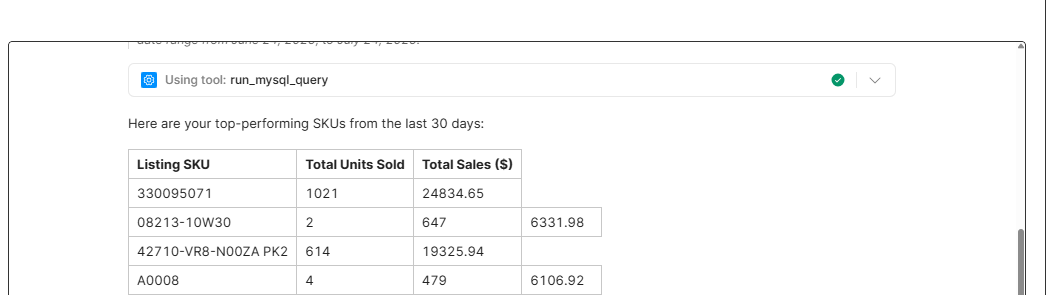
comprehensive_comparison.csv (8.7 KB)

Spacial Analysis

  • Context-based pipe classification

    • Spatial Analysis examines the positional context around pipe characters to determine their purpose. It analyzes character distances, groupings, and patterns to classify pipes as either structural (table separators) or content (data within cells).
  • Implementation:

    • Scored each cell based on fragment likelihood (length, capitalization, position)
    • Used greedy algorithm to iteratively merge highest-scoring adjacent pairs
    • Applied heuristics like "short cells are fragments" and "middle cells more likely to split"
    • Made quick local decisions without considering global optimality
  • Pros:
    :white_check_mark: Context-Aware: Considers surrounding characters and spacing
    :white_check_mark: Pattern Recognition: Excellent for emails, URLs, file paths
    :white_check_mark: Distance Analysis: Can identify unusual spacing patterns
    :white_check_mark: Character Classification: Distinguishes word boundaries and types

  • Cons:
    :x: Complex Logic: Many heuristic rules to maintain
    :x: False Positives: May misclassify legitimate structural pipes
    :x: Performance: Multiple character analysis passes
    :x: Edge Cases: Struggles with inconsistent spacing in tables

Greedy Fragment Merging

  • Heuristic-based sequential merging

    • A greedy algorithm that analyzes individual cells for "merge likelihood" and makes locally optimal decisions to combine cells that appear to be fragments.
  • Implementation:

    • Scored each cell based on fragment likelihood (length, capitalization, position)
    • Used greedy algorithm to iteratively merge highest-scoring adjacent pairs
    • Applied heuristics like "short cells are fragments" and "middle cells more likely to split"
    • Made quick local decisions without considering global optimality
  • Pros:
    :white_check_mark: Fast Performance: O(n) greedy decisions
    :white_check_mark: Simple Logic: Clear heuristics easy to understand
    :white_check_mark: Good for Common Cases: Works well for obvious fragments
    :white_check_mark: Low Memory: No combinatorial explosion

  • Cons:
    :x: Locally Optimal: May miss globally better solutions
    :x: Order Dependent: Results can vary based on processing order
    :x: Limited Lookahead: Can't consider complex multi-cell patterns
    :x: Heuristic Bias: May consistently make suboptimal choices

Pattern Matching

  • Exhaustive combinatorial optimization

    • generates all possible ways to merge excess cells, scores each combination using semantic analysis, and selects the globally optimal result.
  • Implementation:

    • Generated all mathematically possible merge combinations using itertools.combinations
    • Applied comprehensive scoring based on content semantics (SKUs, emails, prices)
    • Used column position analysis (first=names, last=status, middle=data)
    • Selected globally optimal solution through exhaustive evaluation
  • Pros:
    :white_check_mark: Globally Optimal: Finds the best possible solution
    :white_check_mark: Semantic Intelligence: Understands content patterns (SKUs, emails)
    :white_check_mark: Comprehensive Scoring: Multiple evaluation criteria
    :white_check_mark: Robust: Handles complex edge cases reliably

  • Cons:
    :x: Performance Cost: Exponential complexity for many excess cells
    :x: Memory Usage: Stores all combinations
    :x: Complex Scoring: Many interacting scoring rules
    :x: Overkill: May be excessive for simple cases

Simple Merge

  • Basic left to right merge
  • Implementation:
    • Identified tables and expected column counts through structure analysis
    • When excess cells detected, merged all extra cells into the leftmost column
    • Preserved rightmost cells assuming they're more likely to be correct
    • Applied simple pipe escaping without complex decision logic

Best Solution (IMO): Pattern Matching

I didn't wanna type this next one out, so yay Claude!

Note:
sorry for the .csv file type but it doesn't allow me to upload .txt for some reason (I fully understand not allowing code files, but txt files??). Anyway, just rename them with either .py or .txt if you want to use them directly or u can just open the csv in notepad and copy/paste to wherever
1 Like

Thanks for the very detailed reply @bobthebear

I will get back to you once I try this out.

2 Likes

Thank you so much for the detailed write up @bobthebear!

Hi @James_Tuxbury, I am curious if this issue occurs across LLM model selection. What model are you using when you get this issue and have you changed models across providers?

If we can isolate this to how Retool to formatting the data response from the model then we should be able to figure out why the pipe character is breaking tables and why it can't be easily replaced with another character in the model's instructions :thinking:

1 Like

Hello and thanks for the reply.

So far I have been using GPT 4o mini mostly. I briefly tried Calude but ran into the token limits more frequently. I will test some more models and let you know what happens. My underlying data has an usually high amount of pipe characters in it so im seeing this issue a good bit because the agent always outputs the tabular data in markdown. It seems to do a good job of following most of the instructions, but for whatever reason will not follow the instruction to escape the pipe characters.

1 Like

Hello @Jack_T

I just tried this again using claude instead and it actually worked fine with the pipe characters escaped without having to edit the prompt or anything else. It seems like this is an LLM issue and not a retool one.

1 Like

That is so great to hear @James_Tuxbury!

Very odd, glad it seems to not be Retool specific.

I gotta learn to start small :rofl:. I'm really happy you found how to fix it reliably!!

1 Like

Thanks and I appreciate your effort @bobthebear !

1 Like

Quick update @Jack_T

I changed the model to gpt 5 since retool supports it now and it seems to be able to correctly escape the pipe characters as well.

2 Likes

Great news to hear @James_Tuxbury!

I am glad all that capital OpenAI has put into their new model has allowed them to overcome this pipe issue :sweat_smile: