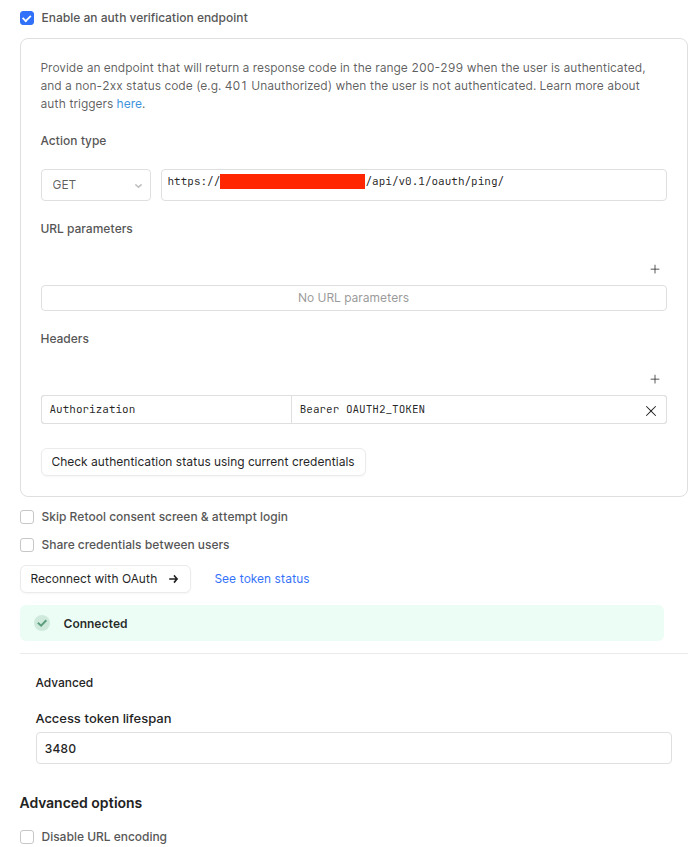
We are experiencing an issue with OAuth 2.0 authentication behavior for one of our API resources in a self-hosted Retool environment.
We have reviewed and validated the resource authentication configuration against the official Retool OAuth 2.0 documentation, and the setup appears to be correct.
Observed behavior:
When the access token expires, Retool correctly initiates a token refresh.
However, while the token refresh request is in progress, other API requests continue to be sent using the expired access token.
These requests receive 401 Unauthorized responses.
After the new token is obtained, the previously failed requests are not automatically retried, and users must manually re-run them to load data.
This behavior is especially noticeable on pages with multiple tables or queries that execute in parallel.
Expected behavior (from our perspective):
During token refresh, parallel requests should either be queued or retried automatically once the new access token is available, instead of failing with 401.
Questions:
Is this behavior expected for OAuth 2.0 resources in Retool, particularly in self-hosted deployments?
Is there any configuration option or recommended approach to prevent parallel requests from executing while a token refresh is in progress?
Are there known limitations or workarounds to enable automatic retry of failed requests after a successful token refresh?
We’d appreciate any guidance or best practices you can share, as this behavior negatively impacts user experience and leads to avoidable errors.
I’m not sure whether this is relevant, but the value is configured to be a few minutes shorter than the actual token lifetime. We did this intentionally to ensure a seamless user experience.
Thanks! Yes, that is relevant. Can you share the logs, the number of seconds that you have put in the Access token lifespan field, and the actual token lifetime?
Have you tested lowering the number of seconds in the Access token lifespan field?
Hi, @Tess
I’ve attached a screenshot with our settings. Our actual token lifetime is 3600 seconds. As you can see in the screenshot, we already tried lowering the value in the Access token lifespan field.
Could you also please clarify which logs would be most helpful on your side?
For additional context on how this happens in real life: some users leave the app open for a long time (for example overnight). When they come back and try to load data, they get 401 Unauthorized errors. We have a ping request that is sent when the page is opened, but since the page stays open, that ping is not triggered again. There’s also a module on the page that sends multiple requests on button click — if the ping doesn’t run, those requests are sent with the old (expired) token. At that point, anywhere from one to all requests may fail, depending on how fast the system gets a new token.
We expected the failed (401) requests to be retried automatically, but that doesn’t happen. If the user manually triggers the requests again afterward, everything works fine.
Thanks for helping us look into this — we really appreciate your support.
Thanks for your patience here. The additional context you provided was helpful!
We can hold off on logs for now. After speaking with my team and doing some testing, I think you should try switching to a custom auth flow instead of the built in OAuth 2.0 option. Per the docs, with the custom auth refresh flow, if the refresh auth workflow is successful, Retool attempts to run the failed query again. Please keep me posted if the custom auth flow proves more suitable to idle app usage.