My Claude Code is having a hard time pushing my repo as the agent keeps kicking back my code and not providing great feedback. I’ve had to manually copy/paste ‘probe .ts files’ into the new editor to figure out which sections of my repo’s code don’t pass the validator.
So far I’ve reverse engineered a few versions of SQL injection errors, but shouldn’t there be a markdown file published by Retool’s team on the current validator rules so Claude knows how to design for them?
Working in a Claude Code → new React app builder (MCP) workflow, code pushes keep getting kicked back by Retool's AI with unhelpful feedback, requiring manual reverse-engineering of validation failures (e.g., SQL injection). The ask is whether Retool publishes a markdown file documenting the current AI validator rules so the coding agent can design compliant code up front.
AI Response
There is no publicly documented markdown file enumerating the AI validator rules — the published MCP guides cover connecting and importing, but not a rules list. The reason the code keeps getting kicked back is structural rather than prompt-level: Retool staff have confirmed that the MCP import path (including retool_submit_prepared_import) always hands work off to the Retool agent, so no CLAUDE.md instruction or rules file can bypass the agent's validation/rework. The affirmatively-documented path forward is the native Retool CLI (in private beta), which lets coding agents like Claude Code write directly to the Retool API/filesystem and deploy without routing through the agent. Requesting access to that beta is the most reliable way to get a direct, credit-efficient push and avoid the opaque validator loop.
Sources
New React App Builder - Claude Code (via VS Code) Workflow
Same Claude Code + new React app builder MCP workflow; Retool staff confirm retool_submit_prepared_import always hands off to the Retool agent and preview the native CLI that enables direct file write/deploy. Preventing Lies/Rework (Claude > Retool AI)
Staff-confirmed that no CLAUDE.md/prompt-level instruction can stop the Retool agent from reworking code, and that the native CLI private beta is the intended fix for a direct, credit-efficient push.
The Community Team is testing out a new automation. Let us know if it's helpful (or not) by leaving a , , or . Or by marking this post as the "Solution"! Let us know if you have any feedback here.
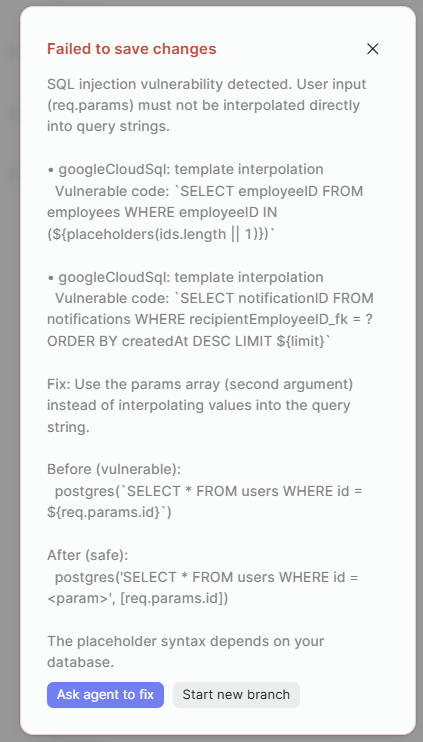
This SQL injection validator error that doesn’t name a file/path has taken a whole day of troubleshooting and I still haven’t gotten the app to publish.
From angry Claude:
Retool React app, agent thread branch. The editor's client-side save validator rejects a commit with "SQL injection vulnerability detected — googleCloudSql: tainted variable, Vulnerable code: sql". No network request is issued (verified in DevTools: only Datadog telemetry), so the block is purely browser-side and produces no server-side error to inspect. The server-side validator accepts the identical files — the MCP agent wrote all of them successfully into the same thread. Because the commit never succeeds, the branch head stays at commit ebe254af… while the thread's working tree advances; retool_list_react_app_files returns the new content, but publish builds the stale head and replays a build error from content that no longer exists (it cites a column offset matching a line that was edited hours earlier). Two asks:
Why does the browser-side validator reject what the server-side one accepts?
Can the dialog surface the offending file path? It currently names only the variable.
Would be nice if the file editor flagged the files (color or icon) that are okay versus the ones the Retool Agent modified or the ones with problems that need fixing.
Hey @nickroz1 - this is great feedback! The ask for a published set of validation rules is particularly on point. We have an internal ticket tracking that particular request and I'll give you an update as soon as I can. I'll also open up a ticket to pass on the offending file path.
As far as the apparent mismatch between client and server-side validations is concerned - more investigation is probably required. At first glance, though, it looks like the execution environment resolves the underlying files differently.
And thanks for doing so much testing with the MCP! Have you tried the CLI yet?
How's it going, @nickroz1? Have you continued to build with the MCP? We've cleaned up the SQL injection error messages, as there were a ton of false positives and it was far too noisy as a result. I'm still tracking the ask for published validation rules and will follow up as soon as I can!

 ,
,  , or
, or  . Or by marking this post as the "Solution"! Let us know if you have any feedback
