N00b here, im very new to retool and and very new to programming. So any help would be appreciated. I have a workflow that grabs order (ecommerce) info from an api, then loops and gets Order Details from the same API.
The response comes back with the "Products" from this order inside an array of key/values like this:
// this is nested inside {{query1.data['0'].data['0'].custom_field
"custom_field": [
            {
              "label": "Order_Details",
              "display_name": "Order Details",
              "data_type": "Table",
              "app_side": "1",
              "required": 0,
              "value": 1,
              "data": {
                "head": [
                  {
                    "label": "QTY",
                    "display_name": "QTY",
                    "type": "number",
                    "arth": " ",
                    "id": 0,
                    "show": 1,
                    "app_side": 0,
                    "required": 0
                  },
                  {
                    "label": "ITEM",
                    "display_name": "ITEM",
                    "type": "text",
                    "arth": " ",
                    "id": 1,
                    "show": 1,
                    "app_side": 0,
                    "required": 0
                  },
                  {
                    "label": "PRICE",
                    "display_name": "PRICE",
                    "type": "number",
                    "arth": " ",
                    "id": 2,
                    "show": 1,
                    "app_side": 0,
                    "required": 0
                  },
                  {
                    "label": "ID",
                    "display_name": "ID",
                    "type": "number",
                    "arth": " ",
                    "id": 3,
                    "show": 1,
                    "app_side": 0,
                    "required": 0
                  }
                ],
                "other": [],
                "body": [
                  [
                    {
                      "val": 1, // qty of product1
                      "id": 0,
                      "head": "QTY",
                      "arth": " "
                    },
                    {
                      "val": "product1", // Name of Product
                      "id": 1,
                      "head": "ITEM",
                      "arth": " "
                    },
                    {
                      "val": 35, // price of product1
                      "id": 2,
                      "head": "PRICE",
                      "arth": " "
                    },
                    {
                      "val": 154, // product_id of product1
                      "id": 3,
                      "head": "ID",
                      "arth": " "
                    }
                  ],
                  [
                    {
                      "val": 1, // qty of product2
                      "id": 0,
                      "head": "QTY",
                      "arth": " "
                    },
                    {
                      "val": "Product2", // name of product2
                      "id": 1,
                      "head": "ITEM",
                      "arth": " "
                    },
                    {
                      "val": 35, // price of product2
                      "id": 2,
                      "head": "PRICE",
                      "arth": " "
                    },
                    {
                      "val": 153, // id of product2
                      "id": 3,
                      "head": "ID",
                      "arth": " "
                    }
                  ],
                  [
                    {
                      "val": 1,
                      "id": 0,
                      "head": "QTY",
                      "arth": " "
                    },
                    {
                      "val": "Product 3",
                      "id": 1,
                      "head": "ITEM",
                      "arth": " "
                    },
                    {
                      "val": 35,
                      "id": 2,
                      "head": "PRICE",
                      "arth": " "
                    },
                    {
                      "val": 730,
                      "id": 3,
                      "head": "ID",
                      "arth": " "
                    }
                  ],
                  [
                    {
                      "val": 1,
                      "id": 0,
                      "head": "QTY",
                      "arth": " "
                    },
                    {
                      "val": "Product 4",
                      "id": 1,
                      "head": "ITEM",
                      "arth": " "
                    },
                    {
                      "val": 30,
                      "id": 2,
                      "head": "PRICE",
                      "arth": " "
                    },
                    {
                      "val": 721,
                      "id": 3,
                      "head": "ID",
                      "arth": " "
                    }
                  ]
                ],
What I need to do achieve, is a loop that will create a row in the table (order_products) for each product in the invoice, which also includes other values from this query (see below).
Keep in mind.. everything that I know is self taught and im pretty (extremely) new to this.. lol Javascript still melts my brain.
| order_id | order_date | fleet_id | qty | product | price | product_id |
|---|---|---|---|---|---|---|
| 1234 | 2022-12-17 | 123456 | 1 | product1 | 9.99 | 123 |
| 1234 | 2022-12-17 | 123456 | 1 | product2 | 19.99 | 124 |
| 1234 | 2022-12-17 | 123456 | 1 | product3 | 9.99 | 125 |
| 1235 | 2022-12-17 | 123456 | 1 | product1 | 9.99 | 123 |
| 1235 | 2022-12-17 | 123456 | 1 | product2 | 19.99 | 124 |
| 1235 | 2022-12-17 | 123456 | 1 | product3 | 9.99 | 125 |
etc etc.
This is what I have so far - but when i run the loop it is only creating 1 row for each order and only putting the first product into the row.. I also don't know how to make it create a new line for each product in the order. (I don't really understand the [i] or {index}, but I THINK is that it represents a "wildcard" so to speak so that it knows which keys to parse through.. so.. ive tried all kinds of combinations to no avail:

{{value.data['0'].custom_field['0'].data.body[i]['0'].val}}
{{value.data['0'].custom_field['0'].data.body[index]['0'].val}}
{{value.data['0'].custom_field['0'].data.body[{index}]['0'].val}}
{{value.data['0'].custom_field['0'].data.body[{{index}}]['0'].val}}
// -----------^-----------------------------------^
I need it to loop through both of those keys. First one would represent each order, send key represents the products inside each order.
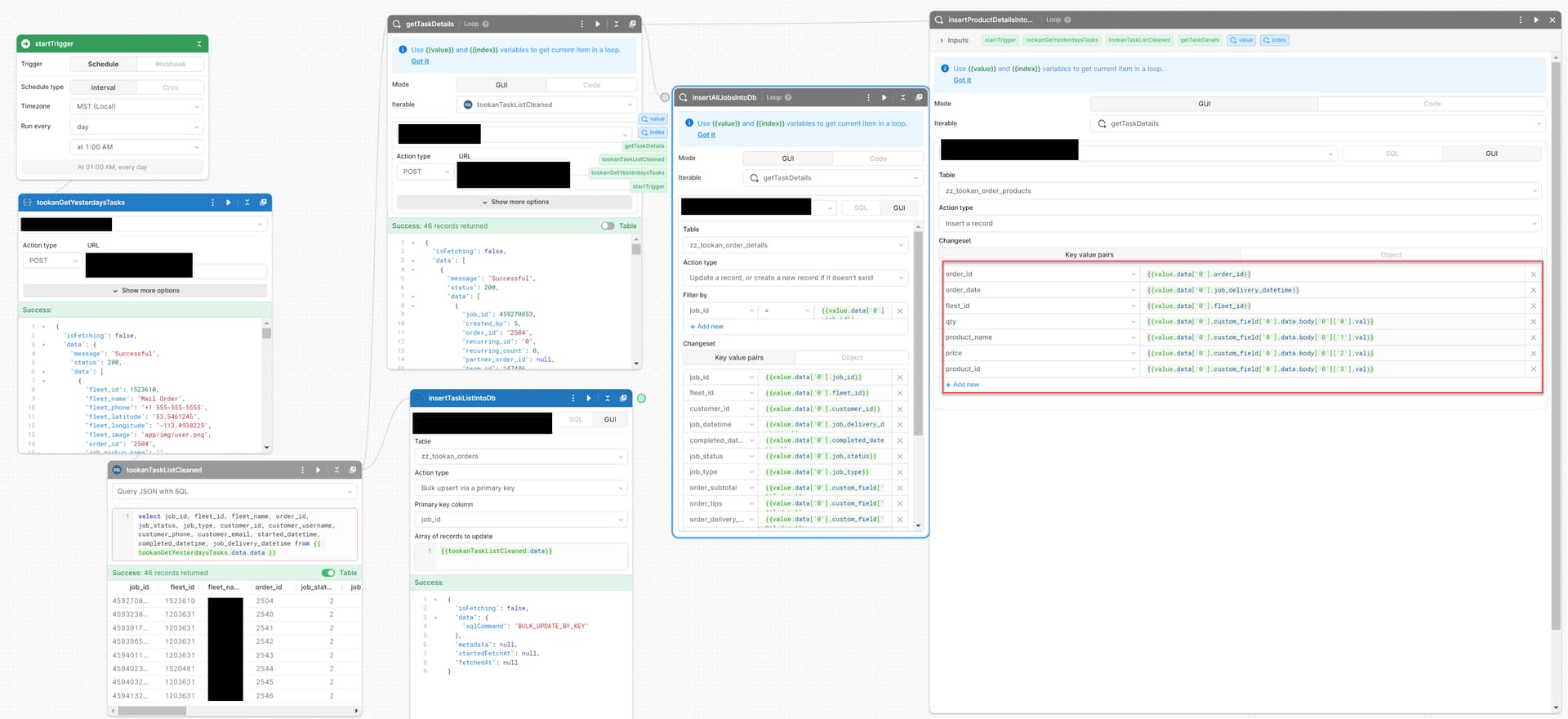
My apologies if I sound like a bit of a knob and using the incorrect terminology. .ive been trying to solve this issue for a week now and I keep coming back to it. Ive read countless forum posts (and im sure that one of them actually has the answers... i just cant understand it lol.
Thank you in advance for any help or insight you fine people may have.
 but I would also recommend feeding the data structure into ChatGPT and asking it how you can loop through the order and the products within order!