Hey @Siraj_Samsudeen!
Retool apps don't support Python outside of Workflows at the moment, though it's something that has been requested before and is on the dev team's radar. You can send your data to a Workflow from your app for further manipulation but that might add too much overhead since you're working with large files. For now, if it's comfortable for you, the best way might be to add additional parsing logic using JavaScript.
There are some built-in libraries like lodash and Papa Parse that might be helpful in working with your data. 1-4 sound doable with vanilla JS or lodash but there are also other third-party libraries like sheetjs that are built specifically for managing xlsx files and might help with parsing xlsb files. I can't say for sure that it'll work but Retool stores unparsed file data as a base64 string which is readable by sheetjs. There's documentation on how to import third-party libraries here!
If JavaScript is a hard no and your files are to big to send in a request to a Workflow you can also try using SQL to grab certain rows/columns from the parsed value with a Query JSON with SQL query. That doesn't give you all the functionality of 1-5 but can be convenient to work with.
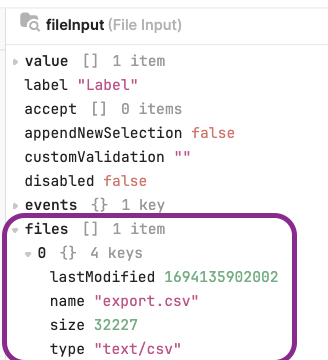
As for 6... it's possible to temporarily store data in your app (docs here) so you could conceivably pull the file name from yourFileInput.files[0], store it, and compare it to the most recently uploaded file in an event handler.
Hopefully that gives you some ideas! It looks like @AnsonHwang may also have some useful suggestions here!