Current plan level (Free, Team, Business, or Enterprise: Retool | Pricing ): Business
Monthly/Annual (if Team or Business): Monthly
Version of Retool (if self-hosted): N/A
Question / Description:
With the addition of Permissions Roles, we want to be able to create roles for specific product features and give those permission roles to groups. In our JavaScript code, how can we check what permission roles a user has? Currently for checking a permission group we do current_user.groups.some(group => group.name === "admin"), but I was hoping to be able to do something like current_user.roles.some(role => role.name === "use_admin_toggle_control").
I believe since you are a business plan you should be able to take advantage of the Retool API to connect some of the dots. I don’t believe you can directly see a user’s associated Roles and Permissions, but you can see their groups (as in your example).
The Retool API will allow you to query Retool Groups as well as the Roles and Role Grants, which you can parse to show you a full map of Users–>Groups–>Roles.
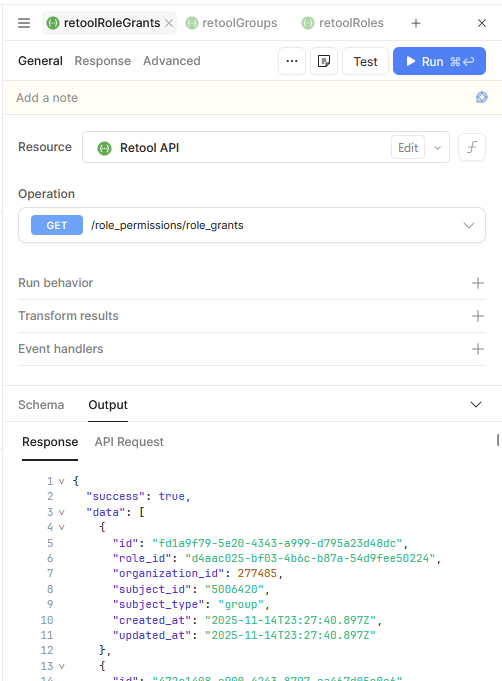
You’d need to get the full list of groups and roles (for their ids/matching) to then cross reference the associated group ids within the Role Grants endpoint:
Here the role_id is the associated Roles and Permissions entry (in this case "Access Account Details Migrated Role") and the subject_id is the group_id (since the subject_type is group).
This is a bit of a slog, so maybe there is room for a feature request in here too.
To echo what @pyrrho said, the Retool API docs will have the details on what endpoints you can hit to gather data on users and their permissions/roles/groups.