Generated Emails from Retool

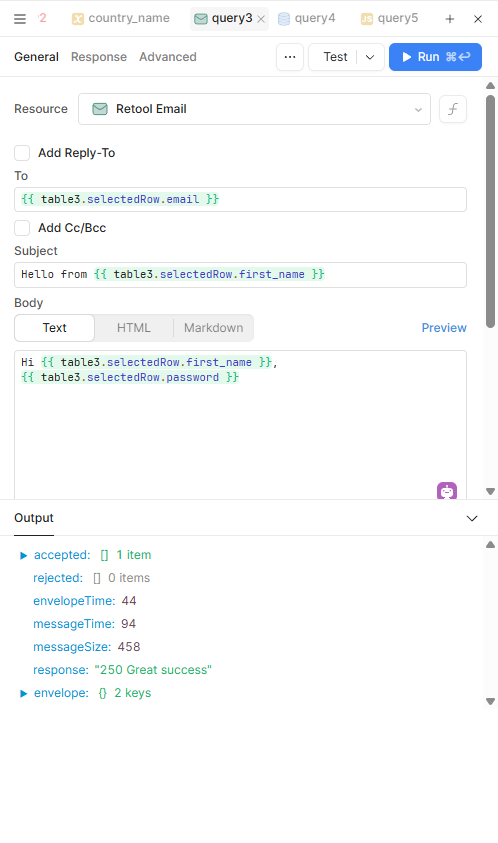
Below, please find a screen capture of the Retool version of a generated email.

I get the general idea of how it works but I need to be able to run this from a table that would include the name of the person receiving the email and name of the person sending the email. The content would also need to come from the table.

Where could I learn how this would work?

Mike

I see you took my advice on Retool Email! :dancer:

Like most of Retool, you can dynamically change values in a query using JS escape brackets. To send this email en bulk with dynamic changing variables, you can also loop this using JS JavaScript within Retool | Retool Docs

Let me know if that helps!

Hello @mdsmith1

Maybe you can try the below approach

  • Have your table ready
  • Your table could have columns like:
    • to_email
    • from_name
    • to_name
    • content
  • Bind the email fields to the table
  • In your Retool Email query (like in your screenshot), instead of typing a fixed email, use curly braces to pull from the table. Example:
    • To: {{ table1.selectedRow.data.to_email }}
    • Subject: Hello from {{ table1.selectedRow.data.from_name }}
    • Body: Hi {{ table1.selectedRow.data.to_name }}, {{ table1.selectedRow.data.content }}
  • Run it row by row
  • whenever we click on a row in the table → then clicks “Send Email” button → query runs using that row’s info.

Hope this helps !

I tried this and got an error message about scope and the page.

See below.

Mike

Sriya:

I have never worked with code like this before. I don't understand about binding the fields .

I have developed the code in but MySql and JS format and all I get is error messages.

I am showing a screen shot below.

Mike

hey @mdsmith1 !

Do you want to try switching your ProcEmail querry to local scope?

Joey:

I tried that. It made no difference.

Mike

Hey @mdsmith1 this looks like you are using the wrong query type here.

Hello @mdsmith1 ,

To generate emails in Retool, you’ll need to use the Retool Email query and pull data from the table using curly braces (as shown in the screenshot).

If this is the type of email you’re looking to create, then @sriya’s suggestion is correct.

1 Like

I ran into something similar and found that using an email deliverability platform helped a lot. Things like SPF, DKIM, and domain reputation were messing with Retool emails showing up in inboxes.

Once I had tracking and DNS configs cleaned up through the platform, deliverability got way better. I also switched to sending from a subdomain to keep things cleaner.

Lyra:

I seem to have it working now, but I have no idea of how this will work with high volumes.

I will probably only need volumes of 50-100 per day.

I have a lot of work to get all the parts working, so I will have to wait and see.

Thank you for your thoughts.

Mike

Sriya:

I have been working with your code.

My latest version is below. This is intended to produce an email for all rows in the table.

The last line is EmailForm2.trigger().

The console output (see last 2 screens) is showing correct output for each row of the table but the Emails that arrive only come for the last row in the table.

Any thoughts?

Mike