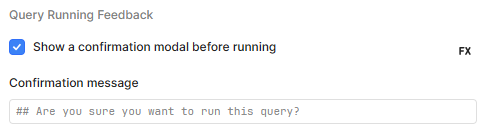
It appears that Retool Mobile hints at markdown support in confirmation modals—e.g., using placeholder text like ## Are you sure you want to run this query?—but in reality, markdown formatting isn't actually rendered on mobile.
This is a bit misleading and also a missed opportunity. Markdown support in confirmation modals would allow for much clearer, better-formatted prompts, especially when communicating important actions to end users.
Would love to see markdown fully supported in confirmation modals on Retool Mobile, just as it is on web.
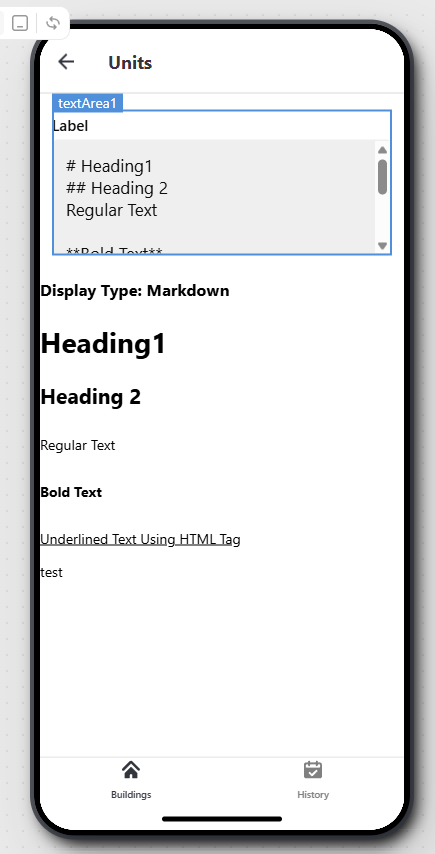
then use the variable as the datasource for an HTML Component.... this would be more usefull/reuseable, but I thought I'd show how you can distinguish between valid HTML, Markdown and normal Text
Markdown does not render here in mobile like it does in desktop despite the placeholder, "## Are you sure you want to run this query?", hinting at the fact that it supports it.
my bad, I fully understand you're wanting a built-in/native support for markdown in confirmation modals, and I can not provide a solution that fits this. I can however provide the code for a similar example giving you the useful information to either lead you to the solution or it itself is an actual solution minus the full implementation.
this is why I suggested using the markdownjs/markdown library to turn any POSSIBLE markup into HTML while leaving other non-markdown and non-html pattern of characters unaltered. You're clearly using Javascript in your confirmation message so why not use a library which gives you an HTML version of your message? HTML is WWWAAAAYYYYY more commonly supproted than Markdown, so turning your full message into "HTML" using that library should result in any of Retools component rendering/displaying the content as HTML
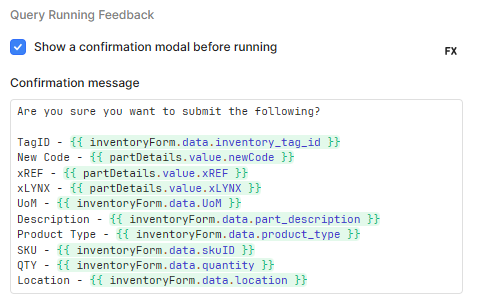
if you replace textArea1.value with any variable containing a string that may or may not contain HTML, Markdown, Plain Text, or any combination of the 3 you will ALWAYS be given a string containing the HTML equivalent of whatever was supplied. we do this because HTML is way more widely supported than Markdown, so instead of hoping a browser supports Markdown, we translate any Markdown that does happen to appear in our string into HTML. While most of Retools built-in text components are able to render/display HTML correctly, as you've noticed not all can display Markdown, so I've provided a way to take a string containing possible Markdown and Plain Text then turn it into HTML which the HTML Component or other Retool Text Components are able to display. Yes I get I keep saying HTML Component or Text Component when you're talking about the confirmation message, but the space in which you enter that message allows Javascript via {{ }} so use the language to it's fullest instead of only using it reference inventoryForm.data.inventory_tag_id, partDetails.value.newCode, inventoryForm.data.location, ect
const input_as_html = marked.parse(f"## Are you sure you want to run this query?\n\nTagId - {inventoryForm.data.inventory_tag_id}\nNew Code - {partDetails.value.newCode}")
feel free to let me know if you're still having trouble taking my example and applying it to your situation and yes, i do get you noticed there are hints that point towards the fact that it supports Markdown but apparently does not, which is why my solution turns any string into an HTML render-able version.... you provide a string with HTML, Markdown and/or Plain Text, then my code will always return a full HTML version.
I can make a feature request for enabling markdown in confirmation modals on Retool Mobile
I can see how the use of ## in the example placeholder text could lead one to believe that markdown is usable. My guess is that the engineer who added that in was following the convention commenting in code files, such as python, where the double # is used to comment out a line of code so that it is not being run, so that users can leave notes/documentation for others
@bobthebear Thank you for sharing that great workaround for using HTML! I appreciate the attention to detail in explaining the pros of HTML having a much better success rate for being rendered correctly in Retool apps and in browsers. As well as that HTML can include stylings such as bold and italics to draw the users attention to important details.