Hi Retool Builders,
We are sharing a custom-built Expandable Row Table component developed using React and TypeScript for advanced data visualization and operational dashboards inside Retool.
This component was designed to address common limitations around handling large datasets, expandable details, dynamic column management, and enterprise-style table interactions within Retool custom components.
Overview
The component provides a highly customizable and scalable table experience with support for:
- Expandable rows
- Dynamic column visibility
- Drag-and-drop column rearranging
- Advanced sorting behavior
- Pagination
- Search and filtering
- CSV export
- Dynamic key-value rendering
- Theme-aware footer styling
- Persistent column ordering
- Interactive row selection state
- Multi-key expandable rendering
- Recursive nested JSON visualization
The component is optimized for:
- Financial dashboards
- Operational tooling
- Audit monitoring
- Transaction tracking
- API response inspection
- Analytics applications
Key Features
Expandable Rows
The expandable section is designed to intelligently render almost any type of nested data structure.
Supported capabilities include:
- Single expandable object rendering
- Multi-key expandable data rendering
- Recursive nested JSON visualization
- Automatic key-value formatting
- API response inspection
- Object and array rendering
- Dynamic nested structure handling
- Long text handling
- URL rendering
- Mixed datatype rendering
- Automatic readable formatting for nested content
The component supports multiple expandable keys such as:
environment,activity_log
or:
[ "environment" , "activity_log" ]
Expandable content is automatically normalized and rendered into a structured UI layout for easier inspection and debugging.
Smart Data Handling
Supports:
- Objects
- Arrays
- Nested JSON
- API responses
- Long-form text
- URLs
- Booleans
- Null values
- Mixed data structures
Advanced Table Interactions
- Drag-and-drop column rearranging
- Persistent column order after refresh
- Dynamic visible column support
- ASC → DESC → Reset sorting cycle
- Responsive pagination footer
- Interactive row selection state
Toolbar Actions
- CSV export
- Refresh actions
Custom Styling Controls
- Header colors
- Row colors
- Font customization
- Pagination styling
- Footer customization
- Theme-aware footer support
Additional Features
- Automatic column label formatting
- Search support
- Empty state handling
- Responsive layout behavior
- Dynamic schema support
- Runtime column persistence
Preview Use Cases
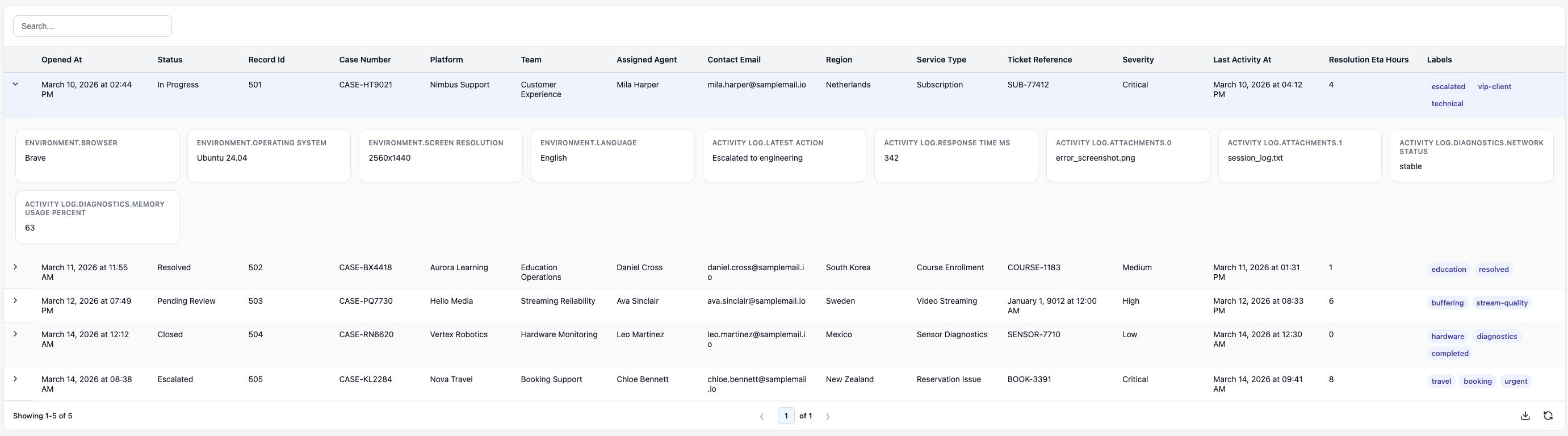
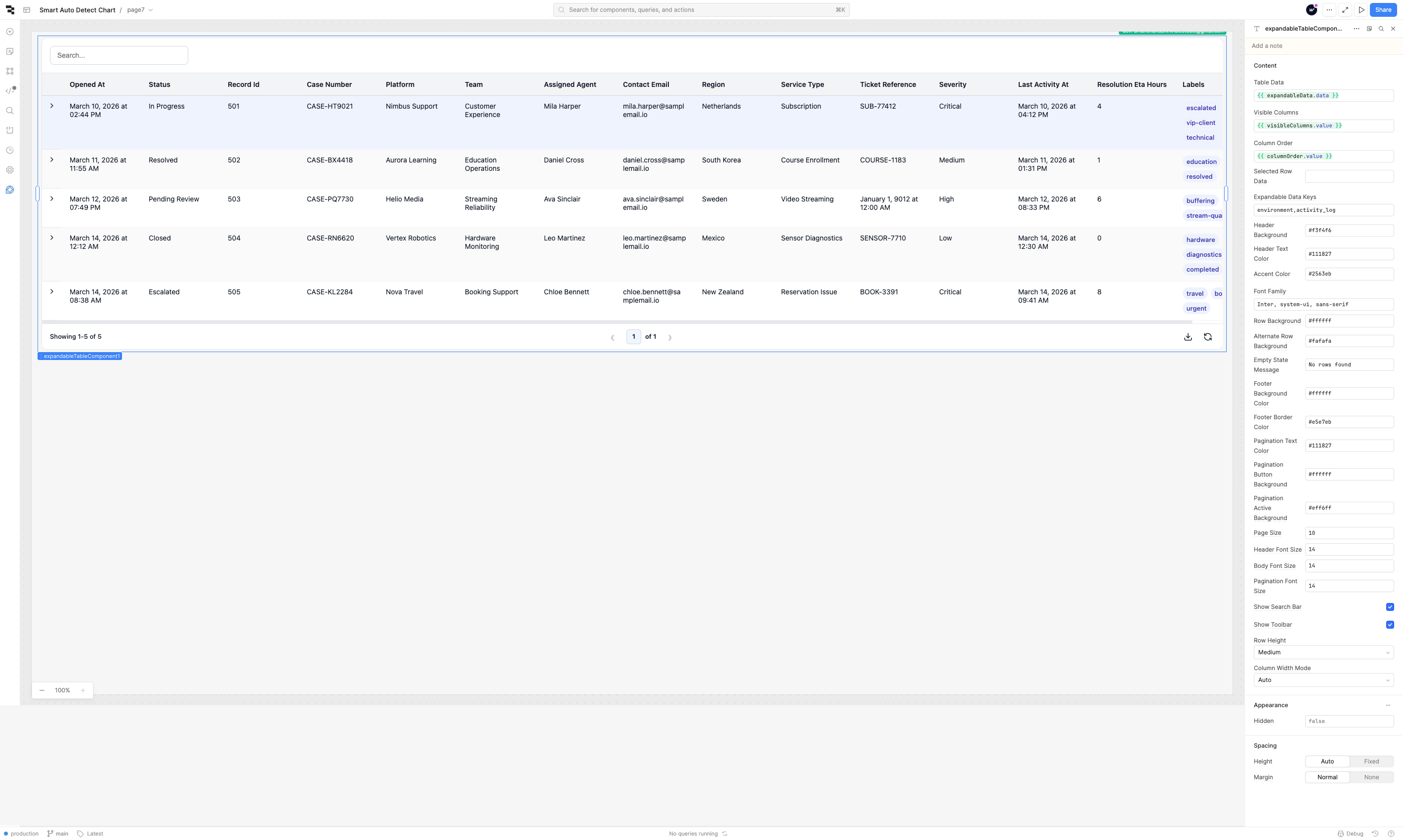
- Expandable transaction inspection
- Dynamic audit log analysis
- API response viewer
- Financial operations dashboards
- Nested metadata viewers
- Enterprise data grid interfaces
Inputs
| Property | Type | Description |
|---|---|---|
| tableData | Array | Main table dataset |
| pageSize | Number | Rows per page |
| expandableDataKey | String | Expandable object field(s) |
| showToolbar | Boolean | Toggle toolbar visibility |
| showSearchBar | Boolean | Toggle search functionality |
| headerColor | String | Header background color |
| headerTextColor | String | Header text color |
| rowBackground | String | Default row background |
| alternateRowBackground | String | Alternate row background |
| accentColor | String | Accent/highlight color |
| footerBackgroundColor | String | Footer background color |
| paginationTextColor | String | Pagination text styling |
| rowHeight | Enum | Small / Medium / Large / Dynamic |
| columnWidthMode | Enum | Auto / Manual |
Outputs
| Property | Type | Description |
|---|---|---|
| selectedRowData | Object | Selected row object |
| columnOrder | Array | Current column arrangement |
| visibleColumns | Array | Active visible columns |
Example output:
 {
    record_id: 501,
    case_number: "CASE-HT9021",
    platform: "Nimbus Support",
    team: "Customer Experience",
    assigned_agent: "Mila Harper",
    contact_email: "mila.harper@samplemail.io",
    region: "Netherlands",
    service_type: "Subscription",
    ticket_reference: "SUB-77412",
    severity: "Critical",
    status: "In Progress",
    opened_at: "2026-03-10T09:14:21Z",
    last_activity_at: "2026-03-10T10:42:11Z",
    resolution_eta_hours: 4,
    labels: ["escalated", "vip-client", "technical"],
    environment: {
      browser: "Brave",
      operating_system: "Ubuntu 24.04",
      screen_resolution: "2560x1440",
      language: "English",
    },
    activity_log: {
      latest_action: "Escalated to engineering",
      response_time_ms: 342,
      attachments: ["error_screenshot.png", "session_log.txt"],
      diagnostics: {
        network_status: "stable",
        memory_usage_percent: 63,
      },
    },
  }
How It Works
- Built using React 18 and the Retool Custom Component SDK
- Dynamically adapts to changing schemas and datasets
- Supports recursive expandable content rendering
- Supports multi-key expandable rendering
- Stores column arrangement persistently
- Optimized for large operational datasets
- Fully frontend-based with no backend dependency
Use Cases
- Audit Logs
- Financial Transactions
- Payment Monitoring
- API Debugging
- Shipment Tracking
- Operational Dashboards
- Analytics Tables
- Internal Admin Tools
- Compliance Monitoring
- KPI Reporting
Implementation Details
- Dynamic schema handling
- Recursive JSON normalization
- Runtime column persistence
- Responsive rendering logic
- Enterprise-style pagination behavior
- Lightweight frontend architecture
Technology Stack
- React 18
- TypeScript
- Retool Custom Component SDK
- Lucide React Icons
Source Code
The component is fully built using:
- React 18
- TypeScript
- Retool Custom Component SDK
- Lucide React Icons
Current capabilities include:
- Expandable rows
- Multi-key expandable rendering
- Dynamic column visibility
- Drag-and-drop column rearranging
- Persistent column ordering
- Sorting (ASC / DESC / Reset)
- Pagination
- CSV export
- Search and filtering
- Dynamic expandable key-value rendering
- Recursive nested JSON rendering
- Custom footer and theme controls
- Row selection state handling
- Responsive UI behavior